Forking Glitchlet
I'm teaching an intro computer science course again this year and I knew I wanted to revamp how to introduce kids to writing code. Last time, the overhead of learning all the new tools at the same time as learning concepts was a really high barrier that I wanted to remove as much as possible.
The last time I taught the class, Glitch was stuff functioning, so that was the plan. That plan changed when they shut down in July 2025. So, I started looking around for something similar for the low price of $0. Turns out, there isn't much.
Mark Sample is a media professor at Davidson College and he posted a screenshot of his own self-hosted Glitch-like app and I was immediately interested. I waited for a while, watching Mark's account for an "it's ready!" post, but then I remembered that I understand code and could probably find it myself. I was in luck and he had his alpha source in a GitHub repo.
I made a fork and immediately started playing with it.
Glitchlet runs as a traditional web app - scripts are all loaded in order in an index.html page and the user interaction is local-first. Projects are saved in the browser's IndexedDB and localStorage. There is a file manager, code editor, and live preview pane in the editor. If the user has an account, they can publish projects which can then be shared and remixed by other people with accounts. The server-side work happens with PHP and MySQL. The PHP scripts take care of the admin-side and publishing work and there's a small database with an index of published projects.
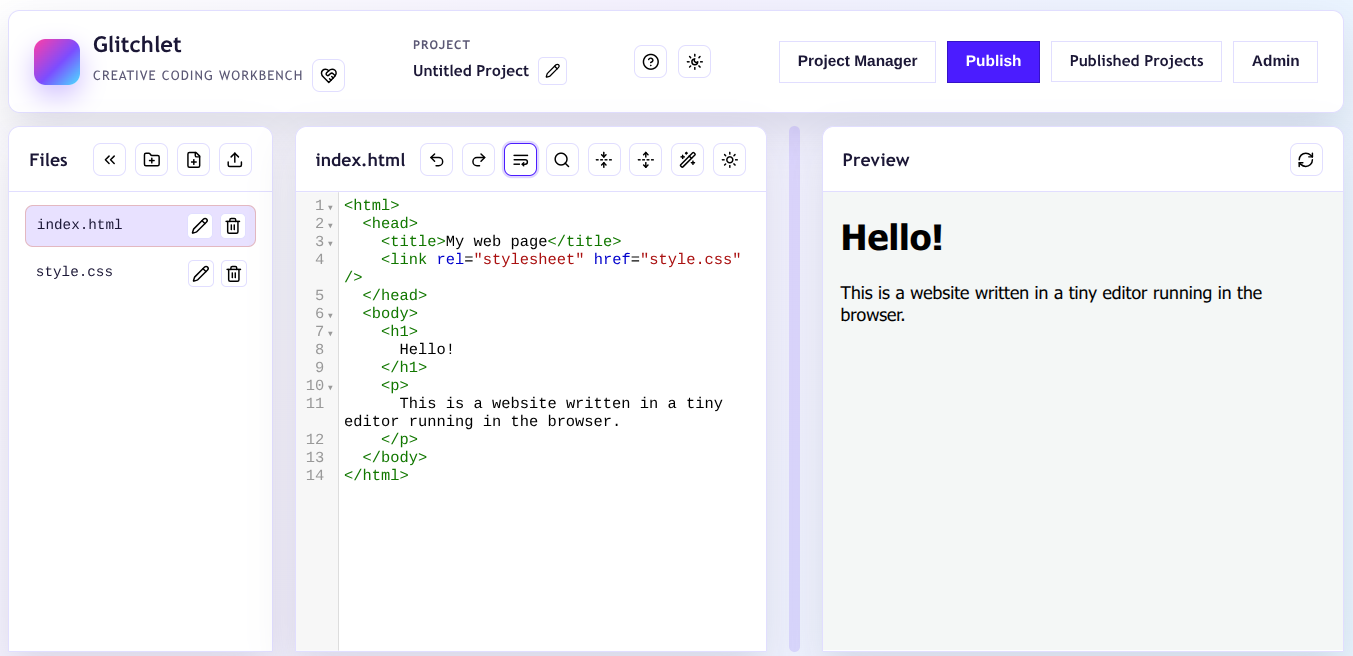
Pretty much the whole deal can be thrown onto a cheap VPS. Sold.
I knew I wanted to make some changes when I got my fork up and running. Some things were superficial, like reducing the whitespace to work a little bit better on a Chromebook. Other things were more significant, which is what led me to maintaing my own fork of the project.
First, all of the PHP scripts were under the /publish directory, which didn't make sense in my head. I started by creating new /admin/ and /public/ directories. admin holds files related to managing settings on the backend. public holds published projects and any project templates.
Speaking of templates, Glitchlet allows admins to pre-populate the editor with template files, but you have to upload a .zip file and it only loads if there isn't an active project in the editor. I wanted a way to better create and share template files with classes, so I updated the database model to include an is_template flag. This flag is only available for admins.
With the templates update, there is a templates.php page for signed-in users. Now, instead of having to distribute .zip files like I had to in the past, I can link to a specific project for students to open, save, and start to remix before publishing their own copy.
There are some other changes I still have on my list, the first being to turn this into a full-fledged PWA. I'm hosting this at school but it is not publicly available on the Internet. So, they can start a project in class, but they can't keep plinking away on it once they're off campus. Wrapping this into a PWA will allow them to continue to work in the editor and then publish once they're back in class.
The other change I'd like to work on is a smoother remix flow. Currently, to remix a project, logged in users have to download a .zip file of the assets and then re-upload those assets into their project editor. I would prefer that it loads directly into the editor taking out the download/upload step.
I've got a few more weeks to get things really fine tuned before students hop in. If you're inclined, I'd be happy to have any help you want to offer to make this a success.

Previous
Van Buren State ParkNext
August 2026 Reading