Posts

This is an eye-opening look at the teacher-as-content-creator world of classroom DIY. Two quotes jump out that highlight the broken legislative system we have and the broken social media expectations we set for ourselves.
Teachers need their content to perform well and often, it’s the pretty, palatable posts that perform well; so that’s what teachers feel pressured to deliver.
As long as teachers continue to share online tips and tricks for shielding their students from the threat of gun violence, as if they were simply sharing book recommendations or math worksheets, in lieu of explicitly demanding gun reform, teachers will continue to carry the overwhelming burden of keeping their students alive in deadly situations.
Source: School Shootings and the Cheerily Gruesome World of DIY Classroom Prep
Running PD for an entire district is a challenge. The biggest gap I see is knowing how or when teachers actually use what they've learned in a session or a series of sessions. We have automated systems in place, but it doesn't give us information on the effectiveness of our instruction.
We coach our teachers to check for understanding and watch for application of learning with their students, yet this is something I have not done well with the teachers I work with. Granted, I work with all five secondary buildings (and teachers in general with my partners), so geography and time are a challenge in gathering and collating the right kind of information.
I'm interested in what kinds of supports we provide will help teachers actually use what they've learned. We run several programs, but which ones are the most effective at engaging and enabling our teachers to make changes to their teaching? What kinds of environments or availabilities are the most helpful to the staff?
Homing In
I haven't defined a specific question yet, but several I'm thinking about include:
- How long do teachers wait before implementing training they've received from the district?
- What professional development structures or systems best enable teachers to implement skills or strategies learned in professional workshops?
- How does student engagement or learning change as a result of a specific instructional change by a teacher after attending a training event?
- What are the reasons teachers do not put strategies or systems in place after a workshop?
- Do professional development workshops make an impact on day to day instruction by the teaching staff?
My main concern is that several of these questions are very subjective. Measuring the result - either quantitatively or qualitatively - will be difficult and rely on select groups of teachers self-electing an evaluation tool. We already send a basic implementation survey to teacher three weeks after an event, so my intent is to go through all of those records and begin to identify the response rate as well as the most common responses for implementation vs non-implementation by teachers. I'm also hoping to gain some candid insight on the state of our professional learning opportunities from teachers' perspectives.
I'm helping several teachers move toward standards-based grading practices this year. We work a lot on philosophy - why they'd want to use this grading mechanism over traditional scores, how to support learning, and the language of SBG in general with students - before we get into the how-to. That helps make sure everyone is in the right frame of mind.
Once they're ready to start, that's where the how-to work comes in. I know what I think about how to set up a class, but there is no gold standard when it comes to actually running the class. If you're looking to start, allow me to redirect you to Frank Noschese and his excellent blog as well as pretty much anything written by Rick Wormeli.
Today's post started as an email asking how I handled retests in my class. The following is more or less what I wrote back, with some edits for clarity and more general application.
I’m trying to up my standards based grading game. We briefly talked about this last semester, but I’m wondering...how can I most efficiently update students’ grades to show mastery when I’m having them do test corrections? Ideas welcome!!
This came in an emailDo you do paper-and-pencil corrections? How are you building your tests? I ask because there are a few ways you could consider, but each kind of depends on your own style and class processes.
Grading paper-and-pencil corrections
When I did this, it was usually something like:
- write out the wrong answer,
- write the correct answer,
-
- give a reference to the right answer,
- which standard/outcome does this relate to?
So, they would go through the material, evaluate their responses, and then find the right answer and justify it. I was mainly concerned with the justification of the response, not so much that they found the right answer. I would grade their mastery on that justification, bumping them up or down a little bit.
To track it, you could download the MagicMarker (iOS only) app and mark them on Outcomes as if you were talking to them in class. It aggregates those scores into the Canvas Learning Mastery grade book and then you can evaluate the overall growth rather than give credit based on that one assessment.
Question Banks
This is definitely the most time consuming to set up, but once it's set up, you're golden. Getting questions in standards-referenced banks allows you to build out Quizzes that pull randomly, so you can give a retake or another attempt that updates those Learning Mastery grade book results. This is what I tended to do instead of paper/pencil once I had everything going.
Students would get their results and then focus on any standards that were less than a three in their Learning Mastery grades (out of four total). There'd be some kind of work involved so they weren't blindly guessing, but then they could take the test again because the questions were likely to be different with the bank setup.
Set up banks based on standard and then file questions in there. When you build the Quiz, you use Add new question group rather than Add question in Canvas. You can link the question group to a question bank and specify how many items to pull at X number of points.
Student defense and other evidence
This one is probably my favorite: just giving students a chance to plead their case...a verbal quiz, essentially. I'd use MagicMarker while we were talking to keep track of their demonstration. I would ask them to show me work we'd done, explain how they know what they know, and then prod them with more questions.
I typically did this if they were having trouble demonstrating understanding in other ways. I wanted to remove test anxiety or reading comprehension from the equation, but this was typically the last option for those kids. I'd then work with them to get over those test-taking humps (granted, this was more important to do in the AP class because they had to take the test and I needed them to be ready for it).
I think all of this boils down to get more data into Canvas (or your LMS if you can)...try not to rely on a single demonstration to judge understanding. My goal was to have students show mastery on standards by the end of the semester. So, if they're not getting one of them now, it still goes in as a zero but it serves as a reminder that they still have to do that standard. I was updating grades on the last day of the semester for my students. It's a weird way for them to think and it'll take some prodding by you so they don't forget that a zero can always convert to full credit. Usually what happens is a later unit will give them more context for whatever they're struggling with and cycling back after more scaffolding is more effective than trying to drill the issue immediately, if that makes sense.
If you're not using Canvas, there may be similar systems in your LMS that will help you track growth. I also have a Google Sheet template that you can use to track student growth. Shoot me an email if you'd like that and I'd be happy to send it along.
I'm taking a graduate course this semester on action research, part of which is defining and designing a question to tackle. Most of the coursework relates to classroom-level research by teachers to drive reflection and instructional change, but I'm not in the classroom right now. I'm thinking through what kind of teacher-focused research could help me in a coaching role.
- Can reflection be an emergent property in teaching given the right context to grow?
- How can formative data push teachers toward ideas in contrast with what they think is the "best" instructional habit?
- How do PLNs (local or digital) change teacher practice?
- What conditions are favorable for teachers starting - and completing - PD regimens?
- Are mixed-format (online, self-paced, in person) PD sequences more or less effective than single-format (single sessions)?
- What kind of follow up intervention or touchpoints can spur implementation of methods or ideas learned in professional development?
- How do student results from trying new methods impact the type and frequency of PD offered to teachers?
- How does implementing a new lesson or instructional method impact teacher satisfaction or overall morale?
This definitely isn't exhaustive, but it's a start. There are some others floating around my head that I can't quite verbalize yet. Much of what I'm interested in surrounds teacher intent to join PD, their actual attendance, and then, most importantly, their implementation of the methods and techniques learned together. What kinds of prompts or supports are needed to ensure follow through?
At face value, it seems collaborative action - longitudinal groups of teachers - working together has a high impact on implementation. But, given time constraints (including perceived time restrictions) on the part of teachers, this is hard to get off the ground at a systemic level during the school day.
The district as a whole is ripe for this kind of problem solving. Department and cross-department PLCs are forming and they are given freedom to choose how to spend that time. Perhaps a good way to start is to identify a team at each building willing to go through a more formal process. While their focus is on student improvement, I'm more interested in the supplemental activities I can provide as a coach to develop the action research mindset of the teacher.
Featured image from *`Unsplash <https://unsplash.com/photos/1NyiWD3iorA>`__* by David Papillon
If you work in big systems, sometimes you come across a situation where you want to share a single tab of a Google Sheet with someone else rather than the master copy. An easy way is to just make a snapshot copy of that tab and share a new sheet with them. A more advanced method is to use a parent/child relationship and some Sheets cell formulas to share an always-up-to-date copy of the master data. The problem with that (there's always a problem, isn't there?) is that it only copies the data, none of the notes or any other information that might be on the master sheet.
In this post, I'm going to give an example of a Google Apps Script that can be used to copy notes from a master parent sheet to a child spreadsheet. If you want to make a copy of a folder with working examples, ask and thou shalt receive.
The Basic Setup
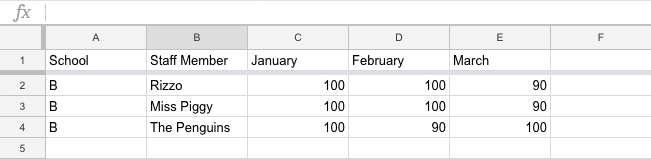
For this example, we have a master Google Sheet with several rows of data organized by location, like this:
We want to share child sheets tied to schools A, B, and C with only their relevant data. This first part is done with query and importrange in the following formula in cell A1 of the child spreadsheet.
=query(importrange("masterSheetURL","Sheet1:A:E"),"SELECT * WHERE Col1 CONTAINS 'A'",1)
Query selects an entire row where Column 1 contains the string 'A'. If this were a real situation, the building name would be the imported data, which looks like this:
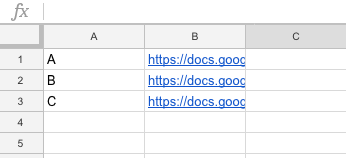
I prefer query because I don't have to select a specific range - it will look at the entire sheet for that data. If you don't want to import notes, this works really well. If you do want to import notes, make sure data is grouped together because you need to determine some offsets when writing to the child sheets. Create a second spreadsheet in masterthat has the following structure:
where column A is the building (or location or other selector) and the URL to the child sheet you want to update. Column C will become very important as it holds the offset data for writing notes to the child sheet.
The Script
Copying notes can only be done with the .getNotes() Google Apps Script method. This script looks at the sheet and uses a couple of loops to build arrays to post to the child sheets. The first challenge is to set the offsets. Notice location B in the master sheet is rows six through eight, while on the child sheet it is rows two through four. Without setting an offset, our notes would be written into the wrong rows, and that's no fun.
After running that script, your child sheet will update the offset of each building in Column 3 of the helper sheet in the master copy. I also added an onChange trigger to this function so it runs when rows are inserted anywhere in the sheet.
Now, you're ready to copy notes from one sheet to another.
This script will loop the master spreadsheet and look for a building name it recognizes. If there's a match, it will open the child sheet and set the notes for each row using the offset provided in the previous step. To be honest, this isn't the most elegant solution, but hey, it works.
Just in case of catastrophe, here's another little utility script you can use to clear all notes from the child sheets. This was particularly helpful when I had my offset calculations off by a row.
This is a manual process - there is no edit or change event you can hook into when a note is added or deleted. So, I wrapped all of this into an onOpen simple trigger to add a custom menu.
There are definitely improvements that can be made. Here are all the files as a gist so you can clone, copy/paste, and hack away at your own sheets.
Tom Woodward has a semi-regular weekly roundup blog post with links to interesting things he finds on the Internet. A couple weeks back, he posted a link to something called arbtt (pronounced ar-bit? that's what I say, anyways), which is actually an acronym for "arbitrary, rule-based time tracker." In short, it runs in the background and samples all the open programs on your computer, once per minute, and writes that information to a text log.
It's super, super geeky. Like seriously. I've used todo-txt for almost two years now and I recently started tracking how long I work on a given task so I can keep better track of what I spend my time on. But, the catch is, I have to remember to do turn on the tracker. arbtt runs in the background. The data is standardized, so you can write different queries and poll for information in very, very granular ways.
It was a real pain to get set up. After two days of fussing on and off, I have it running well on my computer. The documentation for Mac OS is really lacking, so here's what I did for my machine.
(This is fairly technical, so jump to the bottom if you want to see what it does once it's running.)
Install
Installation wasn't too bad for arbtt on Mac. The install instructions on the project page worked fine, particularly because I already had Homebrew installed and set up. I'm not going to rehash those steps here. Go read them there.
Binaries
Getting the thing to run was a different story. arbtt installs itself at the User level on Mac OS in a hidden .arbtt directory. This holds the configuration file and the actual capture.log file.
The actual executables are in the .cabal directory (also under /Users/yourname) because they're managed by the package manager. The documentation says to go into .cabal/bin and run arbtt-capture in order to start capturing data with the daemon.
Well, that didn't work.
The files in .cabal/bin are symlinked to the actual executables, and from what I can gather, Mac OS doesn't like that. At all. So, to run the scripts, you have to call the absolute path to the actual binaries. Those are in .cabal/store/ghc-8.4.4/rbtt-0.10.1-*/bin. I don't know enough about package managers, but those binaries are buried. I ended up creating aliases in my terminal so I can use one-line invocation.
categorize.cfg
Because the collection of information is arbitrary, you can collect without knowing what you want to know, which is pretty cool. The syntax for the query rules is in Haskell, which I don't know, so mine is a little hacky right now. In my playing, there are two main rules:
- Target the current window with $program.
- Target the current window title with $title.
You can use standard boolean operators to combine queries to get specific information. Each query pushes to a tag object that contains a Category and identifier in a Category:identifier syntax. A query I'm using to watch my Twitter use is:
current window $program == "Vivaldi" && current window $title =~ [m!TweetDeck!, m!Twitter!] ==> tag Social:twitter
So, it checks for both the browser (I use one called Vivaldi) and the window title before pushing (==>) to the Social:twitter tag. Mine are all really rudimentary right now, but you can sort and filter by date, titles, even directory locations if you're working on your filesystem. Since the underlying data never changes, you can just write new rules that will parse with arbtt-stats (next).
arbtt-stats
The main capture daemon just runs in the background and collects data. The workhorse is arbtt-stats which parses all of the raw data. You can run arbtt-stats in the command line and get a full report of all matched rules or you can query by specific tag with the -c flag. So, executing arbtt-stats -c Social:twitter would return only the time recorded where Twitter was the focused window.
arbtt-graph (addon)
This all happens in the command line, which isn't super helpful, especially if you have a lot of results like this:

Filtering down by tag with -c is helpful, but it would also be nice to turn this into something graphical. That's where arbtt-graph comes in. It's a Python-based parser that generates a website based on arbtt stats for each day as well as a four-month aggregate.

The biggest problem I had with arbtt-graph was that python isn't super happy with relative file locations. I had to edit the scripts with absolute paths to write and read all of the necessary documents. It's a fun little helper on my computer, and if I was insane, I might investigate putting it online somewhere with a cron job, but that's for another day.
I've never had a case for my Raspberry Pi because...well...I just haven't.
One of our schools recently purchased all kinds of STEM stuff and I've been spending some time learning how to use the 3D printers, drones, along with a bunch of Spheros. I've used the Spheros a bunch and while I've 3D printed in the past, I've not gone through the whole process by myself. Today was the day.
We have Flashforge Finder printers which, compared to others, are a breeze to use. They're compact, easy to maintain, and print well (with one exception, but I think the extruder is a little blocked). I grabbed a Thingiverse model for the sake of time and got started.
My biggest problem was using the wrong software. I grabbed Slic3r to do the print rendering because it's what I'd used in the past. But, for some reason, I couldn't get the print bed size to set correctly, so the prints were going off the edge. Then, I realize that Flashforge has their own slicer, and once I installed that, it was all good.
The bottom print file was up and off, no problem. The upper half of the shell caused me some issues because the print file had it oriented as if it were fully rendered.
I flipped it upside down and added a bigger print footprint and it was finally able to start running (after realizing an extruder was bad and changing machines).
Three hours later, I had two halves of a nice little case for the nice little computer.
Photo CC0 Public Domain by me
Photo CC0 Public Domain by me
This week, I co-taught an AP Biology class with one of our high school teachers. She was looking for a way to have students wrestle with the molecular structure of DNA, so I suggested a card sort activity.
[David Knuffke](https://twitter.com/davidknuffke) suggested the [Central Dogma sort from HHMI](https://www.hhmi.org/biointeractive/central-dogma-card-activity), but they weren't quite at the point of replication/transcription/translation. I ended up modeling its structure for our molecular sort. [Here's the Google Doc](https://docs.google.com/document/d/1Pv-iCEkZT09xGStWe6AL21tnYwT5wWJATrCqNTCQA0k/edit?usp=sharing).
This sort worked well for the students because they had already spent some time reviewing 3' --> 5' structure as well as the purine/pyrimidine relationship. Most of their work had been with simple block models at this point and I wanted to stretch them to think about the atomic interactions. We started by handing out just the pictures and giving pairs of students about three minutes to discuss and sort together. Here are three samples:
Each group was able to explain their rationale to one another and to the class. There are similarities between groups 1 and 2. I _really_ loved that group 3 was almost the exact opposite of the first two groups, mainly to illustrate to the class that the _process of thinking_ is the critical piece to the exercise, not necessarily the 'right order.'
After groups felt good about their initial order, I handed the terms out and asked them to label each step. Connecting the visual to the language of DNA structure and introducing the idea of replication left us in a good spot for the day.
No matter how often I do card sorts, I never cease to be amazed at how _deep_ conversations get as students are putting cards in order. I think that's the challenge - getting a good set of images or graphics in place which promote those conversations without leading to a 'right answer,' especially in the AP context.
[The Google Doc](https://docs.google.com/document/d/1Pv-iCEkZT09xGStWe6AL21tnYwT5wWJATrCqNTCQA0k/edit?usp=sharing) with the cards and terms is is public, so feel free to grab it for your class if you're interested.
I've been playing around with building websites and self-teaching myself (is that redundant?) web development languages. I feel like I've crossed some kind of line in the last 18 months where I can identify a problem, conceptualize a web-based solution, and then build it much more easily than I could in the past. I know that skill comes from experience, but it's nice to reflect back on my learning and see growth.
I built mostly for myself at the start. I run a simple [static homepage](https://ohheybrian.com) and a few small pages (see links in the right sidebar) for some small Google Apps Add Ons that haven't seen much love lately (shame on me). I've also kicked off a couple of projects for the district that have seen some daylight.
Most of this has been totally private. I would cruise [GitHub](https://github.com) from time to time for [interesting](https://github.com/bennettscience/tweetmineR) [projects](https://github.com/bennettscience/TimelineJS3) [to play with](https://github.com/bennettscience/gifify), but never really contributed to any of the projects.
Without getting too deep, Git tracks all changes made to files by anyone working on a project. It's terrifyingly complex, especially when you work yourself into an unsolvable tangle, but it does make seeing changes to code really, really handy. GitHub takes all of this information and puts it into one nice place for people from all over the world to see and work on together.
Contributing to a project on GitHub felt like walking into a room with a bunch of geniuses and asking what I could help with.

Recently, I came across a really cool project called [Lychee](https://lycheeorg.github.io/) which is a self-hosted photo sharing site. It runs on any web server and gives you a nice, clean tool to upload, organize, and share photos. [I downloaded and got it running](https://photos.ohheybrian.com) after a couple days of [poking around](https://blog.ohheybrian.com/2018/11/forget-the-mac-mini-bring-on-the-raspberry/). While I was using it, I noticed a small error: toggling a setting didn't work because of a wrong function name. I was able to look at the code, find, and fix the error on my own site within about 20 minutes.
Then came the scary part - submitting a fix to the problem.
I had done this only once, and it ended with the owner saying, "Thanks but no," which was a bummer and a little embarrassing. I was about to submit some code that would be used in a real, live app that people downloaded and installed on their machines. My name would be attached to this particular fix (git tracks who changes what). I was worried that my fix would magically not work as soon as I posted it.
All of this fear was built up in the _perception_ of what community-based projects require. Most of the anxiety I felt was because of the image of this world being closed off to people who could speak the language or do things perfectly (sidebar: this is true, especially in the [tech sector](https://www.recode.net/2018/2/5/16972096/emily-chang-brotopia-book-bloomberg-technology-culture-silicon-valley-kara-swisher-decode-podcast), and GitHub isn't immune. More on that later.). But, things break. Problems need to be solved. And I'd just solved one that could help someone else. And anyone can submit fixes to code, so I decided to [give it a try](https://github.com/LycheeOrg/Lychee/pull/112).
Nothing scary happened. The site manager sent me a quick thanks and implemented the code.
I just had a small bugfix pull request merged into a real-life open source project, so that's cool.
—Brian E. Bennett (@bennettscience) November 22, 2018
I started looking through some of the other issues on this particular project and noticed one that I felt like I could help with, even if it was just exploring possibilities. Someone wanted to be able to tag photos with Creative Commons licenses using a menu, not just throwing tags into the `tag` field.
Long story short, this was a much bigger problem. There were easily six to ten non-trivial changes necessary to make this update happen. Over the last four days, I've worked hard to learn about the app's structure, the languages used to make the whole thing tick, and how to implement this feature without breaking the entire site. Today, [that feature was added](https://github.com/LycheeOrg/Lychee-front/pull/18) after some back and forth on code structure with the main author.
I'm a hobbyist. I don't plan on going into development full time because I like teaching too much. But there are definite things I learned through this weekend's project:
- **Submitting requests to update an app is just that: a request**. I'd built up this idea that submitting code - even flawed code - to a project would be a waste of that person's time. But really, providing a starting point can help make progress on complex issues.
- **Take time to look at the culture around the project**. The first one I'd submitted to was a single guy who wrote a script to make something easier. In hindsight, submitting a suggestion for a feature wasn't in his interest, so he had every right to say no. Larger projects have more eyes on requests and dialog is easier to kick off.
- **Pay attention to the project's style guides and code requirements**. I was able to save myself a major headache by going thoroughly through my code to make sure it was at least up to the grammatical standard set by the project owners. That way, we could focus on implementation discussion rather than form.
- **If you can't submit code, submit bug reports or provide insight in other discussions**. The documentation pages are a great way to get involved as well. Bugs need to be reported and instructions don't write themselves. Both are low-barrier entry points and can help get you established as a good-faith contributor to the community.
- **Take a big breath of humility**. I didn't submit my request thinking it was the best solution, only that it was a _potential_ solution. After I submitted, we spent a day going back and forth, tweaking items here and there before adding it to the core files. [And there was _still_ a bug we missed!](
https://github.com/LycheeOrg/Lychee/issues/120) Code is written by people, and people make mistakes, so plan on your code having mistakes. Know that you will get feedback on whatever you submit, but look at the goal and avoid taking it personally.
Last night, I got [a self-hosted photo sharing site](https://photos.ohheybrian.com) up and running on my raspberry pi 3. You can see more about that process [here](https://blog.ohheybrian.com/2018/11/forget-the-mac-mini-bring-on-the-raspberry/).
Putting it on the real, live Internet is scary. Securing a server is no small task, so I took some steps based on [these tips](https://serverfault.com/questions/212269/tips-for-securing-a-lamp-server) to make sure I don't royally get myself into trouble.
(I have a stinking feeling that posting this exposes vulnerability even more, but c'est la vie.)
To start: new user password. Easy to do using `sudo raspi-config` and going through the menus. It's big, it's unique and no, I'm not giving any hints.
As for updating the OS, I have a cron job which runs as root to update and reboot every couple of days. Lychee is [active on GitHub](https://github.com/lycheeorg/lychee) and I've starred it so I'll get updates with releases, etc. I also took some steps to separate the Apache server from the OS.
Putting a self-hosted server online requires port forwarding. That involves opening specific ports to outside traffic. I only opened the public HTTP/HTTPS ports. Several sites say to open SSH ports, but I think that's where I feel very timid. I don't plan on running anything insanely heavy which would require in-the-moment updates from somewhere remote. (There's also the fact that my school network blocks SSH traffic entirely, so there's even less reason to enable it.)
Once the ports were open, I had to find my external IP address and update my DNS Zone records on [Reclaim Hosting](https://reclaimhosting.com). By default, Comcast assigns dynamic IP addresses so they can adjust network traffic. Most tutorials encourage users to request static IPs for home servers, but others say they've used a dynamic address for years without issue. I'll see if I can work myself up to calling.
Anyways, I logged into my cPanel and added an A record for a new subdomain: [photos.ohheybrian.com](https://photos.ohheybrian.com) that pointed to my public IP address. The router sees that traffic coming in and points it at the Raspberry Pi. I tested on my phone and, hey presto, it worked.
Opening HTTP/HTTPS ports came next. It's easy to get unencrypted traffic in and out. But, like the rest of my sites, I wanted to make sure they were all SSL by default. I could't assign a Let's Encrypt certificate through Reclaim because it wasn't hosted on their servers. [The Internet came through with another good tutorial](https://www.tecmint.com/install-free-lets-encrypt-ssl-certificate-for-apache-on-debian-and-ubuntu/) and I was off.
First, I had to enable the `ssl` package on the Apache server:
```
sudo a2enmod ssl
sudo a2ensite default-ssl.conf
sudo service apache2 restart
```
Once it can accept SSL traffic, it was time to install the Let's Encrypt package, which lives on GitHub:
I then had to install the Apache2 plugin:
```
sudo apt-get install python-certbot-apache
```
From there, the entire process is automated. I moved into the install directory and then ran:
```bash
cd /usr/local/letsencrypt
sudo ./letsencrypt-auto --apache -d photos.ohheybrian.com
```
It works by verifying you own the domain and then sending the verification to the Let's Encrypt servers to generate the certificate. The default life is three months, but you can also cron-job the renewal if nothing about the site is changing.
After I was given the certification, I went to https://photos.ohheybrian.com and got a 'could not connect' error, which was curious. After more DuckDuckGoing, I realized that SSL uses a different port (duh). So, Back to the router to update port forwarding and it was finished.
There are several steps I want to take, like disaggregating accounts (one for Apache, one for MySQL, one for phpMyAdmin) so if one _happens_ to be compromised, the whole thing isn't borked.
---
_Featured image is They Call It Camel Rock flickr photo by carfull...in Wyoming shared under a Creative Commons (BY-NC-ND) license _
This weekend I decided to try and tackle [turning a Mac Mini into a server to host my own photos](https://blog.ohheybrian.com/2018/11/reviving-the-mac-mini/). Well, that turned into a real mess and I abandoned the idea after I had to disassemble the computer to retrieve a stuck recovery DVD. We went all kinds of places together, but this Mac couldn't go the distance with me this time.
So, I grabbed the semi-used Raspberry Pi 3 that was working as a wireless musicbox on our stereo (kind of) and gave it an overhaul. I removed the [PiMusicbox OS](http://www.pimusicbox.com/) and went back to a fresh Raspbian image. (Actually, I only grabbed the Lite distribution because I won't need to go to the desktop. Ever.)
I wanted a basic LAMP (Linux - Apache - MySQL - PHP) stack to run the website, specifically because the end goal was to have [Lychee](https://github.com/LycheeOrg/Lychee) installed and running on a public space. I relied on two _really good_ tutorials to help me through the process.
The first, written by a guy named Richie, is a [full-blown, step-by-step guide](https://pchelp.ricmedia.com/setup-lamp-server-raspberry-pi-3-complete-diy-guide/) on all the software setup. He even uses WordPress as his thing-to-install-at-the-end, so that's a bonus. It's written for non-technical people and isn't just a wall of command line code to type in. He had explanations (why does he always use the `-y` flag on his install commands?) and screenshots of what to expect. Really superb. If you're looking to try setting up a local server (available only on your wifi network) or have students who want to try, this is the place to start.
Once everything was going, I went to the GitHub project and used a quick command download the package into the Pi:
`wget https://github.com/LycheeOrg/Lychee/archive/master.zip`
and then unzipped the project:
`unzip master.zip`
This put all of the source files into the `/var/www` directory on the Pi, which becomes the public space. For updates, I can just use `git pull` in the directory and I'll get those updates automatically. A cron job could even take care of that, so double bonus.
I was able to go to my internal IP address and see the setup prompt. I signed into my MySQL admin and I was off.
[caption id="attachment_649" align="aligncenter" width="695"] CC0 by Brian Bennett[/caption]
Photos are organized by album and tags, so you can quickly search for items. I uploaded an old photo of my wife, just to see if it would accept files.
[caption id="attachment_650" align="aligncenter" width="1383"] CC0 by Brian Bennett[/caption]
There's another option I need to dig into that says "Upload from Link," but I'm not quite sure what that does yet. In the short term, I can start uploading photos here rather than Flickr.
The second article had some hints about how to get the server visible to the public. Your modem and router take a public IP address from your ISP and convert it into something you can use in the house. So, getting the Pi up with an IP address is easy to do and use, but only if you're at home. Making it publicly available requires two things:
- Some serious guts (this was the part I was most scared about)
- Some IP address and DNS work (potentially)
RaspberryPiGuy, who apparently works for RedHat, has a guide on [taking your server public](https://opensource.com/article/17/3/building-personal-web-server-raspberry-pi-3). I added a couple more packages to help with security, like fail2ban, which blocks an IP address after too many login attempts. I'm also going to split my network one more time so my home computers are sequestered from this little public slice. I found my public IP address on [this site](https://www.iplocation.net/find-ip-address) and then edited my router to forward traffic to the **public** IP (my house) to the **Pi** (the internal network IP).
I was able to use my phone on 4G to go directly to the public IP address and see public photos in my library, so mission accomplished for tonight. The next steps are to do some DNS forwarding so you don't have to memorize an IP address to see pictures. Some other considerations are to get a static IP so those DNS records don't get messed up, but I have to work up to that call to Comcast.
---
Featured image is Looking Through the Lens flickr photo by my friend, Alan Levine, shared into the public domain using Creative Commons Public Domain Dedication (CC0) **
My wife bought a Mac Mini toward the end of college that has been sitting in our basement pretty much since we went to Korea in 2009. I've been wanting to do something with it for a while and with Flickr changing its accounts, now seemed like a good time.
I was looking for photo sharing alternatives to Flickr, mostly because I can't afford a pro membership and I'm already over the 1000 photo limit being imposed in January. I came across [Lychee](https://github.com/LycheeOrg/Lychee/), which is essentially single-user, self-hosted photo management. (Check out their [demo site](https://ld.electerious.com/) - it's pretty impressive). My home photo collection could also stand being backed up somewhere more consistently, so my goal is to convert the mini into a self-hosted photo sharing site so I can continue to post out on the web and have a backup at home.
*cracks knuckles*
I set up in the dining room and got started.
I have to say, it was pretty amazing plugging in this computer, which hasn't seen use in nearly a decade, and watching it boot up as if I had used it yesterday.
Tonight's fun is transferring old photos from a much-neglected Mac mini and then installing Linux. pic.twitter.com/U4bbG7ShFp
—Brian E. Bennett (@bennettscience) November 15, 2018
Macs have [long-had web hosting built right in](http://www.macinstruct.com/node/112). Apache and PHP are included by default and it's easy to install MySQL for databasing. I was hoping to go the easy route and just use the default tools. LOL.
Lychee requires PHP 5.5+. The mini (late 2006 model) has PHP 4.4 and Apache 1.3 installed. No good. I started searching for [ways to upgrade both](https://jeromejaglale.com/doc/mac/upgrade_php5_tiger), but the recommended site with ported versions for old copies doesn't exist anymore.
So, I grabbed another Mac for more efficient Googling. There was also beer.
The command center is fully operational. pic.twitter.com/3ScrhI76da
—Brian E. Bennett (@bennettscience) November 15, 2018
The best option, I think, is to boot into Linux rather than OSX 10.4. So, I started researching Debian distributions that would work on older hardware. My plan was to wipe the entire hard drive and dedicate it to server resources. When I landed on the Debian wiki, they had a page specifically for older, Intel-based Macs. This line caught my eye:
The oldest Mini (macmini1,1) is typically the most problematic, due to bugs in its firmware. When booting off CD/DVD, if there is more than one El Torito boot record on the disc then the firmware gets confused. It tried to offer a choice of the boot options, but it locks up instead.
That's not good. I have two choices: I can partition the drive to prevent losing the entire machine or I can go for it and hope that the OSX recover DVD I have in the basement still works. (I'll probably partition, just to be safe.)
Luckily, two lines later, the Debian wiki notes that specific builds are now available which only include _one_ boot record, which solves the problem. [A quick 300MB download of the Mac-specific distribution](https://cdimage.debian.org/pub/debian-cd/current/amd64/iso-cd/) later and I'm ready to burn then disk image to a USB drive with [Etcher](https://github.com/balena-io/etcher).
Next steps are to actually do the Debian install.
an element is anything that needs to be learned or processed and the interactivity relates to how reliant one element is on other elements for comprehension.
Source: Element Interactivity in the Classroom
I was first introduced to working memory by [Ramsey Musallam](https://twitter.com/ramusallam) and I've pulled it out every now and then in workshops with teachers. The idea is easy to grasp, but hard to put into specific practice when planning.
I'd never heard of "element interactivity" either, but this is - hands down - one of the _most_ approachable descriptions of how to adjust planning and instruction to account for cognitive limitations with novel or complex material.
---
_Featured image "Dandelion Seeds" flickr photo by thatSandygirl https://flickr.com/photos/thatsandygirl/34111155501 shared under a Creative Commons (BY-NC-ND) license_
When taking the necessary in-depth look at Visible Learning with the eye of an expert, we find not a mighty castle but a fragile house of cards that quickly falls apart.
Source: HOW TO ENGAGE IN PSEUDOSCIENCE WITH REAL DATA: A CRITICISM OF JOHN HATTIE’S ARGUMENTS IN VISIBLE LEARNING FROM THE PERSPECTIVE OF A STATISTICIAN | Bergeron | McGill Journal of Education / Revue des sciences de l'éducation de McGill
Hattie's effect sizes are often thrown around as catch-all measurements of classroom methods. This reminds me of the learning styles discussions from several years ago. Both of these approaches have the same critical danger: reducing teaching and habits to single styles or single measures of effect is bad practice.
The idea of learning styles or effects on instruction are fine, but not when presented as scientific fact. A statistical breakdown of Hattie's effect sizes shows the clearly, as evidenced by this line:
Basically, Hattie computes averages that do not make any sense. A classic example of this type of average is: if my head is in the oven and my feet are in the freezer, on average, I’m comfortably warm.
Aggregating each category into a single effect size calculation disregards all of the other confounding variables present in a given population or individual. Learning styles has the same reductionist problem. In the mornings, reading works better for me. By the end of the day, I'm using YouTube tutorial videos for quick information. The style changes given the context and the idea of a single, best style ignores those context clues.
Use descriptors and measurements with care. Recognize the deficiencies and adjust for context as needed.
“We are helping them become more knowledgeable about what the digital landscape is like,” Mr. Hodgson said of his students, “so they can make choices about what they use and what they don’t use.”
Source: Google Is Teaching Children How to Act Online. Is It the Best Role Model? - The New York Times
The Times article on Google's "Be Internet Awesome" campaign does a great job of outlining why programs like this are needed, but not from companies who benefit from users within the program.
I tend to lean toward Kevin's (Mr. Hodgson) approach to teaching about the Internet: it's complex and you need to be aware of what you're using and why. The same is true for teachers. When I'm asked about apps or websites, I encourage them to read terms of service, privacy statements, and other conditions, especially if they want to use the thing with students.
Cutifying the practice of using the web wisely makes it exciting and easy to get into, but it's also easier to gloss over the deeper practices we should be teaching our students.
(Be sure to check out Kevin's blog for more of his writing.)
---
_[Conduits for Textbooks (and more!)](https://flickr.com/photos/wfryer/6997193539 "Conduits for Textbooks (and more!)") flickr photo by [Wesley Fryer](https://flickr.com/people/wfryer) shared under a [Creative Commons (BY) license](https://creativecommons.org/licenses/by/2.0/)_
Twitter made a UI change this week with it's card-styled link previews. It's subtle, but the changes have hurt accessibility and hurt the end user.
Twitter allows branded sites (anyone can do it, but brands use it the most) to create "cards" for links they post which include media previews, bold headlines, and a snippet of the article or post text. This gives the user a preview of what's in the link before they visit. The cards used to function like normal HTML `anchor` tags and included alternate text (the small popup when you hover your mouse) or showed the full URL of the link.
Since earlier this week, all of that is gone and it's led to some frustrating limitations.
First, headlines are cut off. And the alt text is gone from the mouse hover action.
[caption id="attachment_614" align="alignnone" width="312"] A shortage of what? Cold drinks?[/caption]
All browsers show URL paths in the bottom of the screen before you click on them. Twitter short links (t.co) would show first, but then resolve into the full path after a second or two. Not anymore.
[caption id="attachment_617" align="aligncenter" width="357"] Why is this less accessible?[/caption]
The top-level domain shows, but that's all. Does this link take me to the registration page? Or to the article? Or neither?

Really, Twitter is making it harder to know what you click on, asking you, the user, to trust them, the company, to show us what we need to know. This update does nothing to help the usability on a platform that has done little to increase transparency and improve the quality of the platform for users.
[video width="1440" height="900" mp4="https://blog.ohheybrian.com/wp-content/uploads/2018/10/twitupdate.mp4"][/video]
Aside from trying to be as productive as I can every day, listening - truly listening to people - has completely changed my coaching. Elena Agular talks about listening at length in The Art of Coaching (well worth the read, btw) and since I've made the conscious effort to listen first, I've seen fruits.
I stopped going in with preconceptions about progress or willingness to try new things. One unfortunate carryover from teaching is that I have expectations about specific teachers. So and so is hard to work with or this person will never change...I had shut down any possibility of working productively before I even walked in the room. Meeting people with the intent to listen rather than talk erased those expectations and allowed for positive conversations.
My ability to help people has increased. I don't limit this statement to technical help, which is certainly a component of my work these days. Asking questions and listening for context clues has allowed me to look beyond immediate problems and solve deeper issues, or at least identify issues to work toward solutions.
Summarizing the problem before offering solutions is critical. I stopped taking my computer to meetings with teachers because it leads to distractions. Or, if I do have it, I don't open it until we're working on a specific item. While we're talking, I have a notebook. I'm quietly making notes, looking for patterns and letting the teacher express their frustrations, ideas, or concerns without interrupting. I ask probing questions - "Why did you feel that way?" or, "What did [this thing] help you learn about your students' understandings?" - to draw out reflective thought. Before I start to talk, I take one minute to process my notes and state back, in my words, what they're experiencing. This catalyzes the rest of the conversation and helps us work together.
I can loop back to previous conversations and push toward growth. Since I have detailed notes (completely confidential notes) I can look back to previous meetings and probe next time we're together. Looping back to gently push toward growth on goals is easier because they're the teacher's own ideas. I'm there as a processing tool, not as the Owner Of Solutions.
In the end, I want to make sure I'm helping people in ways they want to be helped. I want to push them professionally by talking honestly about teaching - why we do what we do - to promote growth. If I can't understand what they're saying, it's a fool's errand.
Reflected Rocks flickr photo by Stanley Zimny (Thank You for 32 Million views) shared under a Creative Commons (BY-NC) license
However, working outside the LMS, well-trained instructors will be able to do far more than meet the minimal requirements for moving college courses online...
Source: The role of the faculty in the post-LMS world (opinion)
I don't work at a university, but we're in the process of moving teachers into using Canvas in our district, so this resonates. I see two groups of people:
- those who already had material online and are struggling to work backwards (essentially) to fit items into Canvas.
- those who have nothing online and are struggling to make sense of what works well digitally and what doesn't.
The LMS is a weird stepping stone. I've had materials online for years, so I don't like the constriction an LMS brings to what I've done in the past, but I _do_ appreciate the streamlined data I can grab from the system (I need to write more on using Outcomes in Canvas later...)
For the second group, it's a great intermediate step and I'm already seeing people look for more online on their own. They want to push the system now that they understand it more. They're seeing the benefit if using the Internet as a whole and not limiting their courses to the flow in Canvas.
Striking the balance between structure and variety is difficult. I'm not sure the LMS will ever completely go away, but I can see the influence waning as skills develop and alternatives becoming more accessible to teachers.
Whatever the reason, he was afforded the opportunity to learn and apply. It hasn’t come easy, but that’s the point. Giving a chance to redo isn’t about being easy.
Source: If We Don’t Allow A Redo, What Are We Teaching? – The Teacher And The Admins
Still in my standards-based grading vein, this is inevitably the biggest sticking point for teachers I work with.
"What do you mean they can retake the test for full credit?"
Mentally, we can agree with the argument that redoing work or retaking tests makes sense in the scheme of student learning. The hold up, I find, is more with the work involved in making those opportunities reliable and valid more than the mental exercise of finding value in the habit.
There are ways to allow students to reassess work that does _not_ include sitting an exam again, which opens more possibilities for authentic learning and demonstration of mastery.
Remember, though, that grades should not be used as rewards. Nor should they be used as affirmation, compensation, or validation. Grades should represent an honest report of evidence at this moment in time, nothing more. If we make them something more than that, we undermine the student’s maturation and any useful purpose for grading.
Source: Fair Isn't Always Equal: Three Grading Practices to Avoid
I'm working with several teachers on moving toward standards-based grading and we're starting to have conversations about grades themselves. I ask how they feel about zeroes, extra credit, completion, and makeup work. This article is a great primer and/or followup to those initial meetings.



Do you ever give personal help?
I can try to help here and there. If you have something specific about this method, you can leave it here as a comment so others benefit from a (possible) answer.
I’m trying to do something similar to this but I get the error: You do not have permission to call SpreadsheetApp.openByUrl
I’m reading that this can not be used in a custom function, so not understanding what I am doing differently than what you have done here.
Thanks for any help.
There are a couple possibilities. It won’t work if you’re trying to run it using an
event or if you don’t have edit permissions on the child spreadsheet. The other possibility is that the sheet might not have reauthorized you when you updated the script. To do that, sometimes I’ll write a little function that forces the OAuth window to open again and it’ll pick up the new permissions:Does this work for comments as well? I am having hard time setting up another sheet (we have two and the “master” sheet will have information that does not need to be shown on the 2nd sheet). The 2nd sheet is for clients. I have the IMPORTRANGE function working and only pulling the information I want but the comments are not coming through.
Unfortunately, no. Comments aren’t actually a “part” of the document in the sense that you can get them with IMPORTRANGE. To copy comments, you would need to use some scripting to pull them from one sheet to another.
I hope you still look at this article. I have always been a heavy user of comments in cells. When I used Excel or Open Office this was not a problem. I could copy/paste large portions of text into the comment in one cell, however, with Google sheets this does not seem to work. I can copy text out of the cell comment Ok, but when I try to paste text into the cell comment it does not work. Unfortunately I got used to Comments as a way to streamline my spreadsheets, and by now I have hundreds of spreadsheets created with Excel or Open Office that are full of comments.. Appreciate any ideas you may have.
Many thanks in advance. Rafael.