Posts
Keeping a todo list has always been a struggle for me. I have a notebook, I have some stuff in Google Keep, I’ve tried Google Tasks, Any.do, Remember the Milk, and Wunderlist. I’ve tried apps with goal setting, apps with reminders, and apps with synced web and phone apps.
My main problem is that it’s just another window to have open at any given point. I run a minimal desktop and dock – I don’t like windows all over the place with a dock that needs two monitors to show everything.
Robert Talbert tweeted about todo.txt the other day and I fell in love. Instantly.
I work in code and the command line a lot. I usually have the Mac Terminal open along with Atom. I hop between projects and use key commands because it’s faster than moving my hands to and from the trackpad. Todo.txt is a command-line script which manages a text file called (wait for it) todo.txt. It also has a done.txt file to hold things that are finished.
I won’t go into the syntax here, but essentially, each item has a priority, a title, and a tag or two. Putting one task per line in the text file creates one new entry on your list.

The command line just makes it faster to work with because it gives built-in commands, much like the Git architecture, to create, edit, or mark tasks as done. For example, using todo add “(A) filter schools by content areas +curriculum” creates an item in the text file. Opening the file shows a single line. But, using the command line, it shows a sorted list of items based on priority.

Marking items is easy, too. Put an “x” in front of the task and – hey presto! – it’s marked as finished. Using the command line, todo do and the item number marks it as done and moves it to your done.txt file.
Putting the notes in your Dropbox is tiny and updates instantly. Any computer I use is synced to Dropbox, hence my list is synced. Pull up the Terminal, and I’m ready to go.
Then I found GeekTool.
Getting rid of window clutter even more, GeekTool takes scripts (called “geeklets”) and lays them on your desktop in modules you customize. You can set the refresh rate as well as define groups of geeklets for different setups. For instance, I have a geeklet set to use when I’m on my laptop and one for when I’m hooked to an external monitor.
Part of my GeekTool setup is displaying my task list right on my desktop. Having a color coded list right there, all the time, is really helpful. And I’m not promoting an unhealthy work/life ratio because I can turn the geeklet off whenever I want (namely, on the weekend).

In the end, I’m really happy with this system because I control it. The setup isn’t as easy as downloading an app, but I know where my data is and I know how it’s being used. It’s a little thing, but some of the best things in life are the little things.
—
All images in the post are mine. There are a lot of great tutorials online for todo.txt as well as GeekTool.
In what’s become a half-tradition, some unfiltered thoughts as I finish another school year.
– Splitting time between teaching and instructional coaching is really, really difficult. It’s hard to pour into both equally. Next year, I’m going to be coaching 100% of the time.
– I still need to work on alternative assessment and measurement methods. Using Canvas has helped me implement SBG more effectively this year, but I still need to make improvements, especially giving feedback.
– I tend to close in on myself when working with other teachers. I need to focus on opening up and encouraging reflective dialog about effective instructional strategies.
– As I work with curriculum development and implementation teams, I need to bone up on my frameworks.
– I’m not teaching a class next year, which feels very strange…again.
There is a ton of change happening in the district and the implementation of the growth plan is wide open. My team continues to set high goals to make sure we’re constantly pushing the bar. It takes a lot of energy and effort, but the growth this year has been astronomical. Maintaining momentum and implementing new support structures in the fall is the big challenge ahead.
Featured image is Unpopular Opinions, a flickr photo by DarlingJack shared under a Creative Commons (BY) license
In November 2015, an independent model showed YouTube received around 500 hours of video content uploaded every minute. There are 1440 minutes in a day, meaning there was roughly 720,000 hours of video every day.
That’s a lot of videos.
Granted, many are of cats, kids, and Barbie Jeep Racing, so it’s not necessarily quality content uploading, but there is a lot of great video available for flipping if you’re not quite ready to make your own yet.
Where to start?
Before looking at how to choose videos, let’s define the goals of using video as an instructional tool (not method) in the first place. Don’t ask yourself, “How do I get rid of lecture?” because it’s too narrow a focus. The intent of using video should be to create space for students to explore ideas with the support of a teacher. Ramsey Musallam says it well: “Good teaching, regardless of discipline, should always limit passive transfer of knowledge in class, and promote learning environments built on the tenants of inquiry, collaboration and critical thinking.”
Flipping can help accomplish the goals of increasing student interaction with material and using existing videos is an easy way to start that process. When it comes to choosing videos to use with students, I focus on three main things:
- What value does a video bring?
- How well is the idea presented?
- How will the video expand on what is happening in class?
Using videos should supplement, not replace your work in the classroom. Your students have a relationship with you, not a video personality. It is important that you frame using outside content as a supporting factor in the interactive and collaborative work happening in the classroom. Otherwise, you run the risk of losing student trust because it appears that you’re taking the easy way out.
What value does a video bring?
There are situations when a video can help you immediately reclaim some time. Algorithmic processes – solving a problem, correcting grammatical mistakes, putting together a timeline of events – are great starting points. They’re usually short and to the point and they become a self-help library for students. When you’re in the middle of a larger activity, these can be a “first line of defense” when students ask procedural questions. At the same time, you can pay attention to which videos you’re referring to the most and address those in class as a whole.
The value here is that you’re not bogged down answering the same, small question over and over. You’re also not obligated to stop the entire activity. You’ll be teaching students self-reliance by curating helpful instructional videos to get the habit started. Eventually, students will go off and find their own help when they need it.
From another angle, resources are limited. I can’t always provide concrete examples in the classroom. Using videos to bring in those topics and examples is a great way to bridge the gap.
How well is it presented?
Presentation isn’t everything, but it’s important. As you’re vetting content, pay attention to the content, obviously, but also make sure it isn’t mind-numbing to watch. Audio is very important in this case. A video that is clear as crystal but sounds like a drive-through is just as bad as a video you can’t see. Don’t pick the first result in the search, either. Take some time to find a video that fits your need and won’t cause more confusion for you later.
How will it expand on what is happening in class?
Remember, you are the teacher and you set the tone of the course with your students. Any video you choose – instructional or exploratory – should fit in with your day to day work. Be explicit and specific about why you’re assigning a particular video to help students see the big picture. Without making connections for the students, you run the risk of looking lazy and the videos become another assignment, not a helpful tool.
Additionally, if you can’t make a solid connection to the learning process, perhaps a video isn’t the best means. It’s a good self-check to make sure you’re proving engaging and meaningful assignments at all levels of the learning cycle.
Big picture
Online video is here to stay. The amount of content available is staggering both in scale and in potential to positively impact learning behaviors. In the end, starting with existing video can help lay a foundation for using video as a learning tool. The major time commitment on your end is starting to curate those materials. Most video sites have playlists that you can create and customize, so start saving videos you like to build out that library.
You may find, though, that you can’t find one that really hits the issue you’re having. Don’t be afraid to make your own. I’ll repeat: you have the relationship with your students. Making a short video is easier than ever and you can find a number of tutorials online to help you get started.
Focus on enhancing the class time. Use the questions above to guide your thinking as you look for materials. If you’re not sure where to start, here are some of my favorites:
| Veritasium |
All sciences, culture of science and inquiry |
—
The featured image is titled Audience Full Movie, a flickr photo by Emily Barney shared under a Creative Commons (BY-NC) license
If you’ve used Endnote Generator in your Docs, thanks.
I posted an update this evening which will retain the formatting of your footnotes. So, if you have text formatting (bold, underline, etc) or links, those are still there when the Endnotes are added.
You can grab the Addon from the Docs Addon menu. You can also take a look at the source (or contribute!) and test it out on a single document on GitHub.
The New York Times profiled Google’s rush into education over the last eight years in a long piece this weekend. Some initial thoughts:
– The value behind the “Innovative Educator” title is completely created by Google. There is no value other than the fact that a company says it has value.
– Skills in a platform – even a cloud platform – are important, but not removed from the content students are supposed to be learning.
– If you don’t pay for it, you are the product being sold. Even if advertising isn’t targeted to students in GSuite, when you roll that data into a consumer account, it’s all there, ripe for auction.
– The marketization of education is pervasive and can erode the purpose of education: the holistic growth of students in all areas. Allowing companies like Google (among others) to direct what “good education” looks like is dangerous.
be careful what you buy into. Everything Google has done over the last decade in education is not altruistic. There is a company mission which drives all decisions and being aware of how those impact users is important.
The New York Times profiled Google’s rush into education over the last eight years in a long piece this weekend. Some initial thoughts:
– The value behind the “Innovative Educator” title is completely created by Google. There is no value other than the fact that a company says it has value.
– Skills in a platform – even a cloud platform – are important, but not removed from the content students are supposed to be learning.
– If you don’t pay for it, you are the product being sold. Even if advertising isn’t targeted to students in GSuite, when you roll that data into a consumer account, it’s all there, ripe for auction.
– The marketization of education is pervasive and can erode the purpose of education: the holistic growth of students in all areas. Allowing companies like Google (among others) to direct what “good education” looks like is dangerous.
be careful what you buy into. Everything Google has done over the last decade in education is not altruistic. There is a company mission which drives all decisions and being aware of how those impact users is important.
Our district is distributing 13,000 iPads in the next 24 months. We have ~1,300 staff who need to be trained on instructional methods with technology in addition to functional training on a new platform, using GSuite effectively and building a course in Canvas.
Training has been touchpoint number one for our team. We’re not in a culture where it’s normal – or expected – for you to go research and try something before requesting in-person help. Before this year, there was no in-person help. When I started this role in July, we were starting from ground zero. To handle how-to requests, we started a YouTube channel and a simple ticketing system. On Mondays, we host some simple how-to training workshops to get functional basics down. Otherwise, all of our training has focused on instructional changes in the classroom.
The hardest thing about building a culture of exploration and self-driven growth is the temptation to just fall back on what would alleviate people’s stress, but not actually solve the problem. Designing an effective workshop is much more than answering the questions asked. We’re constantly evaluating ways in which we ask teachers to engage with the principles of instruction we’re modeling without falling into the trap of giving lesson templates to be repeated throughout the district.
Orange Flowers Ruin Camouflage flickr photo by mikecogh shared under a Creative Commons (BY-SA) license
Move training beyond content
It’s difficult to model a lesson completely void of content. In fact, I think it would be bad practice to do so because ignoring content for the sake of context is a disservice to students. Content is important. But, in this case, it needs to be the backdrop. The lesson we’re modeling may be based on science, but we want to pull out the instructional practices that can be applied anywhere, not just in the immediate context. We use “metacognitive moments” embedded at strategic points in the task which ask teachers to identify what would work in their situation.
Prompts that force teachers to abstract to the lesson, not go through a lesson
Stemming from moving beyond content, my content expertise is in high school science. We focus on helping teachers apply the methods we’re modeling to their classroom using their expertise. I cannot tell an elementary english teacher to model the lesson in exactly the way I did. But, I can ask probing questions and push that teacher to reflect on what the principles of the lesson are, where they’re already utilizing those ideas, and where they could implement more.
Avoid key phrases like “compare and contrast”
Trigger phrases can immediately drop the level of discussion. Compare and contrast is especially egregious because people – teachers and students – fall back to a two-circle Venn diagram to complete the task without analyzing the problem. Action verbs are important…we do want people to compare and contrast, but we avoid the trigger attached to the status quo.
Encourage big thinking
When you’ve never had training on changing practice, you don’t know how to think big. Or, you don’t feel empowered to take the risks. Our workshops are often the first time a teacher has been encouraged to express agency and implement the big ideas. We regularly get emails weeks after a workshop where a teacher has taken something they’d learned and implemented it successfully. Excitement is palpable and it pushes them to continue to try new things.
I’ve wanted to try the Desmos activity builder for a long time, so I finally did. We were finishing up the nervous system, so I grabbed a graph of an action potential and went for it. Here’s a live student link if you want to give it a try.
I set up a few slides with an image of an action potential superimposed on a graph. I then asked students to identify different regions on the graph using the activity input tools.
The really powerful moment came when I revealed their work superimposed on the question. individually, it was easy to see in the dashboard that most people had the right shape.

Superimposed, we could really dive into the differences between the sketches.

At the AP level, we focused on the scales and how it lines up with the chemical concentration in the cells. I’m also glad I had this question first because it immediately helped me target students who were struggling more than others.
From there, I used the same graph but superimposed a horizontal line and asked students to mark the rest state voltage as well as the threshold voltage. Again, the superimposed image gave students a lot to think about.
—
As a lesson, I’m happy with how it went. Students were able to self-assess and gain insight from seeing multiple, simultaneous responses. I’m thinking hard about how to break the content barrier and get teachers to look at it’s utility for feedback and metacognition.
As a teacher, what could I have done better? What would you have done differently? Can you help me get a true graph of the action potential (ahem…please?).
(Both screenshots are mine, names are anonymized).
Some initial, mostly unfiltered thoughts on digital badges from a professional development perspective:
- Most badging programs are too simple. They focus on rote skill and don't have a clear pathway for building competency on a holistic level.
- Buy in, like any other initiative, is extremely important. Badging isn't enticing on it's own. And being enticing for the sake of being enticing, is a really bad reason to tackle a large project.
- In designing a meaningful program, outlining desired outcomes needs to happen before competencies are even discussed. Aligning tasks and work for the participants will only happen if you know what you want them to get out of the program.
- Credentialing has to have weight behind it. This comes either from the organization or the privileges and benefits that come from earning the credential. This can be at the department level certainly, but becomes more meaningful if the institution shifts to recognize micro-credentials.
- Displaying the credential needs to be simple.
—
I'm not entirely sure where this is going to go, but there it is.
Some helpful reading:
– Developing a Higher Education Badging Initiative
– Digital Badges as Curricular Building Blocks
– Open Badges specifications
Bill Fitzgerald already wrote an analysis of what can happen now that Congress has essentially erased privacy rules governing how Internet Service Providers can gather and sell your information indiscriminately, so I won’t get into that here.
If you’re working in instructional support (#edtech, instructional tech, learning support…whatever you want to call it) you’ve probably heard, “Today’s students just learn differently.”
No they don’t.
Writers will write. Storytellers will tell stories. Musicians will make music. Athletes will compete.
People have drives to be creative, curious, playful, impactful, relevant…
What’s different is the fact that school rams them through a system which actively works to standardize as much of the process as possible. We’ve built a system which prevents students from using the outlets available to show off their learning. By default, the system eliminates creative, playful, impactful work.
Today’s students don’t learn differently.
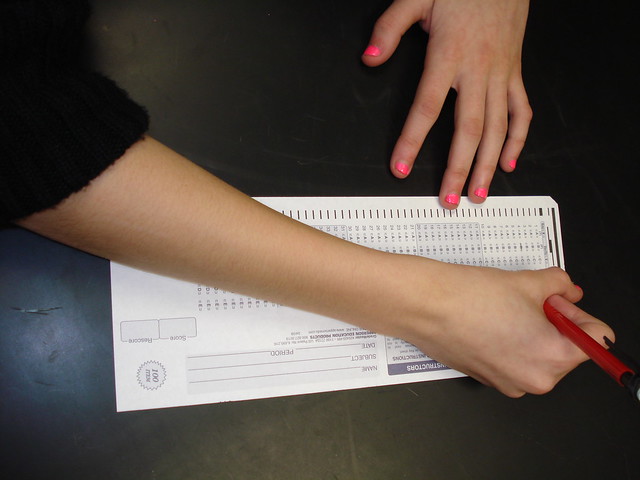
Standardized Test flickr photo by biologycorner shared under a Creative Commons (BY-NC) license
What I’m finding is that teachers, when shown methods and tools that give students opportunities to be creative, are surprised at how learning changes. As they struggle to characterize what’s happening, the easiest explanation is that today’s students are just “different.”
We fail to recognize that it doesn’t take a computer to allow students to engage. My job is to help teachers figure out how to get out of the way. The challenge is to make sure that teachers see instructional benefit in shifting practice with – or without – the technology in the classroom.
—
Featured image is Creative Playground flickr photo by Radoslav Minchev shared under a Creative Commons (BY) license
Teaching is being overrun by impostors. Perhaps I’m reading into something, but the explosion of “Teach Like a [thing]” culture scares me. Culturally, have we reached a place in education where taking on a persona to find inspiration for change is the best option for our students? Simile is powerful and inspiration comes in many forms. But when inspiration turns into identity, it becomes a problem.
A lot of the personas invoked in these discussions are really awful role models. Working renegade, above the mire of educational bureaucracy, might set you apart on facebook or Twitter, but institutional change – powerful change for all students – rarely comes from one person doing their own thing in isolation.
How do these ideas spread? How do we move beyond the 150 “best” ideas for X, Y, and Z? Where does the inspiration really make lasting impact on our practice and not just the toolset?

Growth flickr photo by rubberkid shared under a Creative Commons (BY-NC-ND) license
Finding excellence in teaching means recognizing teachers at their best: real interaction with real students. My students don’t want a viking, a ninja, a champion, or a wizard. They want a teacher who is genuine.
Let these ideas serve as inspiration, but remember that real change in learning comes from teaching like a Teacher.
I wanted to use a new method of reviewing with students as we wrap up our cell activity unit. I’ve been working with my students on forming questions with the question formulation strategy around content as well as finding new ways to build content knowledge resources. We’re at the point in the year where details are more and more significant and we connect (seemingly) disconnected ideas.
I threw together a template spreadsheet (click to make a copy for yourself) in Drive and then assigned students to groups. Using Doctopus (life changing…really), I was able to give each group a blank template. Their task was to come up with review questions on anything they’d like from this section.
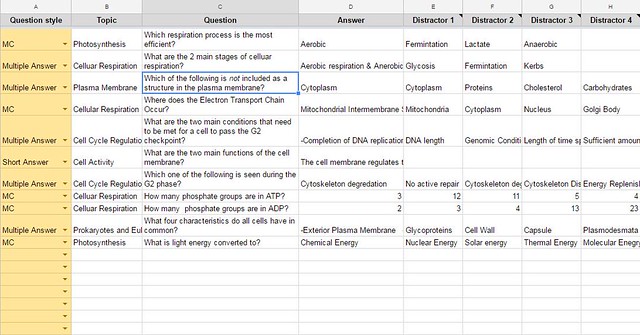
Review questions in Sheets flickr photo by bennettscience shared under a Creative Commons (BY) license
The next layer was to have the groups look at their original questions and revamp them into something that is AP Biology-worthy. Groups that do this well will have their questions included on the test.
I noticed three things:
- Critical review by individual students. The questions they asked me underscored misconceptions present. I was able to work them through why the right answer was right and where they needed to correct their understanding.
- Competition amongst groups to ask better questions was high. I didn’t promise only one question included, so there is a high desire to write really good questions. Group members worked together to revise and strengthen their questions.
- Writing questions that really check for understanding is difficult. It’s easy to write a really hard questions. It’s much more difficult to write a question that checks for understanding. Students recognize that the questions I design and ask are very specific for a reason. They’re going through the same process.
In the future, I would build some kind of dashboard to aggregate the questions and look them over as a class, but with time short, I think this is a good first pass.
How would you build or extend this? What am I missing?
I’m proud of the work I do every day, both in my classroom and in the small instructional team I work with. There’s nothing wrong with being proud of work, but there’s a world of hurt if pride creeps its way into your team dynamic.
Being prideful serves only one person – you. It will alienate you from relationships, especially when there is shared work to finish. Revision is consistent and this is where, in my experience, pride often comes to a head.
Consider this situation: You and a team are working on a shared document. Your role, just because of time, has turned into synthesizing the bulk of the notes and outlines into the narrative of the piece. You write and re-write multiple times until you’re happy with the finished product. You’re proud of the work and you send it off for approval.
Your team leader comes and reads and makes a number of changes to the document. This is the telling moment: do you discuss and work with their perspective? Or do you let pride well up in your throat and you choke back frustration?
If you choose the latter, from now on, you’re going to carry that hurt. Any work environment, especially a collaborative setting, has to allow for safe and constructive feedback. Changes to a final product improve the performance of the team and not any one team member. Pride tells you to push for your own recognition. Humility tells you to work for the good of others. Powerful, effective teams work for the benefit of their members.

Building this culture in the classroom takes a long time and it takes the guidance of an experienced teacher. These are not normal behaviors for adults, let alone students. This is one argument against assigning random or variable groups in class. Building a cohesive, service-based culture with peers requires consistency. On the other hand, if every student can develop this mindset, then the specifics of a group become less of an issue as each individual is already committed to working for the good of the whole.
This is a cross post from my photo-a-day(ish) blog, the photoyear.
—
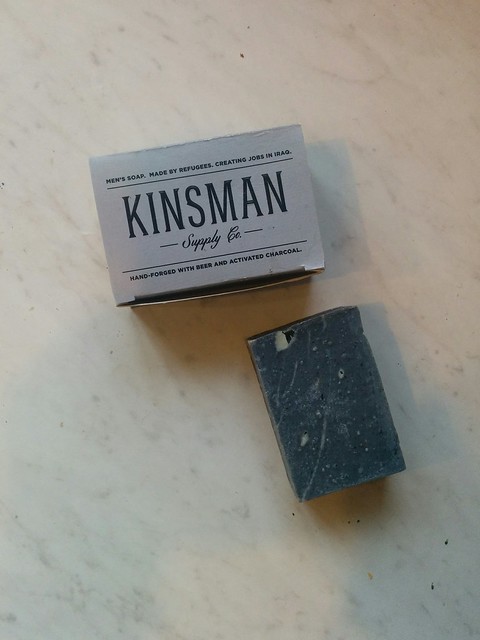
Kinsman soap flickr photo by bennettscience shared under a Creative Commons (BY) license
My family has a heart for the refugee crisis. We’ve researched how we can help Syrians, in particular, fleeing civil war find their way to the United States. Unfortunately, Indiana has some of the most restrictive regulations in place in terms of bringing in or facilitating the arrival of refugees.
Kinsman soap is run by the Preemptive Love Coalition as a way to support refugees who cannot make it somewhere safer. We received gifts of soap made by men and women who haven’t been home in years. This is our small way of helping from a distance.
If you’d like to know more about the organization, check out their website at www.preemptivelove.org/kinsman.
One of the main responsibilities my team has is offering and running training on a number of resources teachers in the district have access to. The most popular, because of their new-ness, are Google Apps (GSuite…whatever) and Canvas. Because we offer so many workshops, our Drive is full of copies of copies of copies of registration forms. So, I built a custom registration form using Google Apps Script and a Sheet. This detail-heavy post walks through the entire process with code.
The End Product
There were a lot of iterations of the project and in the end, we wound up with a website which:
– Can be managed by anyone on the team
– Collects the username (their email address, actually)
– Displays available seats for the workshop
– Allows users to both register and cancel registrations
– Displays the user’s current registrations
The Back End
This uses a Google Apps Script web app and a Spreadsheet to run the back end service. The sheet serves as two databases: course offerings (with details) and user registrations. The front end site uses AJAX calls to populate a page specific to the user.
In order to return the correct data, Session.getEffectiveUser().getEmail() is used to check the logged-in user against the database so only their course information is returned. For example, this script gets the current user registrations from the registration sheet:
Much of the backend work is building arrays and objects of the correct data and sending it to the client side scripts to display. The full commented code is in this GitHub Gist.
The Front End
Google Apps Script allows for templated HTML. I’m not using a template, per se, because it’s loading a static page and populating div elements with AJAX calls. But, the same could be done to create multiple pages using the same template.
There are two main actions: registering for a course and cancelling a course. Both call the server to make changes to the spreadsheet and pass updated information to the front. Registering for a course (or courses) write across a range rather than submitting n number of results for that user. Cancelling a course, instead of building and writing a new array, searches through the Sheet for the user and the matching date and simply deletes the cell. The app is then reloaded to refresh the user registrations at the top.
It’s not pretty and there are some changes I still want to make to clean up some of the array building/passing, but it’s such a small amount of data, the site loads very quickly even with a large number of registrations.
If you have suggestions, or if you make improvements, please leave a note in the comments. As is, you could probably copy and paste most of this into your own sheet and get it going. Be sure to fill in the correct sheet names and ID’s in the code.gs file to avoid breakage.
—
Networks flickr photo by eflon shared under a Creative Commons (BY) license
When I try new things, the fear really sets in as I’m giving instructions and trying to pick up on the nonverbal cues my students are sending me. Most days, they roll with it. Other days…well, there is usually some kind of course correction in there.
But it’s part of my practice now. Not crashing and burning of course; I learn a lot on those days, but I try not to make them the norm. My practice is to constantly as, “Can this be better?” Sometimes, the answer is “No, not right now,” and that’s totally okay. Other times, I’m actively trying to improve on a lesson, a task, or a supporting item.
Flipping is easy to jump into. Need to teach something? Find a video. Slap an EdPuzzle quiz on there and post it through Google Classroom. Students, turn in a one page summary of what you watched. Quiz on Friday.
Don’t keep your practice the same and call it flipped.

flickr photo shared by Daniel Kulinski under a Creative Commons ( BY-NC-SA ) license
How are students engaging with the ideas? Not engaging with the video, but with the idea? The intangible? The abstract? The metaphorical? How are your students processing what you need them to learn in meaningful ways?
Flipping is really about a core change in practice that forces you, the teacher, to recognize that effective, deep learning requires our students chew on ideas…and not just gnaw, but really chew hard. Video might be a component of the chewing, but it can’t be the beginning and the end.
How do we avoid falling into a trap of simply adding another task to check off the list in the learning cycle? I have three main self-checks:
- Keep the video _thin_. This is the first exposure, not the only (or even main) exposure. Some questions should be answered, but I really want to get students asking more questions. I try to ride the line of thorough instruction and full instruction.
- Explicitly connect ideas from the video to class. I do this in a number of ways from a quick five-minute warm up at the start of class (“Remember, in the video…”) or in the video itself as a preview (“We’re going to do a lab where…”). I’ve found that these peeks help students make connections more readily as the learning tasks come around.
- Tell them the videos aren’t enough to get by on. I don’t remember when this hit me, but I never really said that the video alone isn’t enough to help them learn. I make sure it’s very, very clear that they need to engage with me – and each other – during class to really excel. Video is a tool, not the solution.
In the long run, by downplaying the magic-ness of your videos and underlining the importance of multiple modes of engagement, your practice will begin to change. You’ll use that reclaimed time more effectively and you’ll find yourself starting to look critically at everything you do.
I use darktable to edit my photos. It’s a really robust RAW photo editor with a very active development community. The GitHub repo has 19,000+ commits on it over the last five or six years, which is great because it means active improvements. Open source FTW.
It’s built mainly for Linux, but somewhere, someone added an OSX installer. I edit my photos and then used the Flickr export option to dump them right up to my albums. Over a year ago, I got a really weird error about an invalid “frob” that prevented authenticating.
After digging…a lot…the problem started in 2014 when Flickr required HTTPS calls to the API. Tonight, I figured out how to patch the broken library in the app so I can upload to Flickr again from darktable. Hurray.
To fix, you’ll need to grab the latest version of the flickcurl library. The one packaged with the app is out of date, using HTTP requests rather than HTTPS requests. I used Homebrew to grab a copy (brew install flickcurl) but you can also download a zip file and install that way.
All apps on Mac have files you can explore. I worked in the command line because it was faster for me than opening a couple Finder windows, but you could do it that way, too.
Terminal command
cp Your/File/Location/libflickcurl.0.dylib /Applications/darktable.app/Contents/Resources/lib
Finder window
- Open a finder window with your downloaded library. Then, open a second Finder window and go to Applications. Right click on libflickcurl.0.dylib and click Copy.
- Right click on Darktable and choose “Show package contents”

Screenshot is mine.
- Go to Contents > Resources > lib
- Right click in the folder and select Paste (or Cmd + V) and then click Replace.
The next time darktable opens, you’ll use the updated flickcurl library and be able to share directly from the app itself.
Pictures launch stories. I take a lot of photos and like most people, they stay on my phone. I used to use Instagram, but I’m not happy with their terms or use limitations on photos (ever tried to embed an image? It’s a nightmare). Maybe I’m an idealist and this is a funk, but whatever.
I’m posting to Flickr more and more regularly and I decided to make a small project for 2017. I’m going to tag a photo each day that will push it and the description over to a new blog I’m calling The Photoyear. It’ll syndicate that photo (technical stuff below) and turn it into a blog post. You can subscribe via RSS over there if you’d like. Sometimes, I’ll cross post it here, but that will be a place for pictures and their stories for the next year.
Thanks, as always, for reading.
Setting up Flickr syndication
I started by writing more descriptive…descriptions…with my photos. That led to the idea of running a blog entirely on photos – content and all. Since I’m already doing that on Flickr, it made sense to try and syndicate it back to a blog of some kind. Alan Levine is the king of all things RSS. Some of his posts led to working solutions.
Recently, Alan posted where to find the Flickr RSS feed for public photos. Instead of grabbing everything I post (often more than one photo per day) I wanted to grab just one. I was going to manage that by adding photos to an album, but you can’t do that anymore (not with an RSS URL, anyways). Sad trombone. So, I stick to tags.
I fired up a subdomain – photoyear.ohheybrian.com and installed WordPress and the FeedWordPress plugin to syndicate posts from any RSS feed. Running out of the box, it grabs the tag only from the XML:
The immediate problem is the size of the embedded image. The src attribute is https://farm1.staticflickr.com/543/31231759933_ba613deec1_m.jpg, meaning the medium sized image is embedded, which is tiny. I had to get brave and check out a PHP solution.
In functions.php, I added a new filter (thanks to the suggestion of…you guessed it…Alan) which simply changes the _m.jpg to _b.jpg for a nice, full-width image.
I’m still not totally happy with my PHP solution because each post is going to come with, “a new photo by bennettscience” appended at the top. I tried using a preg_replace function to find the string and remove it (it’s always the same), but I didn’t have any luck. If you have a suggestion, I’d love some help figuring that snippet out.
Anyways, all said and done, you can check out The Photoyear now and then to see what’s up. I’m looking forward to reading back over everything as we move through 2017.
A year ago, I posted a script which converts footnotes in a Google Doc into endnotes. I’ve gotten great comments and feedback and have made the standalone script better, which is still available.
The Endnote Generator Add-On is now available in the Chrome Web Store for Docs. Install it once and you’ll be able to create endnotes from the footnotes you’ve already inserted in your doc.
There are a couple of known issues (pictures with a footnote aren’t included yet), but if you run into anything, leave a note here or on GitHub.
Check out the Endnote Generator.


I am interested in the Desmos activity you talk about here, but after trying the live student link, I see it is expired. Would you be willing to share the original activity with me? It looks like a great use of Desmos in a science setting!
Thank you in advance!
Hi Lia,
Here's the teacher link you can use.
I’d be curious to see how you’d modify it for your class if you’re inclined to share back.
Brian,
Thanks, I really appreciate it! I am actually a math teacher teaching a PD session to the science department about the Activity Builder, so I was looking for some examples of activities science teachers had already tested out in their classrooms to use as examples. In the workshop, I was hoping to explore a few different possibilities for using the graphing features of Activity Builder, and this is an awesome example of the possibilities available.
Thank you!