Posts
I do some (really) amateur web development when I get a chance to. I enjoy building things that make life easier for me, and others, using the Internet to drive the functionality. I’ve also been working more and more on a Chromebook just because it’s easier to carry around than my 15″ Mac.
The big problem with the Chromebook is that it’s pretty locked down. I got permission from our IT department to put mine into developer mode (which is usually restricted when enrolled in a GSuite environment) so I could make things work.
First, this is not the same as working on a full-fledged computer. The RAM available on this machine is minimal, which really limits what I can do. It also partitions the hard drive in really strange ways, which makes it hard to keep a neat filesystem.
I started by installing Crouton, which puts a Ubuntu desktop environment on the Chromebook. It’s run in parallel, which makes it nice for jumping back and forth. You can also choose which flavor of Ubuntu you like, from xfce to Unity.
I used Crouton to run Gimp and git, mostly. But, I wasn’t using Gimp as much as I expected and it really slowed down the device. I ended up dropping it in favor of Chromebrew, which has worked beautifully. It’s a package manager built specifically for Chrome which includes things like Git, Ruby, python, imagemagick…all kinds of things that make life easier working on such a stripped down device.
I use a mix of Chrome apps to work in.
- Crosh – Similar to the bash environment, crosh is the Chrome’s terminal emulator. You can get to it by hitting Ctrl + Alt + T. If you’re not in developer mode, most of what you can do is look at system stats. All other functions are locked down. Once you’re in developer mode, you can type in shell and browse the filesystem (Linux-based) just like any other full computer. This is where I run git.
- Caret – Caret is a Chrome text editor that supports syntax highlighting and offline use. It’s based on Sublime Text, so it includes custom keymaps and functions to help the process. https://github.com/thomaswilburn/Caret/wiki.
- **Secure Shell – Another Chrome app which emulates a SSH client. Really handy for jumping in and out of my own remote server as I need things. Much faster than relying on the cPanel through my hosts’s admin panel.
It’s lightweight, but it works well. Chrome’s own developer tools and console are really helpful with autocomplete and error logging (just like any other browser, really).
I was working on student grades in a Google Sheet last night and I needed an easy way to randomly sort students so I could show some score adjustments. Sheets lets you sort A-Z and Z-A easily, but there’s no baked in random function, which makes sense.
I could have scripted it, but it was late and I was feeling lazy. There’s an easier method.
Grab a column and enter =rand(). This will generate a random number between 0 and 1. Click and drag this down the entire range. Then, sort this column A-Z. Hey presto! Random sorting a Sheet.
Notice that the random column changes every time something else is clicked. This won’t affect anything other than the sorting, but it allows you to resort if it isn’t “random enough.”
I’ve been ruminating on a way to use Sheets and Google Apps Script as a fully-functional gradebook. I’m not there yet, but I can see this being helpful in that implementation.
I feel like I’m on a social networking pilgrimage.
I left Facebook two years ago and haven’t looked back. (Well, technically, like Alan Levine, I’m there, but only to manage a page for a group.)
Twitter is becoming super-broadcasty. It’s still a fun space in some respects because it’s the only space I can connect with some dear friends. Goofiness matters. I check it, but I’m only paying attention to very specific items. I also push out things I’m doing. But, there are fewer and fewer replies these days.
Mastodon is a newer, federated Twitter-meets-Tumblr social space that I’ve poked around in. There are definitely some merits, but some things I’m not super happy with. We’ll see, ultimately, what ends up happening there.
Just today, I checked back into Known, both through Reclaim Social and through my own little stream. I’d tried Known a while ago but ultimately abandoned it because I don’t think I really understood how it worked.
When all is said and done, I think I’m looking for something of substance that can go anywhere. It’s really difficult to find that balance, and I’m not sure I ever will. The need for connections is real and it’s what drove me to pour into Twitter and blogging four or five years back. The desire to connect is still there, but the means of connecting are more and more limited even though we have a number of choices. I want flexibility. I want ownership.
I’ve grown up a bunch, and I’m giving Known a shot again because I think I finally understand the power behind the POSSE model. Hopefully, this’ll scratch the itch.
An interesting Stack Overflow question popped up about auto-translating one document into another when edits are made. Most Google services have things called “triggers” which run functions after some kind of event – opening the doc, making a change, etc.
A Google Doc does not have access to the onEdit trigger, so there is no way to automatically run the translation unless you put it on a timer trigger, and that’s a waste of resources, especially if you’re not constantly updating the document. But, you can link two documents together via the ID and push changes made using a custom menu.
Grab a copy of the template with instructions.
Source:
var ui = DocumentApp.getUi();
var docProps = PropertiesService.getDocumentProperties();

function getText() {
  var doc = DocumentApp.getActiveDocument();
  var body = doc.getBody();
  var array = [];

  array.push(body.getText());

  sendTheText(array);
}

function sendTheText(e) {
  if (docProps.getProperty("childId") == "") {
    var prompt = ui.prompt("Child doc ID", ui.ButtonSet.OK);
    var response = prompt.getResponseText()
    docProps.setProperty("childId", response);
  }
  var childDoc = DocumentApp.openById(docProps.getProperty("childId"));
  var es = LanguageApp.translate(e, 'en', 'es');
  childDoc.getBody().clear();
  childDoc.getBody().appendParagraph(es);
}

function clearProps() {
  docProps.setProperty("childId", "");
}

function onOpen() {
  ui.createMenu("Custom Translate").addItem("Run", "getText").addItem("Clear IDs","clearProps").addToUi();
}
Like many schools, our students are asked to wear their student ID’s when they come into the building each day. During the day, they don’t need to have them on…just in the morning so we can make sure people coming in are part of our student body. If a student doesn’t have their ID, we issue a temporary and track how many times they don’t have one when they come to school. This process used to be done by hand each morning. A queue would form and a teacher would write down ID numbers (they all have them memorized) and names. This caused several problems:
- If a student gave a fake ID number, office staff wouldn’t know until much later in the day.
- The paper copy of the ID list was given to a secretary to transcribe into a spreadsheet.
- Transcribing meant looking up the ID in our SIS and then manually entering the number of times the student didn’t have their ID.
- When benchmarks were hit (5, 8, 11), disciplinary action was issued and followed up on by an assistant principal.
I spoke with the head secretary and we worked out a custom Google Sheet to do all of this automatically. Now, the duty station is equipped with a Chromebook so the teacher issuing IDs can quickly check veracity of the given ID and have all of the tally work done. This (mega) post outlines the sheet structure and custom code used to do the work.
The template and source are linked at the bottom of the post.
The Sheet
The Google Sheet is split into four tabs:
- Raw: Blank sheet with Timestamp, ID, and Name.
- Lookup: database of student ID numbers and the associated name/grade.
- Aggregate: ID, Name, Grade, Count, Cons 1, Cons 2, Cons 3.
- Daily groups. Filter, ID, Name, Grade.
Aggregate
The same student can have multiple dates of entry and this sheet aggregates by student ID. Using UNIQUE, it pulls each ID as a single column. Then, I used another index-match function to populate the name and grade. To count the number of missing ID instances, a COUNTIF function worked well to count the number of times the ID number shows up in the raw sheet.
Scripting
At this point, much of the work of the sheet was moved over to Apps Scripts. We needed some dynamic results and using a script to sort through the volume of information was much faster and more reliable than using regular Sheets functions. I’m breaking the code into chunks to better explain the purpose. In the actual sheet, all functions are in the same file.
Function 1: Globals and menu item
I use a couple global variables (not super efficiently, though). I also create a custom menu to run sheet functions. This takes care of creating those items. I have mine at the top of the script, but they can go anywhere.
Function 2: Listing dates a student was missing the ID
For reporting, it was helpful to know which dates a student was missing an ID. Rather than adding n columns to fill with dates, a script was used to look up the student ID number and then add a note to the cell with the dates.
Function 3: Populating a daily list of students
Each day, the secretary checks for students who have hit a benchmark: 5, 8, or 11 missing IDs. Searching through the aggregate list isn’t feasible, so a script does the search and then returns the results dynamically.
This checks two conditions: A) The number of missing IDs is equal to or greater than the target and B) there is no consequence filled in the appropriate column. If the consequence has been assigned, it’s in the SIS and doesn’t need to be entered by the secretary.
Function 4: Assigning consequences
When the office staff pulled the daily list, they go into our SIS and update the disciplinary action or other notes. They would still have to go back and document that consequence being assigned in the aggregate sheet. Rather than scroll through the list, the appropriate consequence for the target is now filled in when the list is generated. The daily list isn’t cleared until the script is run again with a new target.
If, by chance, there are no students to assign a consequence to, a popup is shown to let the user know that no students meet the criteria.
The Result
In the end, we’ve removed two steps from the administrative process, but they were the most time-intensive steps. Rather than looking each student up and then remarking a spreadsheet, the staff member needs to simply pull the list of students for that day.
Computers are great at repetitive tasks, so let’s use them to do those tasks. There’s definitely some optimization that can be done, especially in the last two functions as they pass those arrays around like a cold. If you make updates, please comment and share back. The code is hosted on GitHub, so you can fork and update as much as you’d like.
You can look at a copy of the template or just make a copy for yourself and start poking away.
The entire source (not broken up) is hosted on GitHub Gists.
I used to make fill-in-the-blank notes for my students to complete while watching a video. For a particular subset of students, that works well. Helping lower the barrier for learning by providing a construct for information gathering led to more engagement when it came time to use the information.
Then I took on AP Biology.
Some very wise people told me to teach the material and not provide so much structure. I wouldn’t be able to put in the amount of time it would take to get everything pre-made. And boy, were they right. (I’ve taught AP Chem, but that was a long time ago. I needed their reminders.)
I’ve also wanted to move to a more free-form video…not as structured. More fluid. Focused more on deep content. Trying to write while I spoke at the same time was difficult to maintain. So, in response, I’ve moved to drawing out the lesson notes, scanning it, and talking over the pictures.
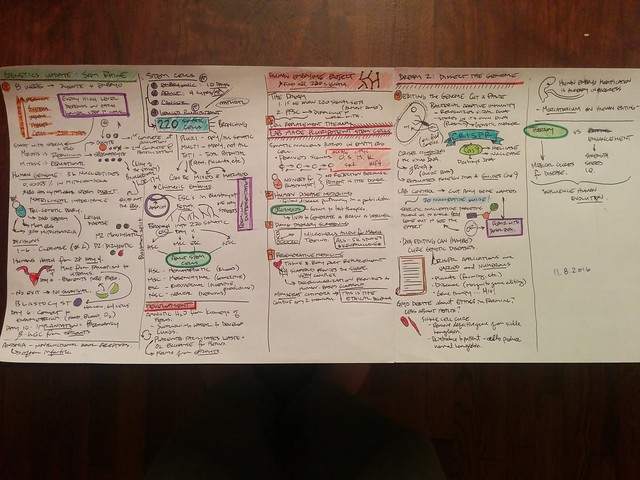
flickr photo shared by bennettscience under a Creative Commons ( BY ) license
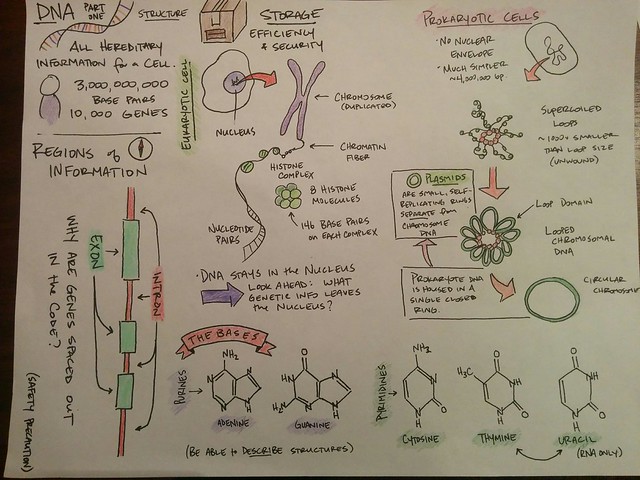
flickr photo shared by bennettscience under a Creative Commons ( BY ) license
This has helped my students improve their own visual representations of the concepts. It’s also helped me tell a better story (all science is a story anyways. Now it’s an illustrated story).
I sketch the notes…maybe 20 minutes to get everything sorted, and then scan it in to the computer. I drop the image into Camtasia and go for it.
Low key, but early indications are that it’s just as effective as fill in the blank. But now, students can fill in their own blanks.
Startup culture ate one of my stories this year and I just found out about it this week.
I check for broken links on my blog. It’s mainly because I don’t like getting emails that such-and-such link doesn’t work anymore from a reader. I try to repair what I can and I remove what’s dead (sites and apps die a little too frequently).
One of my favorite posts from a couple of years back had a broken link, so I went to check it. Turns out, Storehouse, a great storytelling app I used for a while, closed shop in July. Along with it went my photos, videos, and stories published. No notice, no warning. Just gone.
The story embedded on the page? Gone. Replaced with the sad face.

The video of my daughter learning to crawl? Gone.
Shame on me for not backing up better. Shame on us for pouring our stories, images, and videos into a culture that packs up and moves on with no warning.
I’m working with a group of teachers to run a mock election this week. They had a basic Form set up for students to vote along with two other “pie-in-the-sky” ideas:
- Assign electoral votes by homeroom to simulate the Electoral College.
- Have a live-update view of the election teachers could show in their classrooms.
## Electoral Votes
To set up the electoral system, we created a database sheet in the workbook. We listed each teacher in the school and then assigned an electoral value. The next eight columns are used to tally votes per candidate per homeroom. I was able to do this using the `COUNTIFS` function to match the candidate **and** the homeroom teacher.
Another sheet was added to do the electoral tallies. This formula is a little more complex. I needed to grab the data from each row, find the max, and then check which candidate matches the max column. My final formula was:
`=if(and(voteTotals!$D2=0,voteTotals!$E2=0,voteTotals!$F2=0),0,if(max(voteTotals!$D2:$F2)=voteTotals!D2,voteTotals!$C2,0))`
Broken down:
- If all candidates are 0, leave as 0 (it was assigning electoral votes to all three before this)
- If 1 is false, check if the `MAX` value for that row is the same as the candidate header.
- If 2 is true, assign the electoral votes. If false, leave as zero.
It works well and calculates instantly, which is really nice. The columns are then summed by candidate.
## Popular vote
The electoral vote took care of the presidential candidates, but I still needed popular vote totals for all of the candidates. That was a simple `SUM` function pulled from Sheet 2 which aggregated votes by homeroom. I didn’t need to worry about cross-checking against candidates because I was just interested in the totals.
Now that the tallying is done, I turned my attention to the live updates. My first testing was with a published chart from the spreadsheet. You can publish them without exposing the underlying data, which makes sharing results much simpler. But, it turns out, that leaving the chart options as “automatically publish updates” means anywhere from 10-30 minutes later. Not great for a live-update.
After some digging, I settled on the fact that a custom chart built with the Google Visualization API would be the best way to immediately show poll data.
## Coding the Chart
This took much longer than I expected because the Google Visualization API expects you to send a `QUERY` call to get data from a live spreadsheet to draw the chart. I’ve not used the Query language much, and in the end, my data wasn’t structured well enough in the spreadsheet to easily get what I wanted.
Using Google Apps Script, I was able to grab the spreadsheet data and create my own array to then give to the API for the chart.
## Displaying Popular Votes
The teachers also wanted to display the popular vote for all of the elections (President, Governor, Senate, House) next to the electoral data. This wasn’t too bad and I was able to set up a simple HTML table (using CSS `display: table`) to load the live data using AJAX.
Instead of having teachers reload the page every few minutes, the last two lines on the client-side code will re-run each script with fresh data, updating the site on it’s own.
## Why use a web app?
This is definitely more complicated than it could have been. But, I went with a web app approach for two main reasons:
- Simplicity for the _user_
- Data security
They’re collecting some demographic information that they don’t want published, which is one of the problems with just sharing the sheet out with the entire school staff. They also wanted to make sure the vote wasn’t damaged by someone accidentally changing some of the cell calculations.
The nice thing about running a web app is that I can still require a school district login to see the page. Additionally, even if the page were public, it hides the original spreadsheet key because you don’t need it in the client-side scripts. So that spreadsheet data is relatively safe from prying eyes.
Watch for a follow up post with the election results and a wrap up on how using the app went.
We’re using Canvas this year in our district and I’m trying to figure out how to actively (and successfully) utilize the Learning Mastery gradebook alongside the traditional gradebook…sort of a hybrid SBG.
I have Outcomes set for the entire year (the AP Bio curriculum) and I’m assigning Outcomes to each assignment. This is transferring nicely into the Learning Mastery gradebook. At the same time, coursework (labs, tests, etc) are being entered as normal assignments in the traditional gradebook. What I’m trying to figure out is how to weigh the Learning Mastery gradebook into the traditional.
Right now, as far as I can tell, you cannot have the Mastery gradebook results pushed directly into the traditional gradebook. So, I would have to copy each individual Outcome I’m assessing as an individual assignment in the course. I can do it, but it’s far from ideal.
I’m sure there are some of you out there who also use Canvas and hopefully, the Learning Mastery portion of the gradebook. What advice do you have? Any tips?
Our students are required to have their student ID on when they come into the building each day. This is mainly for security, but their ID also allows cafeteria, library, and other office staff to scan their ID for various clerical tasks.
When a student *doesn’t* have their ID, they’re issued a temporary wristband so faculty and staff know they’ve checked in for the day and that their record has been updated. The update process involved a paper copy made at a cart with wristbands being passed to a secretary who would then look up the student and add it to a spreadsheet before adding it to our SIS. Dang.
The head secretary (Deb) and I worked out a Google Sheet that does all of that (minus the SIS portion, but that’s coming soon).
I’ll outline the functions below, but you can [grab a copy of a blank sheet to play with](https://docs.google.com/spreadsheets/d/1MHrQVM0tPql8gx2tKfFlJwc5teNyDx8-LJ1FRulKFv0/copy) if you’d like to tinker or improve.
Raw info in…
At it’s simplest, the staff member at the check in kiosk has to enter the date and the student’s (supposed) ID number. This sheet populates the rest of the workbook.
…rich info out.
Once the date and ID have been put in, some behind-the-scenes magic happens. This isn’t ideal, but for right now, we’re using a hidden sheet with a master record of student ID’s and their associated name. I would like to make this a web-based API call, but it isn’t possible (not a technical issue…internal) right now.
- A staff member enters the student ID into the `raw` data sheet. The ID is cross-referenced in the `lookup` sheet and the name is displayed. This is to avoid students giving the incorrect ID.
- The `noID` sheet gathers unique IDs from the `raw` list so we can aggregate the number of times they’ve come in with an ID. The student name is again pulled from the `lookup` list.
- A simple `countif` formula counts the number of times an ID shows up in the list and aggregates. Those cells also change color using conditional formatting depending on the number of entries.
- Consequence data is filled in automatically depending on the number of entries a student has.
Disaggregating the Aggregate
For reporting, it’s helpful to know the actual incident dates. Going through each row, one by one, looking for a student name (even using the Find tool) can take a while, especially in large sheets. So, we turn to Google Apps Script to do it for us.
The comments in the script should give you an idea of what’s happening, but if you didn’t follow, here’s the general idea:
– Select an ID you want to look up.
– The function looks for that ID in the `raw` sheet. All matched dates are stored in an array.
– Once the loop is finished, the full array is passed to a function which adds the note to the selected cell.
– You can now see the individual dates a student had no ID by hovering over their ID.
It’s done case-by-case and only when the script is selected in the menu so your sheet isn’t trying to constantly update. The idea being that you only use the script when you need to know the dates a student didn’t have an ID when they came in.
What do you think? Leave a comment below, or better yet – make it better and write up your version with a link back here.
[flickr photo by Owen P](https://flickr.com/photos/owenphilipson/26858459235) shared under a Creative Commons (BY) license
This is a new post format I’m going to try out from time to time. I don’t remember where I saw the original idea, but that person suggested going back, reading old posts, and then commenting on changed perspectives as a method of reflection.
I use [Alan Levine’s](http://www.twitter.com/cogdog) [PHP script to dig up wold WordPress posts](http://stackoverflow.com/a/27569816/2278429) by simply visiting [blog.ohheybrian.com/random](http://blog.ohheybrian.com/random) and re-reading. Try it yourself for some vintage bennettscience.
_If you’d like perspective, [here is the original post](http://blog.ohheybrian.com/2014/10/the-new-education-economy-of-free)._
Paying for software continues to be a four-letter word in EDUland. Some of the reasons free services are important are legitimate (I only have so much of my own money to spend) and some aren’t (I’m a teacher, help me out). In particular,
We need to differentiate between the free sharing of ideas and the free sharing of products.
Also, there seems to have been a rise in EDU-ratti who suggest that you give away lessons and your custom materials away for free as long as you remember to buy their book on 50 ways to do that. There cannot be a double standard.
Alan (he’s shown up a lot in my posts lately) [says it much better than I do](http://cogdogblog.com/2016/10/flickr-cc0/):
I get hired to provide them as a service, despite the fact people can use my stuff for free. You make a living from providing services, consulting, ideas, not from digital stuff. If I was a pro photographer, I would hope to make money from the service, not the products. I would get more clients if they can find examples of my work in the world.
Looking back at the original article, I think that was the point I was trying to make. It’s not selling the product (the book, curriculum…whatever) that’s worth the cost, it’s the **service you provide in creating that product.**
The distinction is very small, but again, it gets to the idea that we have to value the time and effort – the service – that goes into creating any product, be it a book or software.
Consider the tools you’re using now. If it’s free, there is usually an option to send some love to the developers through a donation. If not, send them a note and ask how you can buy that person a beer.
My father-in-law came to me with an interesting idea. He wanted to create video kiosk for our church which would play videos on different mission organizations we’re involved with. The wall – previously – had photos and text about each missionary or organization, but he wanted to revamp.
We initially tried to use PowerPoint and a custom keyboard to jump to different slides, but maintaining and updating that system wasn’t going to be very elegant or user friendly. So, about a year later, I had an “oh, duh” moment and realized we could do it as a static, locally-hosted website. It would be easy to build and even easier to maintain, so that’s what we did.
In this post, I’ll talk about the hardware and software we used to get it finished. There are still some things to hammer out, but the bones of the project are done and tested successfully, so it seems like a good time to document it.
The Hardware
Our initial idea was to use a Raspberry Pi 3 to do everything because of it’s low price point and small size. Unfortunately, the RPi, in general, doesn’t handle web video too well. I looked into using the kweb minimal web browser, which hooks into the native OMX Video Player on the Pi, but you can’t customize the look and playing full screen video had lots of menus. In the end, it was turning into a huge job to make it look polished, so we moved away from the Pi.
My brother-in-law had an old HP laptop that had died when he tried to update it to Windows 8 (insert snarky Microsoft joke here). So, he donated it to the cause.
I wiped the hard drive and installed Ubuntu Linux 16.04 LTS. It’s pretty lightweight and gets consistent updates. It’s also really user-friendly in case there is a problem with the laptop, so one of the office assistants can troubleshoot if I can’t make it. I also chose to stick with Linux because I can use SSH to log in via my Chromebook on Sunday mornings and run updates remotely if I need to.

flickr photo shared by bennettscience under a Creative Commons ( BY ) license
You could definitely argue that running a full desktop environment for a simple web kiosk slows the machine and introduces a bunch of variables that could cause things to go wrong, which is 100% accurate. OMG! Ubuntu! has a good article on how to either convert a full machine to a dedicated kiosk or how to build one from scratch, but since I didn’t find the article until we were almost done, I decided not to go back and rework everything.
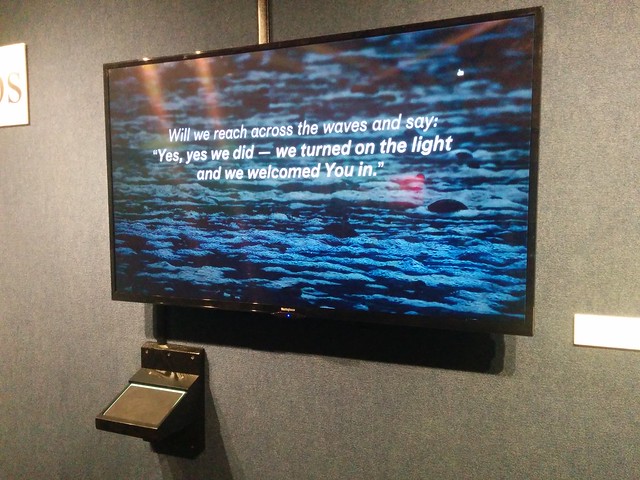
For user interaction, we grabbed an Intuos Art Small tablet from Wacom for $100. It’s seated in a wall mount to lock it in place and hide the wires. Essentially, it’s a giant touchpad.

flickr photo shared by bennettscience under a Creative Commons ( BY ) license
Finally, we bought a 55″ wall mounted TV. The laptop had an HDMI port, so that took care of high-definition video and audio.
The Software
I built the page with plain HTML and JavaScript. It’s currently being hosted locally on the machine to ensure smooth video with no buffering. I’m planning on testing the broadband rates via ethernet next time in church because over wifi we ran into issues. If I can get a good download rate, I’ll switch the site over to GitHub Pages so I can update remotely.
Source
The HTML and CSS is pretty standard. I didn’t want a ton of bloat, so I coded everything from scratch. You can take a look at the markup on GitHub. There’s also a live example so you can see how it’s rendered.
First, this is a hallway display. There will probably be times where people aren’t watching videos, in which case I want to avoid burning an image into the screen of the TV. I added a small jQuery function to bring up a prompt if no one touches the trackpad for 30 seconds. This also turned out to be handy because a lot of people walked up to the tv and tried touching it directly rather than using the trackpad input.
To play the videos, I wanted each container to reference a hidden video div. I use jQuery to handle the element selection and JavaScript to pay attention to the play state. When a user clicks the tile, a fullscreen video starts playing. There is no keyboard for them to quit out of the video, so I don’t worry about keypress events. If they jump out of fullscreen using the playback controls, it saves the video location.
Ubuntu tweaks
There were also some software tweaks I needed to make on the machine itself.
I wanted a standard user to log in automatically. So, I created a generic user on the system and dropped the source files onto the desktop (more on that in a minute). Theoretically, the user will never get out of Chrome because there’s no keyboard available. When the computer boots, it logs into the generic user right away.
Then, I edited the Startup Applications option. You can launch Chrome from the Terminal and you can specify which command to use in the settings. Using:
chromium-browser –kiosk [URL]
launches Chrome in the full screen kiosk mode and displays the website immediately after login.
The laptop is mounted on the wall behind the TV. Ubuntu wasn’t recognizing the monitor when the lid was closed. There is a flag in etc/systemd/logind.conf that handles a dock, but we weren’t using one. So, I had to change the HandleLidSwitch flag to ignore to ignore the lid being closed (thanks to this answer)
Finally, because the laptop is mounted behind the TV on tracks with a padlock, it’s a pain to take it out to turn it on and off. I was able to automate the daily shutdown pretty easily by specifying a time using crontab -e (you have to be root to shut down). Startup was harder.
After some research, I found that most computers have something called a Real Time Clock (RTC) synced with UTC. It can be used to set an alarm to wake the computer. You can test this by setting the clock to zero with:
sudo echo 0 > /sys/class/rtc/rtc0/wakealarm
and then resetting it with:
sudo echo `date '+%s' -d '+ 10 minutes'` > /sys/class/rtc/rtc0/wakealarm
Now that I knew the computer would turn itself back on, I could create a simple bash script to run with cron that would handle startup and shutdown daily:
I stored the file in /usr/bin and made it executable with chmod +x.
Then, I edited crontab -e to run the script daily. Note that this specifies the shutdown time. At 8 PM every day, the computer will shut down. The shutwake script resets the RTC alarm:
0 8 * * * * /usr/bin/shutwake
cron can be picky, so if you need more help, this article helped a lot.
The last thing we needed to work out was muting the audio during sermons so someone didn’t crank out a video in the middle of church. The video will still play with captions (accessibility FTW) and muting the audio turned out to be not too bad. I can toggle the pulse audio driver in Ubuntu with a simple cron job that runs on Sundays at 9:00 and 12:00 to turn the audio on and off:
0 9 * * * 0 amixer -q -D pulse sset Master toggle
flickr photo shared by bennettscience under a Creative Commons ( BY ) license
In the end, I’m really happy with how it turned out. Remote management and simple setup led to a really effective display for the wall.
If you want more specifics about software or construction, leave a comment.
Consider the train problem:
A train is barreling down the tracks. At a fork, you have the option of flipping the train to the left branch or the right branch. On the left side is someone you know, tied to the rails. On the right, there are five strangers.
Which way do you throw the switch?
A philosophy professor posed the question to his two-year old.
The great thing about this is that he was still solving a problem…it just wasn’t the expected problem.
I think a lot of frustration can come up in a classroom comes from ambiguity. I may have a problem and anticipated solution, but if that isn’t clear to students, conflict can pop up when they take a different path. Even more, defining specific solutions to problems worth discussion is a poor teaching method.
Next time you’re given an unexpected solution, consider the validity of a different point of view.
I was talking with our school librarian today about why we don’t offer ebooks for students to check out. It came up because I grabbed a real, hardcover library book six weeks ago and had _just_ finished it this week. It’s only 400ish pages, and taking that long to read a short/medium length book was a little embarrassing.
Compared to reading on my phone or my Kindle, it was an eternity. I like the portability of ebooks. I like being able to pull it up on my phone and read a little when I’m sitting, waiting for something. Especially this year, as I move all over the district day to day, carrying another book in my bag is precious space that’s often wasted due to time.
Ebooks sound great, but I got thinking about [Maha Bali’s post on “owning” a domain](http://blog.mahabali.me/blog/educational-technology-2/i-dont-own-my-domain-i-rent-it-dooo/) and [Audrey Watters’ fantastic take](http://hackeducation.com/2016/08/23/domains) (rebuttal?) on the topic. [I even weighed in a little bit](http://blog.ohheybrian.com/2016/08/flipped-learning-as-a-way-to-build-an-online-presence/) on how teachers can start to build that identity.
I don’t want to encourage a culture where ownership is a burden. Moving school libraries to epubs sounds great: access! they’re on their phones anyways! Kindle!…
…but in practice, it’s a school, paying a company to _licence_ titles. Each borrow by a student turns into dollars paid to an outside entity for the privilege of licensing the book. Libraries cannot give the books away or even recoup shrinking budgets by having used book sales. It’s a expenditure, through and through.
All of that, of course, is ignoring the DRM hurdles put on certain publications, which are only accessible through certain platforms. Ebooks aren’t “just like” books, only in bits. It’s a completely new market geared for one thing: making a profit.
At whose expense?
[|](https://farm9.static.flickr.com/8751/17140910740_dc6fcd4ca2_z.jpg)|
[Hybrid Pedagogy](http://www.hybridpedagogy.com) is a publication you should be reading. It’s completely open access, written, edited, and published by educators. The article authors and editors are laser focused on the deeper questions within technology use in education like innate power structures, programmed bias, and the fact that technology is _not_ agnostic by nature.
This week I read [Beyond Surface-Level Digital Pedagogy](http://www.digitalpedagogylab.com/hybridped/beyond-surface-level/) and was introduced to HybridPod, a companion podcast to Hybrid Pedagogy. The article linked and [Martha Burtis’ keynote at the 2016 Digital Pedagogy Institute](http://www.digitalpedagogylab.com/hybridped/making-breaking-rethinking-web-higher-ed/) really push hard on the idea that all instructors and all students should really be doing stuff on the web. Learning stuff. Breaking stuff. Just stuff.
Tying the two together is this idea (posited in the first article):
“…if our institutions of higher learning ignore the calls for critical digital pedagogy a vast number of K-12 educators will continue to look for shiny tools to cover up education’s most difficult problems.”
Granted, higher education has been involved in the making (and breaking) of the web since the beginning while K-12 has really started using it in earnest with students in the last ten years. There’s history there, in higher ed, that isn’t present in K-12. But, are we learning lessons from that history?
In particular, have K-12 teachers really recognized the enormous value in making and sharing things online? I’m not convinced that lesson is one that’s been learned, nor is it one people want to learn. [Martha’s discussion of the LMS is describing the current state of K-12 education](https://hyp.is/IcOormpnEeaYFytVzSeXnA/www.digitalpedagogylab.com/hybridped/making-breaking-rethinking-web-higher-ed/):
I think the Web hit us at a critical moment in higher education where we were already struggling with doing our work less like schools and more like businesses, and the tech industry and its vendors had already begun to infiltrate us with promises of how technology could help us achieve this goal. We had already bought into student information systems (which eventually became everything information systems), and with the promise of those systems came the promise of lots of data which would allow us to become more efficient and streamlined.
As the web becomes more sterilized for our students, we have important pedagogical decisions to make.
Flipped Learning, given its popularity, is often the first place teachers are confronted with working heavily in the online space. Many are already constrained to the LMS and find the shortcomings frustrating to work within. So, they work around.
That process of working around limitations exposes teachers (and by extension, students) to the potential of working in an _open_ web space rather than a _closed_ web space. Flexibility and customizability become the expectation rather than the “nice-to-have.” And it’s not just about the look of the space: flexibility in functionality – the experience students have – can strongly influence their experience in learning (it’s a _hybrid_ experience, remember?)
I agree that Flipped Learning, at first does not necessarily push a shift in instructional methods. But, when you’re used to teaching in a very straightforward manner, whether in person or online (in an LMS, perhaps) making an instructional shift is very difficult because of the mindset change involved. I’d like to propose that the first shift be to look outside the provided methods of organization and begin to explore the messiness of digital learning through open spaces.
Martha’s suggestion is simple: set up, and run, a domain. The easiest thing to do is purchase a domain name and start a blog. Start sharing. Start reading. Reflecting on practice in an open environment invites comment and outside input to your pedagogy. Being transparent and vulnerable in what we do with instruction will begin to inform those instructional decisions and help bring about a shift.
As you get more comfortable with your space, you’ll feel more comfortable pushing your students to do the same. Our students are creating digital footprints in spaces where there is no control. In schools, it’s in the LMS. Outside of school, it’s through social media (no, they do not own their tweets, snaps, or likes).
Improving in the use of technology is more than just being able to whip out the right app at the right time. It’s being able to critically pick apart the explicit and implicit nuance in function while at the same time enhancing the learning experience. Use the challenge of flipping to really push your thinking about how technology can truly change the teaching and learning experience in schools.
Patrick Donovan put out a tweet the other day with a screenshot to a Chrome extension he had just put together. It caught my attention and led to this post because it’s a really, really good idea.
Got my Chrome Extension created, now to refine and then publish to our organization. Thank you @curt_truc #COL16 pic.twitter.com/HosZU52r2t
—Patrick Donovan (@donovanscience) July 22, 2016
I tracked down Curt Schleibaum whose website included a demo to his Chrome extension idea. In short, he provided a template which included all of the necessary files to have a simple popup Chrome browser extension. It was quite clever – instead of having the user change code for the extension to push information, it had an embedded Google Doc that you use updated with new information. It also included links back to the district website, tech support, etc.
It got me thinking about how the extension could be improved, so that’s what I put together last night. The source is on GitHub so you can see the nitty gritty. My extension builds on Curt’s original idea – allowing a teacher or admin to use a Google service to push announcements out to extension users. Instead of a document, mine uses a spreadsheet and watches for an update to publish and then badges the extension when new information is available.
If you want to play with this yourself, follow the steps below (mostly proof-of-concept at this point, lots of refining to do).
Get the spreadsheet
Google spreadsheets are your friend. The best thing, in my opinion, is that they publish in multiple formats when you publish one to the web (this is different than sharing). One of those formats is JSON, which is a great way to take a lot of data, organize it, and then display that information nicely in another application.
Grab this template spreadsheet and save a copy to your Drive. Then, go to File > Publish to the web and publish it with all the default settings.
The Extension
The extension is a collection of JavaScript files and a popup.html file. The JS does all the magic with the spreadsheet JSON data and the HTML displays it nicely in the Chrome browser. The JS will also ping the spreadsheet every few minutes to see if there have been updates. If there was an update made, a badge notification will appear on the extension icon. Sweet.
The easiest way to do this is to download the extension and load it locally on your machine. To do that, open the project on GitHub and click on “Clone or download” on the right side of the screen. Unzip the file that downloads.
Next, go to chrome:extensions and make sure “Developer Mode” is checked. Once it’s checked, you can click on, “Load unpacked extension” and select the folder you just unzipped.
The extension needs one more thing: the spreadsheet key. Go back to the template spreadsheet and grab the jumble of letters and numbers that come after
https://docs.google.com/spreadsheets/d/
and before edit in the URL. An example URL would be,
https://docs.google.com/spreadsheets/d/THE_SPREADSHEET_KEY_IS_HERE/edit
. When you click on the extension icon the first time, you’ll be prompted to copy and paste that spreadsheet key into the box. Now, you’re good to go!
Testing…testing…
To test the extension, go back to your spreadsheet template and add some data. Give it a minute or two and, hey presto! Your extension will update with the information you just entered.
Most schools are using some kind of learning management system which includes a messaging app. If you’re not, this would be a good way to talk with your students (maybe). In our case, we’re looking at using this as a rapid-push service to notify teachers and other staff about upcoming professional learning, system outages, or other announcements that need to be sent, but don’t need an email. It’s definitely an experimental project, but one I’m curious to play with some more.
I’m on a new team with the school district (I don’t think I’ve written about that change yet…). I’m teaching one section of AP Biology and working the rest of the day with an Instructional Technology Specialist team for the whole district. The goal is to build out a program to support anything to do with…well…instructional technology.
Part of our big “here we are” message is a Google Form available to anyone in the district. We’re in week 1 of school and we’re already getting requests for classroom visits, app support, and staff PD across the district. These spreadsheets, if you’re using something similar, can get really big, really fast. Puzzle piece number one.
To help organize our projects and day to day tasks, we’re using [Trello](https://www.trello.com) as a team. We can create lists to categorize cards with specific tasks. As they change status, drag a card from one list to another. We can also comment, assign team members, and attach files to the tasks to keep our email from exploding all over the room. There’s a web app and a mobile app so we’re all in touch. Puzzle piece number two.
Now, I don’t want to check a spreadsheet to go and manually put a PD request into Trello. Luckily, Google Sheets allow you to `POST` data to other apps through APIs on the web. Doubly luckily, Trello has an API.
Long story short, I had an _awful_ time getting this started because Trello required a particular form of authorization that Google no long supports in Apps Script (go figure). So, I Googled and Googled until I came across an [old post by Riley Pannkuk](http://www.rileypannkuk.com/js-google-form-trello-integration.html) who was doing something similar for bug tracking for his app. So, I sent him an email. He wrote back with a solution; I’m not sure how he found it because it isn’t in the Trello docs (shame shame), but it works.
The problem was that no matter how I authenticated, Trello didn’t recognize my permissions in the app. Riley pointed out that there was a missing parameter on my authorization request: the `response_type` field needed to be set to `token`. Again: not in the docs.
So, step one was to set up a Trello board and then grab my API key from (the developer options page)[http://trello.com/app-key]. Then, I sent an authentication request via URL with the following information:
– key = My app key
– name = arbitrary name to identify the app by in my settings
– scope = level of access needed by the app (in this case, read & write)
– expiration = how long should the app have access?
– response_type = token
The authorization request looks like this when you’re ready to send it:
`https://trello.com/1/authorize?key=YOUR_APP_KEY&name=APP_NAME&scope=read,write&expiration=never&response_type=token`
This returns a webpage with a long string of letters and numbers that need to be included in the script (see below) to post when the sheet is updated.
Here’s the script with comments so you can see what’s going on:
Rather than sharing a pretty team-specific Trello board, the last step in the function is to change the Google sheet status to “In Progress” so others can check up on what needs to be done.
The next step is to add something called a **webhook** to watch the cards as they move through the Trello board and update things like the team member assigned, completed, etc. I’ll add another post when that’s done, complete with code.
In 2011, I wrote a post in which I strongly declared that Flipped Learning [is not about the videos](http://blog.ohheybrian.com/2011/10/video-is-not-the-answer/).
But what if it is?

flickr photo shared by cogdog Creative Commons Attribution BY license.
The whole idea of Flipped Learning is moving from directing instruction in front of the community to allow active learning practices to prompt learning experiences in students. In order to do that, time has to be reclaimed somewhere…something during the class has to be sacrificed.
For many, the way to do that is through video.
So, it _is_ about the video, but only in the sense that it allows the teacher to explore other methods of interacting with students within the context of the class. The transition from instruction in the room to instruction as a recording is a small leap; accessible to most teachers where they are _now_ and one that can lead to deeper learning opportunities.
Obviously, the video is only an enabler of change, not the cause. There is still an active decision made by the teacher to change their classroom practice for students. It is not the only way to effect change in practice, but it is (or seems to be) quite popular.
Beyond offloading instruction, the video doesn’t do much. Without taking steps to improve the learning experiences students have in the classroom, then no, nothing has changed. Use that time to push yourself and students into new experiences and allow those videos to help support the change.
A week or two back, Lisa Dabbs, known for starting and moderating #ntchat wrote a post (a second post, actually) on why new teachers should use Periscope with their students.
There are some concerns with the Periscope terms of service and privacy policy that come up when the teacher is broadcasting students across the app. I posted a comment on Lisa’s blog, but after some tweets and awaiting moderation, it isn’t live, so I’m posting it here because the discussion is valuable. I hope Lisa and others are willing to comment on some of the points below.
Hi Lisa,
I want to push back on the idea that new teachers should jump into using Periscope. Yes, it’s important to share and get feedback and it can be a great way to do that. But jumping right in and sharing student images and student information without at least mentioning the Terms of Use and Privacy Statements is, in my opinion, dangerous.
From the Periscope Privacy Statement (my emphasis added):
We use and store information about your location to provide features of our Services, such as broadcasting with your location, and to improve and customize the Services. We may infer your location based on information from your device. If you have turned on location services for Periscope, we may share your precise location.
There is no limitation on how long they store that information. If a new teacher is broadcasting and a student with limitations from their parents is included in that broadcast, that can lead to serious issues. Broadcasting specific location data is never a wise idea, especially when minors are involved.
From the TOS:
You agree that this license includes the right for Twitter, Inc. to provide, promote, and improve Periscope and to make Content submitted to or through Periscope available to other companies, organizations or individuals who partner with Twitter, Inc. for the syndication, broadcast, distribution or publication of such Content on other media and services, subject to our terms and conditions for such Content use.
Often, this licensing is so Periscope can rebroadcast your content, much like other services ask for the same permission to share materials you create on a wide basis and not case by case. But, this can also include use in advertisements, promotional materials, etc. Again, broadcasting the images of students and having a company with their own profit in mind with no control over how or why those images are stored perpetually can lead to liability problems at some point.
You are responsible for your use of Periscope, for any Content you provide, and for any consequences thereof, including the use of your Content by other users and our third party partners.
In other words, “If someone misuses your content, it’s your fault for posting it.”
The teacher is responsible in loco parentis. We are representatives of the school district. Any liability the teacher takes on using any application can come back to the district. This is an express agreement that is glossed over in most cases. Periscope, because of its public nature, brings a unique challenge.
All I’m saying is that twice now you have implored new teachers to jump into a service with no mention of repercussions that could come from tacit use. You have a great amount of influence and a lot of people look to you for guidance. Please consider taking explicit steps with these recommendations to outline Privacy and Terms of Use considerations for apps and programs. Especially for new teachers. They have enough to worry about already.
As always, comments are open.
[|](https://farm6.static.flickr.com/5533/10176913895_fb59a06963_z.jpg)|
[flickr photo](https://flickr.com/photos/bennettscience/10176913895 “DSC_0149”) shared by [bennettscience](https://flickr.com/people/bennettscience) under a [Creative Commons ( BY-NC-SA ) license](https://creativecommons.org/licenses/by-nc-sa/2.0/)
I heard the first periodical cicada of the summer yesterday. Before I could find him, he stopped buzzing. I’ll have to pay more attention this afternoon and see if I can track him down.
17 years ago, I was in my first biology class. I still remember my teacher: Mr. Brown. He was a certified master diver and knew (it seemed) just about everything. He was the one who really made science alive for me. He was just one of the teachers who made me want to eventually get my degree in biology and teach.
Science is _real_. Our students need to experience the world around them and have opportunities to really see that we can learn through observation and inference. Hearing a cicada that has been underground for 17 years, only to emerge for four weeks to make more cicadas is one of those experiences.
I’m teaching AP Bio next year for the first time since the redesign in 2013. I’m excited to get back to the realm of the living (chemistry is great…but…it can’t really compete) and giving students a chance to be a part of the cycles happening all around us every day.
Learning is more than the cycles, charts, and facts. It’s living and breathing with the rest of the world.

