Posts
News came down this week that [Zaption](http://www.zaption.com), a popular web app that layers quiz question and other interactive features on top of videos, is closing it’s doors on September 30th.
Unlike some of the [other](http://blog.ohheybrian.com/2016/06/the-education-freeconomy-gobbles-up-another/) [recent](http://blog.ohheybrian.com/2015/03/another-casualty-of-the-free-only-economy/) closures, [Zaption is being purchased by a finance firm](https://www.edsurge.com/news/2016-06-30-zap-zaption-sold-to-workday) (Workday) located in San Francisco. The terms of the sale aren’t public, but my guess is that Workday wants to expand it’s learning service to include interactive features for their client base. It adds value to something they’ve already built out and saves the hassle of licensing fees.
Here’s the kicker: Zaption, as far as I can tell, has no information in their [Terms of Service](https://www.zaption.com/terms) or [Privacy Policy](https://www.zaption.com/privacy) about what happens to user data. Nothing came up when I searched the page for **sale, sold, acquire, acquired, bankrupt, bankruptcy purchase, purchased, asset, assets, or close.**
User data is valuable in most cases. The immediate concern is that user data will be transferred in this sale with no prior disclosure. I’ve reached out to Zaption via Twitter asking for clarification on the plan for that data. Given the buyer and Zaptions offering, I’m hoping data transfer isn’t in the deal and that the purchase is for the codebase.
There are two important things to remember:
- “Free” always has a cost associated with it.
- Read the Privacy Policy and Terms for the apps you use.
What happens to data in these situations is important. If you’re looking for a good place to start, [Bill Fitzgerald](http://www.twitter.com/funnymonkey) worked on a project with Common Sense Media to create a [Privacy Policy Browser](http://privacy.graphite.org/) covering the conditions for some popular educational websites and apps. Check it out and see what you’ve agreed to. Being informed is important.
ISTE 2016 is in full swing and right on cue, my hype-o-meter tolerance has dropped significantly. A huge concentration of edtech vendors and Twitterati all in one place can lead to a lot of mumbo jumbo. But, we’ll power through the next four days and try to pull the wheat from the chaff.
Two big things that come up in waves each year: A) If you’re looking for tech, free is what you deserve as a teacher, and B) If you’re creating things, it should be given freely to the rest of the teaching world.
Free is king in edtech and it’s killing good tech.
Exhibit A:
Teachers shouldn’t pay teachers. Teachers would be sharing willingly for the benefit of all kids. #ISTE2016
—?????? ?. ???????? (@web20classroom) June 26, 2016
He later goes on to say:
No one. If a teacher creates something truly amazing, they have a moral obligation to give it away.
—?????? ?. ???????? (@web20classroom) June 26, 2016
The idea that resources for teachers should all be free because of a moral imperative is dangerous and devalues the hard work that goes into creating content.
If you go through the tweets, the main argument is that a lot of the materials on Teachers Pay Teachers (or similar) are really crappy. There are a lot of crappy products available that I choose not to buy. The guy selling it is perfectly within his rights to sell a product to compensate for the time put into creating it. There has to be some kind of recognition that all work is not equal and that being paid for significant time and effort to create a product is completely appropriate, even for teachers.
Second, my moral obligation is to my students first and foremost. I don’t charge them for resources I create, much of it on my own time. I also choose, freely, to give a lot away to the teaching community because I don’t feel the time I’ve put into those resources was significant enough to ask for compensation.
Expecting teachers to work for free devalues those hours and allows edtech companies to fill the gap and make good money while they’re doing it.
There’s another parallel to explore: expecting free software for the sake of teaching devalues the hard work of development, QA testing, troubleshooting, and maintenance of code. The time is valuable and it is completely appropriate to be compensated for that time.
The free-as-best mindset is a dangerous delimiter being placed on what is valuable or invaluable in education based on price alone.
Unfortunately, in order to appeal to the education community at-large, the free-as-best standard is being encouraged by edtech companies. The following was shared by PhET Sims:

The image is well-intended. But, the message is the same one that’s plaguing edtech: all software should be free. (If you’re not familiar with PhET, it runs from grants and individual donations. I’m a big user of their sims in my own classroom and I’ve taken the step to donate some money to the continuation of the project.) I’d be willing to bet that the developers working for PhET to create and maintain the simulations like to be paid for their work. The sims aren't free and the cost is not exposed clearly enough to the user.
ISTE concentrates these ideas and feeds the perception that price point is the main factor in the usefulness or value in a product. There are costs everywhere and to keep doors open as a company, you have to meet those costs. If you’re not paying cash for a service, that cost is most likely data you’re contributing, and that’s for another post.
If you’re at ISTE right now (or if you know someone who is) please keep this in mind as you research and share about new tools. Don’t perpetuate the free-as-best narrative because in the long run, it’s going to cost us all.
I’ve started using the [Hypothes.is](http://hypothes.is) annotation tool more lately, mostly at the behest of [Kris Shaffer](http://www.twitter.com/krisshaffer). He started writing about it’s potential for [public discourse on research](http://kris.shaffermusic.com/2016/04/hypothesis-public-research-notebook/) back in April and has since created [Pypothesis](http://kris.shaffermusic.com/2016/06/introducing-pypothesis-1/) to turn his annotations into a blog post using Python and the [Hypothes.is API](http://h.readthedocs.io/en/latest/api/).
The API is pretty simple – it can take a call for various requests (username, annotation, etc) and return information to use within your app. Kris used Python to create a Markdown page to post on a GitHub-based blog. Coming from K12 land, I see Google Docs serving as the larger research-curation hub and I figured, why not turn this into a simple Google Apps Script?
So I did.
It’s nothing fancy, but it works. It’s nice that the API is so straightforward…Kris mentions how easy it is to jump into if you’ve got even a little experience with scripting. The hardest part, in the Google Script world, was interacting with the JSON. But, I managed to get that worked out.
As you can see, this will search for annotations under my username. There are other parameters you can use in a search, including multiple at a time. [Read more about those in the docs](http://h.readthedocs.io/en/latest/api/). Also, [John Stewart](http://www.twitter.com/jstew511) has a [much more thoroughly developed Google Spreadsheet](https://t.co/ntZ5M0BcI3) which takes multiple search terms and returns results from an API call. Very cool application to play with.
Free in education is a big deal. Don’t bother mentioning paid apps in front of teachers because you’ll lose the group. Last year, we saw [Geddit](http://blog.ohheybrian.com/2015/03/another-casualty-of-the-free-only-economy/) close it’s doors. This year, there are two notables closing shop before the fall: [Curriculet](https://www.edsurge.com/news/2016-05-25-curriculet-closes-shop) and [Snagit for Chrome](https://feedback.techsmith.com/techsmith/topics/snagit-for-google-chrome-end-of-product-support-announcement). The two are in slightly different boats but they’re closing for similar reasons.
Curriculet was a text annotation tool built for schools. You could rent (much like a library) an ebook and then add annotations on top in a user community. The idea was that teachers would be able to assign a novel and have students socially annotate their learning. It was a really great idea and implemented rather well. They were never free, which is unique for an edtech startup. They recognized the cost up front and tried to cover their bases with subscriptions.
Unfortunately, they were up against the publishing world. Plus, if a school already has hard copy books, why invest in a digital copy? I think social annotation is on the cusp of becoming something larger (see the work being done by [Hypothes.is](http://hypothes.is)) and that Curriculet may have been in front of the curve too much. I think this idea will have more legs, either from a standalone company like Curriculet or through traditional publishers (maybe), in the future.
Snagit for Chrome was another beast. TechSmith, already popular with flipping, was trying to jump into the Google Apps for Education space. There are a *ton* of independent developers doing cool things and sharing their work through the Chrome browser. It’s nice because Chrome levels the device playing field – teachers can use apps and extensions on traditional desktop or laptops through the browser and students can rely on a stripped-down Chromebook to access the same material.
Google Apps may be “the great leveller” (more on that in another post) but it’s also siphoning the ability for software developers to run sustainable businesses. Everything in the Chrome store is *free.* There are some paid apps, but most have a free user version. The lowest common denominator soon dominates the system. When a company, like TechSmith, comes along and tries to run a traditional business model within a free-only economy, they need to evolve (which is unlikely given that it’s a single product in a larger portfolio) or they have to jump ship.
In the meantime, teachers are caught in the middle. There is a large amount of trust for name-brands getting into the Chrome space. Many relied on Snagit because they trust TechSmith. Now, they’re left to change their entire system. Again.
Welcome to the land of the Free.
—
I’ve written other posts on the idea of free software. [Check them out](http://blog.ohheybrian.com/tag/free/) if you want more stories of great companies being run out of business.
A while back, I had looked at automating tweets from a Google spreadsheet to reduce the insane number of clicks it takes to do in TweetDeck and HootSuite (5 clicks? Really?) I hit some roadblocks and let it slide because in the long run, it wasn’t really important to me. More of a fun experiment.
I jumped back into it a week or so back to try and solve the last little problems. [I was able to create a script](https://docs.google.com/spreadsheets/d/1kbFIfYGm2sGQJ5TistkaxMzqUqQ8HbgUvJUM8MohOb4/edit?usp=sharing) which loops through a spreadsheet checks the current date and whether or not the tweet has been sent. If those conditions are met (TODAY` and `NOT SENT), it will automatically post the tweet.
The sheet, like all the other Twitter sheets I’ve used, is run with [Martin Hawksey’s](http://twitter.com/mhawksey) fantastic TwtrService library. It allows you to authenticate and tweet right from Google Apps Script and saves a _ton_ of time.
I ran into a problem that is [as-yet unsolved](https://stackoverflow.com/questions/37308911/pause-a-loop-to-wait-for-rest-api-response): I can’t get the sheet to stop after posting one tweet. So, if you have multiple tweets on a given day, it will send _all_ of them at once. That’s not good, especially if you’re promoting an event over a period of time. I’ve tried a number of solutions, but I can’t seem to find one that works. I’d love to hear if you’re able to take the source and tweak it to work.
In the meantime, Martin also took a (much more elegant) pass at the task. [His sheet is also available](https://docs.google.com/spreadsheets/d/10U7Rrr7lfbRS2A8QYRUWL8enlJfat75-QuGm7slKXRE/edit#gid=0) and works really well. The goal is the same, but his mechanics and implementation are much more refined and effective.
It’s a good example of multiple ways to skin a cat. I’m a novice coder (I tell people I know enough to break something) and he’s an expert doing all kinds of things. The great thing is, all of this code is open and available. I can make a copy of Martin’s page and dig into his solution. I learned a few tricks about checking for multiple conditions, which is what I was struggling with. I became better at scripting through my failure and his success.
I absolutely hate teaching bonding. The abstract nature of atoms, the minutiae of nomenclature, and the details of writing formulas bog students down and I struggle to meet their needs. So, we do POGILs, simulations, speed dating, labs, and drills. Lots of time is spent trying to correct patterns of work to meet the learning objectives.
This year, I just can’t seem to meet those goals. I feel like I’m at my wits end and I’m just ready to move into something else for the plain sake of mixing it up a little bit.
I know it’s not my fault entirely. I know I can rely on the multiple short assessments – formative and summative – that I’ve given over the last three weeks (almost) checking on progress. I know I’ve recovered and retaught major points of confusion.
I also know I can’t force students to do something they’re patently disinterested in doing.
Standards based grading is a double-edged sword in that regard. They’ve done plenty of work, but there is still a major lack of understanding of the main ideas, so I cannot report, through the grading system, that they’ve learned the objective. Ethically, I’m not willing to cross that line. At the same time, I question the level of expectation I’ve set up as students work to demonstrate what understanding they have. Am I expecting too much?
The line between high expectations and impossible expectations is thin. Trying to walk it is an exercise in rationalization and stubbornness.

[In 2012](http://blog.ohheybrian.com/2012/06/venus-flyby/), [we saw Venus transit the sun](http://blog.ohheybrian.com/2012/06/venus-the-aftermath/). It won’t happen again until 2117, so if you missed it, you’re our of luck when it comes to seeing that again. Today, you have a chance to see Mercury slide across the surface of our star.
It’s cloudy here, so I’ll be using NASA’s special [Mercury Transit website](http://mercurytransit.gsfc.nasa.gov/) to show images of the planet as it crosses the sun during the day. If you want to learn more about the transit or what information will be displayed on the website, NASA has a [good blog post](http://sdoisgo.blogspot.com/2016/05/the-mercury-transit-is-tomorrow.html) explaining which regions they’re focusing on and why we should care about observing transits like this. Also, be sure to check out the [Solar Dynamics Observatory website](http://sdo.gsfc.nasa.gov/) from time to time for great images of the sun at various websites. They highlight solar phenomena (magnetic regions, sunspots, coronal mass ejections, etc) and really give our students a new view of our energy source. It’s a powerful thing to show how complex our universe is.
[Mercury repeats this trip thirteen times](http://eclipsewise.com/oh/tm2016.html) every hundred years (ish), so you’ll have a chance to watch again in 2019 if you have to miss today.
Everything I do in class is geared toward building understanding. I want students to be able to both complete the task and understand _why_ they’re completing it. Learning is more than a collection of disconnected skills. Especially in chemistry, the more you see the interconnectedness, the easier it is to learn.
Today, I gave a quiz that went less then spectacularly. We’ve finished a chapter on periodic table organization and have moved into ionization and simple bonding. We’ve talked about valence electrons, how to find them, whether or not an atom is gaining or losing those electrons, and finally, how to find the ion charge. We also practiced it in a lab yesterday.
Today, we fell flat pretty quickly.
As we looked back over the last few days of work, I told them that before every quiz, I can usually accurately pick out who will do well and who won’t based on work leading up. It seemed to surprise them that yes, I do know when work is simply copied and handed in. To illustrate that it isn’t uncommon, I closed my eyes and asked everyone to silently raise their hand if they’d ever done that. (Of course, most hands were slapped back down on tables or knees…not so silently…)
I gave my students the GIGO example – if I don’t have accurate information, I cannot teach effectively. When I walk by and offer help, it isn’t random. But they have to choose to accept the offer.
I found, years ago, that posting answer keys around the room while they’re working significantly reduces the desire to just copy it down and turn it in. First off, because I usually won’t take the work up. Secondly, they know there’s no pressure on being perfect. I can still assess their learning (and they can easily self assess, which is more important anyways) and adjust as we go.
Lately, I haven’t posted keys. It could be laziness, forgetfulness, or a combination of any number of things.
The fact of the matter is I’m still fighting a resistant culture. We’re nearly there in some classes – a culture of learning as process, not as destination – but in others, we probably won’t make it this year.
I still have 17 school days until summer break, so we’ll keep the gas pedal down and see what happens.
In software, there’s a lot of discussion about the “minimum viable product” when you’re designing something: what is the bare basic you can deliver to customers that will solve a problem? It helps define the focus and set development priorities for the first weeks.
I think there’s a similar process in learning. I have to have a minimum viable input from students in order to teach effectively. I try to design lessons that are low barrier for entry, ones that allow students to engage with an idea without being bogged down in the details. It takes some amount of effort and the bar is _just_ above what’s comfortable.
I haven’t been receiving that minimum input from students lately. And as a result, we’re struggling. Hard.
There seems to be the expectation that if learning doesn’t happen in class, I’ll drop everything and teach it later. Some are learning the hard way that it doesn’t work that way. When we’re together, I want to engage _together_. I can be flexible, but it’s a two way street.
I’ve had some discussions with students. The nice thing about standards based grading is that it’s less of a numbers game (mathematically impossible to pass, etc.) It’s harder – it’s a learning game.
_Learning must happen._
Learning an entire semester’s worth of material in four weeks is hardly realistic, but I’ll support the ones who give it a try.
I hope there’s a larger takeaway, whatever the outcome.
State testing. There are no words.
Week two of six is halfway done. Meanwhile, I keep teaching and I keep assessing. Most of it is formative, informing the learning process and my instructional cycle. Looping back to rehash ideas that are still elusive; being transparent about why we’re doing what.
Yes, there is still a need for demonstration of learning.
_Yes, you have to take this test today. Show me what you know._
There comes a point where I feel like I’m just chasing shadows to justify my own work.
I know that’s not true, but it sure feels like it some days.
We played Jeopardy today in class (with some major upsets coming during final Jeopardy…quite exciting) to review atoms and the periodic table organization. It’s a super-short chapter that sets up a foundation for bonding, naming, and chemical reactions. It’s also nice because it’s mostly review (or should be) of 8th grade physical science.
There’s still new stuff I throw at them, like valence electron location and Bohr model electron shells.
During Jeopardy, I try to give thought-provoking questions to get students to see patterns and interconnections between ideas. A favorite line of mine is, “There are only so many ways I can ask these questions.” This is painfully obvious as we go through more games and skill building activities.
I started to see a lot of:
neutrons?
valence?
2 shells and 3 valence?
on the whiteboards.
I love the question mark. Sure, I’d love it if they were confident and could just spout some of this stuff (because it makes the rest of the year much, much easier to digest). But, I’m more happy that we’re finally approaching a point of being willing to venture logical responses rather than, “I don’t know.”
It was also super fun to see the excitement when a ventured answer was, believe it or not, correct.
And it only took until April 25th. Maybe next year, we can hit this on April 24th. I’ll call that a win.
I remind my students constantly that I can’t help if they don’t do one of two things: 1) Ask me a question when they’re confused, or 2) get something wrong on an assignment. I need to see their thinking, and those two methods – along with my questioning – are the best indicators of strengths and weaknesses.
Lately, it’s spiraled into something much more confounding. Students are stuck, but they refuse to ask _any_thing. Even when I give a freebie, anything-goes offer. When I come by to prompt, they admit to being stuck, but then don’t do the small task to get _un_stuck. So there they remain. And nothing gets done.
And so we spiral.
It’s hyperbole, but I think they feel like kids in the car in Jurassic Park when I come by.

The fear of being wrong – searching for the right answer every time – is something I’ve tried to combat all year long, but it’s still got hold of most of my students. So many are afraid to be wrong, that they’re paralyzed and can’t take the help, even when offered outright. It’s a safety thing…I don’t know if they don’t feel safe because of my teaching style or because of peers…but it’s something that needs to be worked out somehow.
How do you help students get over the initial hump of just asking a question? Even if it’s something as simple as, “What’s the charge of a proton?” A small door like that would allow me to build their confidence and point to small, accomplishable tasks which will help them progress on their own.
Three years ago, my wife and I bought our first home. I can’t believe I haven’t written more on this before (which is partially true. I mention the remodel, along with some photos in an old post.) Time for a mega update – with pictures!
We rushed during the first summer to get the major work done before Meredith was born, which we were able to do.

We’d found carpenter ants and some serious water damage on the plate for the wall, so the whole thing had to come out and be rebuilt. That was day 1.
Part of the process involved removing a wall from the dining room, which meant a major ceiling repair as well as refinishing hardwood floors after patching in an old exterior door.
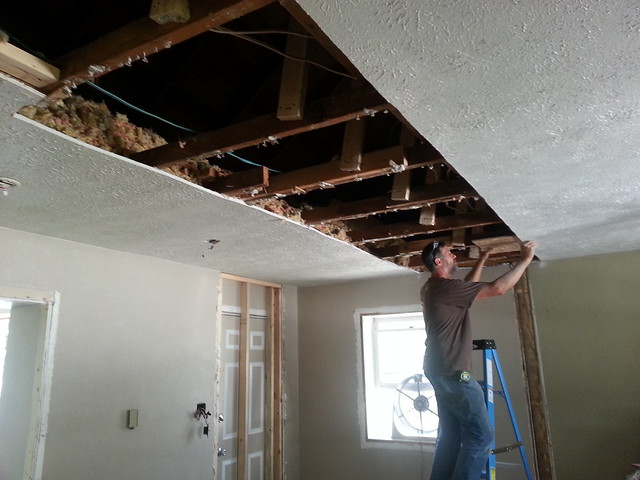
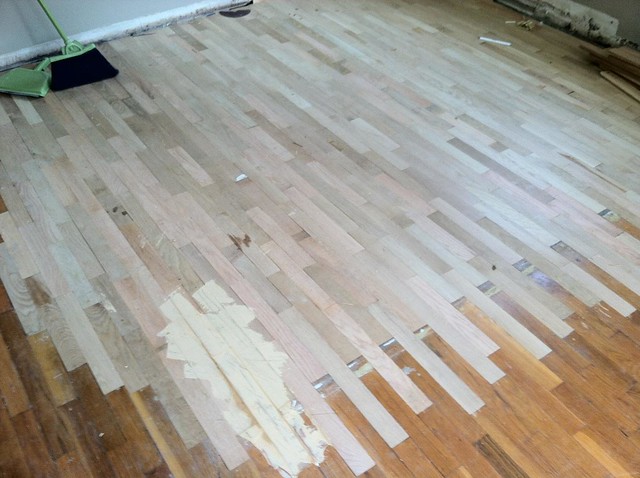
The floors were finished the week M was born.

The summer of 2014 was mostly hired out for siding work from tearing the kitchen wall out the previous year. There were some other structural repairs that needed to be done – new soffits, window moulding, a new window put into the living room…things I don’t have photos for. We finally settled on what the kitchen backsplash needed to look like in the spring, and I got those put in during spring break.
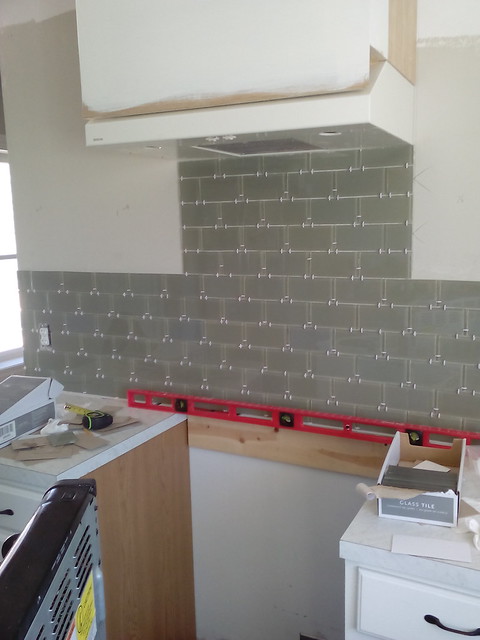
The best part about the backsplash is that the tile we chose was on clearance at Lowe’s, and according to their own policy, they’ll price match. So, a tile that was originally $0.90 each only cost us $0.20 at every store. I bought out northern Indiana and southern Michigan. It was awesome.
Now, a year later, we’re finally pushing hard to finish the rest of the kitchen. The fridge and some old floor cabinets we owned from our first place in the states are getting a facelift with custom shelves, a new butcher block countertop, and some floating oak wall shelves. We started the butcher block last week by milling down some oak we bought from a neighbor.

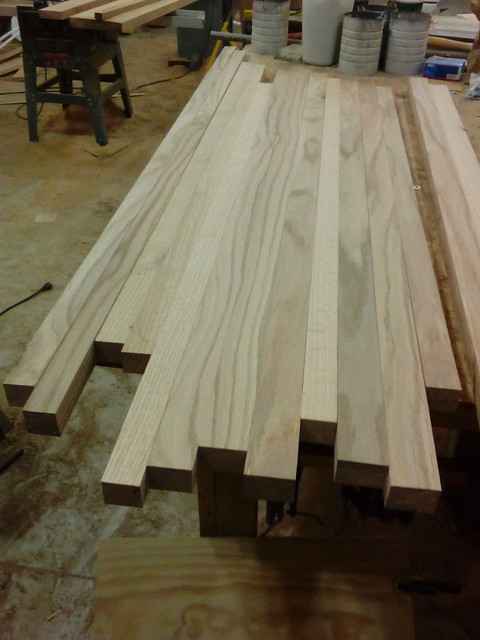
Today, I spent a snowy April morning building the new custom shelves.

This week is the week to get it all finished. In addition to the shelves, I’m going to be milling the face frames from some maple (from the neighbor again) and then putting a wall cabinet over the fridge. Everything will be topped with crown moulding along the ceiling when we’re done.
And who says home projects tend to linger…
—
All photos in this post are mine shared via Flickr CC-BY-NC
My grading practices have improved this year. I’m keeping better track of information, I’m using it more often, and I’m showing students – constantly – their progress in their learning. The notion that grades only report ability is buried deep and digging it out has taken a lot – a lot – of work.
Case in point: I’ve already written about keeping better track of quizzes given on standards in class. That spreadsheet, at the end of the chapter, looks like this:

This shows some interesting things:
- I can pinpoint sticking points on specific students much more accurately.
- Blank spots – missing quizzes – really hurts my ability to help. Same idea as GIGO…if I don’t have consistent information from students, I can’t help them as effectively.
- These quiz scores typically improve over time because older ideas set the foundation for new ideas. Yes, there is a dip in some cases, but I chalk that up to complexity rather than ability.
We just took the test and I found myself much less surprised than I used to be. (It pains me to even admit that I used to be surprised…growth…) I can also whip that tracking chart back out and pair it up with test scores.

Yellow is a set of questions related to a specific learning objective for the chapter. For the most part, the yellow boxes correlate with the tracking page. The conversation now centers on, “What mistakes am I still making?” rather than, “What do I have to do to get my grade up?”
It’s also great to ask a student if their test grade is a surprise and have them – even the most reluctant or disengaged – admit that no, it looks about right. Again, we can then focus on closing gaps in understanding and not point grubbing.
I mentioned Evan Weingberg’s standards-based tracking system in a short snippet a couple weeks back. I want to expand on that thought a little bit.
Essentially, he uses a Google Sheet to aggregate quiz performance to make sure standards are actually learned over time. This has been incredibly valuable to me because I felt that students were growing, but had no solid longitudinal data to back that up. It’s not 100% objective (nor should it be), but it helps inform and confirm (or refute) my gut feeling about a student.
I grade my quiz questions on a 1-4 scale rather than Evan’s 1-3 using a rubric I made years ago with significant help from Jenn Binis.

This is posted in my room and helps me give more specific feedback to my students. The quality in responses and in corrections has jumped dramatically. The rubric is also nice because it can be adapted to just about any question.
I give numeric feedback to students on their quizzes, but most of the time, students toss them in recycling on the way out. I’d like to have a way for students to take a look at their longitudinal growth over the course of a chapter. The idea is to take Evan’s original format and create a companion sheet which is specific to each student – some kind of template mixed with doctopus so I can update a master sheet and each student also can see their personal growth on a connected reporting sheet.
I’m not 1:1 this year, so implementing it before the end of the semester isn’t a major priority, but it’s something I’m going to tinker with over the summer to see if I can’t work out.
I’m going to stop doing labs in one of my classes this semester. Regardless of the supports or steps I put in place, there is a general refusal (save for 4 students who are trying their hardest to rise above the din) to follow procedure, listen to instructions, and work safely.
The class itself has become its own distraction. There lacks a visceral awareness of how actions impact others in the room, which has led to a general disregard for any form of structure. Labs are highly desirable because of the experience students get with the science, but they’re not teaching anything. It’s effort I put in that isn’t spent on a significant learning gain. It’s also creating liabilities.
It’s all the more frustrating because I think they could do well with labs, but the class is fighting me for control. Power struggles aren’t suited for the lab space. For now, we’ll put those on the back burner until such a time we’ve regained enough self-control to work safely and effectively.
Growth is a process and this year, it seems to be an extra intense one.
I use Google Sheets in my classroom a lot. I used to rely on combinations of the vlookup, importrange, and index/match functions to get information, but I’ve recently switched to using if and filter to return arrays of information from master spreadsheets.
Using filter is nice because it takes multiple conditions and you can set which columns of the array you want to return for your summary sheet. A pretty standard search looks like this:
=if(filter($A$2:$A,$A$2:$A=$F$3)=$F$3,filter($B$2:$B,A2:A=$F$3),"")
Here’s a sample spreadsheet so you can see how the result is returned after changing the filter term.
So, let’s break it down:
Cell F3 holds my search term, “A”, “B”, or “C”.
(filter($A$2:$A,$A$2:$A=$F$3) – Filter looks through a range of cells ($A$2:$A) for a specific condition ($A$2:$A=F3), much like the IF statement. The exception is that this only returns the matching content rather than a boolean (true/false). The filter, in this case, is serving as the boolean check for the IF statement it’s wrapped within.
=If() – This function is super helpful because it limits what happens in the sheet. It’s like conditional formatting, but for your functions. It takes two arguments, minimum, but you can set up to three: the condition to check, what to do if true, and what to do if false. In this case, the conditional is set with the filter function (see above). If the filter returns a cell with an “A” in it, the TRUE condition is run.
filter($B$2:$B,A2:A=$F$3) – If it’s true, I want a different column returned. In this case, it’s the names of students with group “A” set. Filter works the same way, except this time, it searches for column B (the names) that match the search parameter (“A” in column A).
In other words, the function reads like this:
- If
– filter through column A
– Look for cells that contain “A”
– If an “A” is found, the IF statement is TRUE
- Execute the “TRUE” parameter
– Print the student’s name in the cell
- If not, leave a blank cell
I added a third column, which prints the student’s project content just to show how these functions can be used in conjunction with one another.
I know you can use ARRAYFORMULA to do essentially the same task, but using ARRAYFORMULA doesn’t allow you to add custom content in the column – the throws an error saying data cannot be overwritten. I don’t run into that case often, but it’s often enough to be annoying.
Again, this is difficult to see without checking out the example spreadsheet. It’ll take some playing, but once you get it, it’s very helpful. Leave a note in the comments if you get stuck and need some help working it out.
I did something I normally don’t do: I had my students play a computer game for class the other day.
We’ve just finished nonrenewable resources – specifically coal and oil. We rounded last week out with a portion of the documentary, Switch, which gives a great nonpartisan look to oil and coal use in the developed and developing worlds. Students understood – in theory – that we are facing not only environmental challenges, but economic as well.
I’d been trying to come up with some kind of simulation for students so they could really experience that economic and environmental conflict. I didn’t really find a good one, so I booked one of the computer labs and we played Energy City. It’s a game created by The National Geographic Society and The JASON project. Think simpler SimCity with less people-managing and more resource managing.
I liked this as an inquiry activity because most students dive right into producing energy with coal and oil because it’s cheap and powerful. They tend to focus more on saving and making money rather than conserving environmental resources. It was often too late to come back from failure by the time they realized that air quality and overall environmental health don’t recoup nearly as fast. A lot of games ended in losses pretty quickly.
It really helped students understand they need a balance. They couldn’t dive in without projecting long-term costs. Most started looking at the per-turn cost rather than the up front. They also looked at what actually improved their environmental impact rather than degraded.
Some things I’m thinking through this week, written here so I can find them later.
– Evan Weinberg has a good string of posts on his blog related to student assessment. This one in particular has me thinking through 1) what I assess, 2) how I’m assessing, and 3) what information I actually get from students on the assessment.
– I really struggle with setting consistent classroom expectations, which has led to a lot of the frustrations I’m dealing with in class.
– My instruction, even though I often call it “student centered,” is still too focused on me.
– But I’m not sure, because of the two items above in conjunction, that I’ve moved my students to a place where they can be self-directed more often.
– The influence of standardized testing on our students is increasingly negative and I need to keep a positive attitude during the testing windows even though I’m incredibly frustrated.
– I need to make consistent time to either code or read, because those have helped me relax more than anything else these days.
This semester, a few classes asked for bi-weekly review over the entire year so they can keep old material fresh. I was really happy to get these requests because it shows a higher level of maturity than I’ve seen lately and that they recognize that old stuff still applies.
State testing starts this week (blargh) so I decided to use Friday and today to do some review over forces with a paper airplane challenge.
We spent some time discussing balanced and unbalanced forces, what causes acceleration, and what forces might be acting on a moving aircraft. Then, I tasked groups of three with building aircraft that would 1) fly really far, and 2) stay in the air for a long time. It’s tough to do because you can either go right for the glide or shoot for something that handles projectile motion a little more effectively for increased distance.
Most groups split the difference with an in-between design which led to pretty consistent success on both counts.

The lab isn’t perfect. There are things I’ll change for next year. It would be great in the forces unit, but I think I’ll keep it as review because 1) it’s a good break up of the monotony, especially in testing season, and 2) we can apply material immediately rather than slogging through principles.
Plus, it’s hard to be discouraged with the state of education when you hear cheers about a paper gliding for 20+ meters down the hallway.
Here’s the document if you’re interested in running this with your students.
