Posts
I want to think smarter.
I don’t want to know more facts or spout more trivia. I don’t want to just work smarter, either. I want to actually think smarter. It’s a much harder goal to accomplish because I’m constantly evaluating not only what I’m doing, but how I’m doing it.
I used to use an app called Any.do to manage a to-do list. Like most productivity apps, it synced across all platforms and I really thought my productivity was going to jump because I would always have access to that list. I would end up ignoring notifications because I had either completed the task or I was being notified during I time when I couldn’t recommit my energy. I was using technology to try and work smarter, but I was actually working harder. I went back to a mix of pen and paper and strategically sending myself text messages, which has worked much better. Because I can now take the time to target – on my calendar – when to be notified to do something, I’m able to work smarter and more effectively.
Working smarter doesn’t always involve an app doing something for us. What really matters is how we can use an app – or a hacked system of tools – to make it easier to work smarter.
In his book Smarter Than You Think, Clive Thompson explores this idea through the development of computer-aided chess. The question is simple: how does chess change when you play with your computer as a resource alongside? The results are interesting and I’ll let you pick up the book to read the whole story, but the short answer is that people played better. Not because they could research every possible solution or find a computer-suggested move with an algorithm, but because they could play more informed. Ideas and hunches could be tested and iterated quickly which would, in turn, inform their final decision. The ability to test ideas and make an informed play is an example of thinking smarter using technology.
The same should be true in education. Technology is exploding in schools and districts, but often with strings attached. Rather than opening the doors to information and pushing students to make smarter decisions about what they’re learning, we’re canning information and delivering it in the traditional way with non-traditional tools. Technology affords us the opportunity to think smarter, but we’re packaging information and removing the thinking process altogether.
To work smarter, you have to be able to articulate why you do what you do the way you do it. What is the goal you’re trying to achieve? Audrey Watters has a fascinating history of the development of the multiple choice test. It boils down to two main reasons: objectivity (presumably) and scalability. Scoring a test is simple: it’s a binary decision – you get each item correct or incorrect. Machines can do the scoring for us, which should help us think smarter because we can free up cognitive processes to analyze results rather than tally. Unfortunately, instruction is rarely informed and the students’ score, rather than a diagnostic, is now a report.
Working smarter means making difficult decisions about the actual practice of teaching and learning. It means gathering information and taking action on that insight. It also means being critical about the technology you’re using to accomplish goals through action. I wanted to be more productive, but the technology I chose to do that wasn’t helpful, so I dropped it for something more effective. Working smarter is working critically and with an open mind, ready to shift if goals aren’t being met.
When you’re working with students, think about the resources available and what goals you’d like to achieve. Just because you can use an app to do something in class doesn’t mean you should. Don’t allow the push to “integrate technology” obfuscate the real reason for being in school – learning to think.
11 days left.
There’s a lot of review happening right now – we’ve finished our final chapter tests and looking ahead at a double-whammy final exam. I’m facing a large bear this year because I wasn’t here first semester, so I don’t have a good idea of what ideas need to revisited more than others. So, I’m assuming we need to touch everything at least once. Tall order, eh?
Review is tedious. Games are fun, but I already wrote about making sure information is more relevant than winning a Dum Dum. Plus, I want to always give opportunities to demonstrate thinking over memorization. If you can think through a problem, you can reason an answer.
Karl had a tweet a few weeks back showing kids finding connections in apartheid South Africa using hexagon cut outs to mind-map the intricacies.
Step 3, #DEEPdt South Africa design task: hexagonal thinking. How are aspects of the problem related. pic.twitter.com/VW4fHqWaMP
—Karl LS (@LS_Karl) May 8, 2015
It looked great and came with high recommendations from Karl, so I tried it out using America’s energy use as our framework. I made small adjustments throughout the day and it went really well in most classes.
Most.
Is the group or the individual more important in teaching? It’s a maddening question and one I’ve wrestled with multiple times already this year.
Most of my hour was spent running from group to group defending myself from, “Is this okay?”-style questions. Another group didn’t even get their pieces cut out. A third got theirs cut about three minutes before the bell rang. I think only one had a really good start at what I was hoping to see in this review activity.
I find myself asking a new, yet similar question: Do the strengths and weaknesses of the group trump the strengths and weaknesses of individuals? Which should I plan for?
“Differentiate!” you may say. “Alas,” say I.
How do you structure an in-depth activity for three or four and a straightforward, rote(?), activity for others? Fairly easily in practice, but that leads to two sets of materials, two sets of directions, and likely multiple sets of rationales about why they get to do something different.
Everything in my teacher brain says that inquiry driven activities are better for long term analysis and retention of information. Much more so than completion on a review worksheet. But, if the environment isn’t conducive to that activity, something has to give.
It’s hard to let go of the ideal in the interest of making it to the finish line.
Review kills me. I struggle with finding a good balance between fun and actual, deep, review of ideas we’ve talked about during class. I also like to make review a little tough to see if they can apply the ideas, not just recall.
I think this original idea came from Crystal Kirch somewhere way back when, but I can’t seem to find the original blog post I think I may have read. Either way, here’s Trashketball.
I split my students into groups of five – it seemed to be the magic number. Threes and fours also worked well. The team could build an uber set of notes, pulling the best from whatever anyone could contribute. They would realize what they had missed over the unit and then add it to theirs as we went, which was nice. The rules are simple:
- Each correct response gets one point for the team.
- Each correct response also gets one shot for bonus points for the team.
- A shot into the Bonus Bucket doubles the point value of the shooting line you choose.
- Each team member must shoot at least once before you begin repeating shooters.
- Winning team gets a Dum Dum from the Bucket of Victors’ Spoils.


It was pretty incredible to see how different teams approached strategy. The incentive to answer questions accurately was high because if you get the question wrong, you can’t shoot for bonus points. You fall behind pretty quickly.
Secondly, some teams took the slow-and-steady approach. For each answer, they took easy, one or two point shots. Their score grew steadily while others took miracle shots, which only saved a team once out of the six games we played during the day. Also, teams didn’t consider the fact that shooting a four-point ball was as easy as hitting the Bonus Bucket from the two point line, which was purposely easy to do.
It’s an easy game to pull off with kids and the more you hype it up, the more fun it is. I took – and missed – plenty of “easy” shots, which broke the ice for those who were apprehensive about shooting a newspaper and tape ball. Others were knocked down a little because those long-range shots are hard to make.
I think, though, this was my favorite review because of the drive to do things well. All teams worked well together to answer questions, and that was important. I know exactly what needs to be discussed again leading into the test later this week. Kids were also attentive – up and moving around – which increased focus and helped everyone review the ideas of the unit.
Bill Fitzgerald is someone you should follow on Twitter if you need help interpreting Terms of Service or Privacy Policies. He pays real close attention to technology use in education, especially new, emerging tech.
Periscope is new and teachers love it. Show the Twitters all the great learning that’s happening in real time??? Definitely sounds like a good idea.
Please, read this.

Click to embiggen.
Privacy is important stuff. You need to pay attention to how you’re sharing information about anyone, including yourself, especially your students.
You can see the whole thread here.
Also, give Bill’s blog a read to dive deeper.
Part two of a post from the other day.
First, head over to the master spreadsheet and make a copy.
What Now?
It's important to note that this works just fine with form responses – you don't have to use the text input I wrote about earlier. You can always go back and add it later. Either way you collect information, we can begin analyzing some of the data.
The whole idea is to have a platform-independent polling system. So, this is built with flexibility and bare-bones functionality in mind. It isn't complex in the way it pulls in student responses, nor is it meant to be. However, there are some tools in place to help you actively identify problem areas.
Setup
An idea I'm borrowing from Andy Schwen is to utilize a central class list. Create a new spreadsheet and fill in student names. I sort mine by last name, first initial. You need the spreadsheet key from this document.
spreadsheet-key
https://docs.google.com/spreadsheets/d/RANDOM-LETTERS-AND-NUMBERS/edit#gid=0
Copy the key and paste it into the cell which asks for it.

Your class list will automatically populate for you. That's all you need to do on this page.
Responses
The Responses tab is meant to be an overview for you. So, if you have a way to extend your desktop across the projector rather than duplicating, you'll have the back-door information.
This page has a response vs. confidence graph that updates as students submit their answers. If you have your class list set (see above), you'll also be able to sort by class period using the dropdown menu. This will import those students and assign an ID number. Students respond with that ID number rather than their name so you can display comments (read on).
If they make a comment, you can also read it and see who asked that particular question or submitted a particularly salty comment.
Finally, you are given an overall confidence (average of all answers) as well as a chart mapping the student's confidence score for each item they choose. It's also broken down by student to aid you in feedback and conversation setting. You could also use this for grouping students on the fly to discuss the question.

Click for full-size image.
Results

This is the page you want to show live to students, and it's meant to go through three steps. At first, the ID boxes at the top are all red. As responses come in, the box will turn green. There isn't any way to prevent someone from submitting the incorrect ID number or a duplicate, so duplicates will turn yellow. You can then follow up individually as needed.
When you click on the “Get Responses” button, a pie graph of all the submitted answers is displayed. This is meant to spur conversation and show the beginnings of a pattern.

Clicking on “Set Answer” allows you to submit the multiple choice answer and change the graph. Rather than the pie chart, it shows the confidence score and the number of each answer submitted. Again, this can lead to conversations with your class about how confidence can correlate with making the right selection.

Clicking “Reset Form” clears all the responses from the form, resets the charts, and clears the Responses tab of data so you can ask another question.
This isn't meant to collect persistent data – it's meant for flexibility and high-level insight. Hopefully, it's helpful to you. Please leave comments on this post (also linked from the template) with bugs, functionality improvement requests, or other feedback. This is definitely a pet project, but I'll try my best to maintain it as it gets used.
Continuing on my data collection and analysis streak, I’ve got a little project to throw out into the wild and see what happens.
Student response systems are expensive and can be clunky. Google Forms are taking over the role of the stand-alone response system because of their flexibility in the wild during collection (device agnostic) and during analysis.
I like using forms, but they don’t work so well when students don’t have access to an Internet-ready device. So, I came up with a way to allow students (or anyone, really) to respond to a poll using either a form input or a text message.
The challenging part of this is getting the message into the spreadsheet. I have a Google Voice number, so I looked into Apps Scripts for Voice. Unfortunately, there is no way to access Voice using Google Scripts. There is an API for Hangouts, but it’s not documented very well and doesn’t look like it would even work with Apps Scripts or Spreadsheets. Maybe I’ll head back down that road someday, but not right now.
I decided to go with IFTTT, which has some benefits (easy to set up and manage) and drawbacks (only checks every 15 minutes-ish, so you need to manually run it during a session). It’s clunky and adds a breakpoint in the flow, but it works.
The Setup
You need to start by making a Google Form. For this, I want to allow students to send in four things: Their name, a multiple choice answer, a confidence rating, and any comments. Create the form with your collection in mind.
| In IFTTT, you have to tell the script which cells to populate in the sheet with three straight bars, “ |
|
|
”. Knowing your form setup is really important before you make the IFTTT recipe because it’ll save you a headache later. My recipe puts the responses into the first three columns and then I use a Google Apps Script to break them into the correct columns. |
The Flow
Method 1 – Pure Google Forms
The audience opens the Form and answers the question displayed live. They hit submit.
Easy.
Method 2 – Text Message to IFTTT
First, in Voice, you set up email notifications for text messages. Then, in Gmail, set up a filter to catch the emails and do two things: add a label (I used “text”) and then mark it as “read” (mostly for your inbox-zero sanity). Now, have the audience send a text to your Google Voice number (see below for formatting).
In IFTTT, set up a trigger which uses Gmail -> Google Drive. The Gmail trigger should do a search for your new Gmail label. When it finds that email, it appends a row to your form input spreadsheet.

More complicated, but now we have a way to get raw text data into the spreadsheet. Now, you need to make sure the text message is formatted correctly.
Splitting the text
Google forms split fields into their own columns. You can’t do that with a text because IFTTT puts the whole message into one cell. To split it, you need a way for a script to find the individual components. For this, I have participants do the following:
Name [comma] MC answer [comma] Confidence (1-4) [comma] comments
IFTTT dumps this into a placeholder cell in the spreadsheet and it can now be broken up at each comma using the following script:
splitsms
function splitCells(from) {
var sheet = SpreadsheetApp.getActiveSpreadsheet().getSheets()[0];
var colC = sheet.getRange(2, 3, sheet.getLastRow()).getValues();
for(var i=0; i< colC.length; i++){
if(colC[i][0] != ''){
sheet.getRange(2+i,4).setValue('=if(istext(C2:C),split(C2:C,",",true),"")')
}
}
}
After running this script, you now have all the responses in the correct column and you can play with the data more and look for patterns in the responses.
*So, there’s the start of the idea. I have a second sheet going, but I’ll write that up in a subsequent post. If you’d like to try this yourself and you’re having trouble reading my rambles, here’s the tl;dr version:
- Get a Google Voice number.
- Turn on email notices when you receive a text message.
- In Gmail, set a filter for your email notifications.
- Sign into IFTTT and copy this recipe.
- In the spreadsheet, copy and paste the Google Apps Script above, which splits the text message rows into columns, into the script editor. You may need to refresh the sheet to have the menu added to run the script.
I’ll follow this up with the data analysis sheet explanation.
Continuing on my data-trends this week, I’ve realized (consciously, at least) that when quantitative data is shown to students, it’s a report of some kind: a report card, a progress report, test scores, etc. It’s all final information – it isn’t actionable.
Yesterday, we played a review game where students submitted answers to a Google form which then spit out a grade based on those submissions. The purpose was to get them thinking about the information and to give them some immediate feedback – as a class – on how they did.

Seeing the gauges along with their place against all reported classes helped visualize where they fell on a preparedness scale in context.
It also helped the class see what specific standards they needed to go back and look over. I didn’t want individual information for this activity because the goal was generalize, actionable information.
Michael Pershan prompted my thinking this morning with his video (and comments) entitled, “Why Our Hints Don’t Help.” It’s extremely insightful (go take a look) and really helped me think through how I talk about quantitative information. It should be a call to action, not just a report.
It also changes the way students see these scores. They aren’t final any more – it’s a spot check on their progress. It’s a reality check for their perception of how well they have learned the information. It also leads to more good questions like, “Where can we find more information on [X]?” It’s a visual prompt, more than anything, which helps set the course for subsequent learning.
I tried something new today with my students – I asked them to rate their confidence in their answers on a 1 (total guess) to 4 (definitely know I know it) scale. I collected the aggregate information for each class and started flagging issues.
First, this only took me about 5 minutes to do. So, after we finished the questions, they started working on their review for our test this week. I pulled in the numbers, ran a formula or two, and had the percent correct for each item as well as the average confidence. Then, we started talking about what they noticed.
Some noticed right away that a few questions were more missed than others. Someone also noticed that questions with a high percent correct tended to have a high confidence rating. The same was true for lower-scoring questions. I then pointed out what I was really interested in:
Discrepancy.
I saw nods and furrowed brows as I pointed out low-scoring questions with high confidence ratings. It doesn’t compute. If so many people got it wrong, why were we so sure it was right?
This highlights areas I need to go back and review again, which is really nice. It also helps students reach a metacognitive place on their own work – it was only 6 questions, so they know what they got right and wrong.
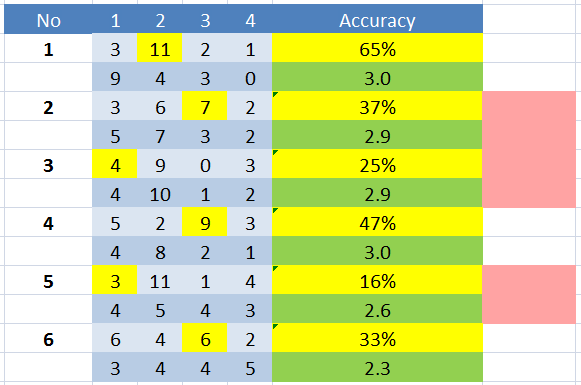
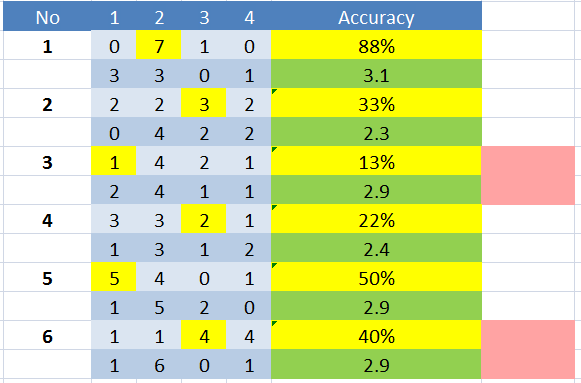
Different classes, different priorities.
And then here’s the aggregate data for all classes:
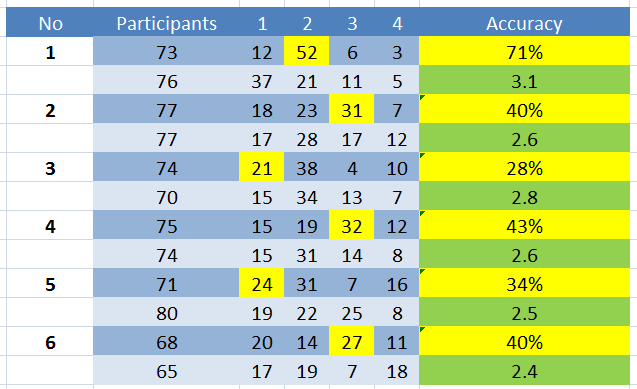
For now, I’m adding the red flags myself based on an arbitrary percentage and confidence level discrepancy. I’m doing that because I don’t know of any other way to make that comparison. So, here’s the question:
Are there statistical analyses that can be done on two-variable data (correct vs. confidence) which can then highlight areas significantly lower than expected?
I even went so far as to perform a correlation test on the data, which shows a definite positive correlation between the score and student confidence:
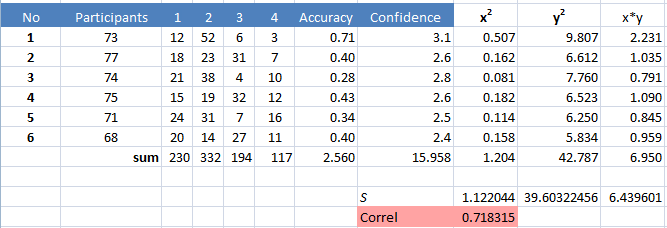
But again, I don’t know how to set up that discrepancy benchmark statistically. I may be thinking too hard about this, but I’d really like to have more to go on than, “This one is low compared to confidence.” It’s also a very small sample, and I know most correlation tests (t-Test, ANOVA, etc) require 10 samples, usually, so I’m not putting a ton of weight on the stats.
If you have any experience in this kind of analysis, I’d appreciate some pointers in the comments.
I meant to grab a bag of stuff for school this morning on my way out the door. Turns out at 5:45 in the morning, you don’t remember to grab things off the counter (thankfully, I don’t need that stuff until tomorrow). I don’t like to-do list apps (prefer pen and paper), and my phone is on silent each morning until I get to school.
I hate notifications anyways, which is why I turned everything off other than phone calls and text messages. I still get calendar reminders (out of absolute necessity) but even then, I tend to close those without thinking too much about actually remembering to do something.
Texts, though, are a different story. I pay attention to them. When someone sends a text, it has my attention.
So, rather than rely on a to-do list or plain calendar reminders to do something, I’m routing those through IFTTT to send myself a text.
To do this, log into IFTTT and create a new recipe using Google Calendar as the trigger. In step 2, be sure to choose “Event from search starts” as the trigger. Otherwise, any time you add an event, you’re going to get a text message, which isn’t cool.

Then, pick a keyword – I used “reminder” – to search for. It has to be in the title or the event description to fire correctly. So, for me, my calendar event would be: “Reminder – get groceries.” Then, set the time to when you actually want to do whatever it is you need to do. Again, mine is around dinner tonight because I’ll be near the kitchen and can do it quickly.
Set the SMS channel as the action (make sure your phone number is correct!) and heypresto, you have a SMS-enabled text reminder system for those little things you tend to forget.
Again, I know that this can be done just using the calendar notifications. But, if you’re like me, and hate those, you can use this instead. Also remember this works with any phone, not just smartphones. So, if you revert (like I’ve also considered) you can have the benefits of notifications when and where you need them on any platform.
I took the time the other day to show my students what exactly I look at when I’m grading tests. I use standards based grading, so I’m going way deeper than just the number right divided by the number wrong. I don’t even put tests into the gradebook, really. They’re each broken down into the standards contained within and they’re reported individually.
This is really hard for students to understand. So, I showed them the data I look at when scoring their tests.
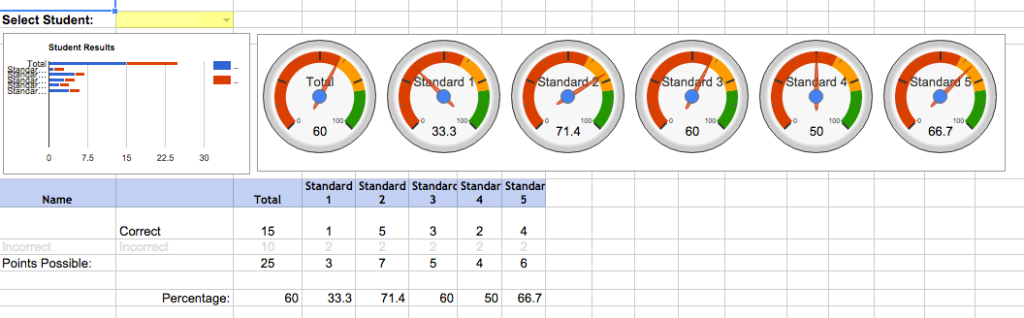 Individual student report
Each student has a report generated (name obfuscated here). Questions on the test are broken down by standard, and I’m shown a quick, high-level gauge of where they stand on this assessment. This is not the only information I take into account when assessing their skills, but a look through this lens can be helpful. I can also see (further down the page) which questions they get wrong and compare those with the item analysis screen.
 Individual class report
I can also take a high-level look at each class. Mean score and deviations are given for the entire assessment, and each standard is broken down again based on the aggregate. This view is especially helpful for remediation and follow-up to the test. Some classes get more attention to one standard, others get different priorities. It’s really helped me make more effective decisions when planning following an exam. This page also has individual student scores broken out by standard down below the gauges.
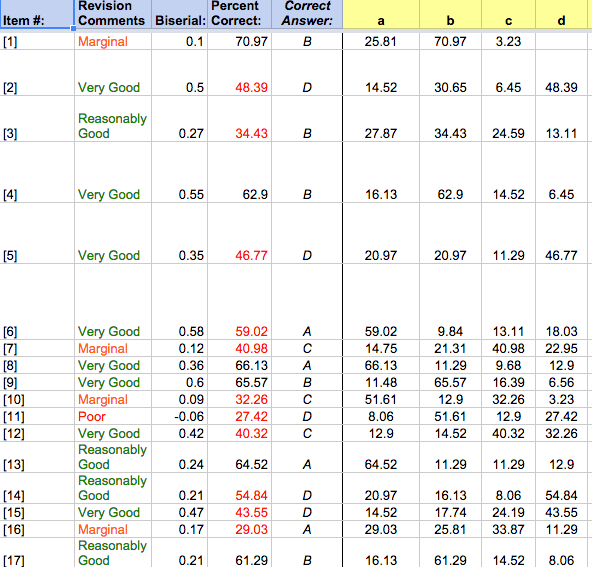 Item analysis
Finally, the item analysis. This helps bring it all together. Again, I see the high-level information for each question, and it helps me pinpoint which items need the most attention. I can then cross-reference those with each individual class and even down to the individual student to see which standard they struggle with the most.
So yeah, I showed this to my students.
And they were surprised that I put so much thought into it. I also think it helped them see the fact that everything we do in class is two things: related to the standards and for their benefit.
I don’t give tests because they’re fun (ok, well, the analysis can be fun…) or because they’re super effective. They can help me make informed decisions which, in turn, help them in the long run.
I don’t think they’d ever seen information used in this way in such an honest and straightforward manner. Many of them actually expressed that I was putting myself through too much with these tests, which means I must’ve gotten through something…
Either way, if you’re collecting information, make sure it’s used productively. Also consider taking it up a notch and plainly showing what you do with that information just so they know.
**Update 12.22.2016** Since this has become quite a popular script, I’ve converted it into a Google Docs Add On so it can be used across documents. Check out [the blog post](http://blog.ohheybrian.com/2016/12/introducing-endnote-generator-add-on/) or the [Endnote Generator website](http://dev.ohheybrian.com/endnotes) for more information.
**Update 8.27.2016** As Phil noted in the comments, the script didn’t format anything over two digits in length. That has been [corrected in the source](https://github.com/bennettscience/footToEnd). If you need more (100+ endnotes may be too many, though…) leave a comment and I’ll go back and make the changes.
Krissy Venosdale asked on Tuesday if there was a way to make endnotes in Google Docs as easily as footnotes. I thought, “Surely there is.”
Well, there’s not.
So I wrote a script that does it.
It’s hosted on GitHub along with instructions on how to install the script (it’s not an add-on…just a custom script) and run it in your document.
Here’s a peek:

When you add the script to the document (manual process right now – read the instructions) it adds a custom menu from which you run the script.
I know endnotes and footnotes aren’t really used in high school, but if you’re writing a book or something…maybe it’ll be helpful to you.
Either way, it was fun to write and it works pretty quickly. I haven’t tested it with documents more than a few pages long, so if you’re going to try it on something major, I’d suggest making a duplicate copy to run it on first, just in case.
I’m a teacher by day, after all.
Some backstory.
A month ago I wrote about Geddit going out of business this summer. I mentioned another response-system app, Kahoot!, which has exploded over the last few months. Specifically, I called out their Terms of Service (TOS) which states that any content a user uploads gives Kahoot! a royalty-free license, yada yada yada. With no qualifying statements, that’s a lot of rights to give up.
What I didn’t expect was a tweet from the CEO of Kahoot! asking if I’d be willing to have a conversation about their TOS.
So we did.
I can’t give specifics about our discussion, but there are some themes that stood out to me:
1. There can be major cultural differences when TOS are written up. Kahoot! is a company based in Norway, and Norway is a country where privacy laws slant heavily in favor of the consumer or user. Not so true here in the States. Johan and I talked about this a little, and he admitted that when Kahoot! was launched, they thought the Norwegian TOS benchmark would be self-evident and that users wouldn’t really worry so much about data loss. I appreciated his honesty in the admission that they are arbitrary, and in countries like the US, some clarification would help.
For the record, that license you agree to is so the community can function. Without granting rights to the company, they’d have to get individual permissions to share any lesson uploaded with any one other person. Totally reasonable, and clarification on that point would be helpful.
2. Kahoot! isn’t interested in personal data because it doesn’t help the service. Johan explained that they started as a formative assessment service – something in the moment and not perpetual. That’s why students don’t sign in. Data is given right back to the teacher as an Excel or csv download. As a company, Johan said they’re focusing on how information is being learned, not what information, which is why storing scores isn’t really important. If a teacher is using it formatively, then the actual score itself should only be informing the next instructional step, not to track progress over time.
It reminded me of a conversation I had with Bob Ambrister, the developer behind Write About. Paraphrasing, he said that nothing about the student helps run the service. All they ask for is a teacher’s code (to link the student with the class) and a name. No email, no birthday, SSN, or twitter login. If it doesn’t help, Write About doesn’t want to collect it.
Johan echoed that sentiment (without prompting), which made me feel much better about using it with students. A pin to get to the quiz and a nickname. Now, we didn’t talk about storing the data on servers, but given that a student can put in whatever nickname they want, it would be pretty hard to link that information back to anything with value. The key is that they only take what matters in order to run an effective formative assessment service.
3. Transparency is more important now than ever before. Clarifying statements and human-readable TOS and Privacy Policies say a lot about the credibility of the company. If you’re willing to clearly and concisely explain what you’re collecting and what you’re doing with it, people tend to trust you more. I also like that Johan was proactive in reaching out to discuss some of the concerns I brought up.
Finally, Johan did hint at some changes the team is working on regarding transparency. I’ll update this series again once that’s pushed out.
I went about four months this year without a smartphone. I used an unlocked flip phone that barely made calls and didn’t have reliable text prediction. I was back to thinking in threes, and I can tell you on which number lies any letter in the alphabet without thinking too hard. The only times my phone made noise were when I received calls or texts, and that’s if I remembered to turn on my ringer.
Then, I bought a cheapo smart phone after reading a great article on Medium about minimalistic thinking when it came to buying a smartphone (the author uses the word “shitphone,” which I like, but find a little crass for day-to-day discussion).
I bought my own [STRIKEOUT:shitphone] economy smartphone and rejoined the world of tweeting, instagramming, emailing, and other various -ings that I’m supposed to do with one of these things. I also rejoined the world of constant notifications. Buzzing, beeping, and LED blinking.
I hated it.

These low-angle shots really make it look more sexy than it is.
I’m enjoying the rate at which I can send a text with a full keyboard, which is what really keeps me from bouncing back to ye olde flip phone. Other than that, I enjoyed being relatively disconnected. I enjoyed reading email when I happened to open it during the day. I enjoyed not knowing someone had liked a photo I put up. Notifications fed my ego and pushed me back into always wanting to know what was up.
So I turned them off.
I find it eerily similar to turning off tracking and stats for this site. I enjoy writing much more. I’m enjoying my life with a smartphone much more now that it isn’t always squawking at me.
All my phone does now is buzz when I get a call or a text. And that’s if I remember to turn my ringer on.
I have a [STRIKEOUT:shitphone] economy smartphone with the noise-making capacity of a flip phone. And I love it.
We had school on Good Friday this year because of snow day accruals, which means we had a ton of students out. I wanted to give one short assessment to see what needed to happen when we returned from break. Students who were out of school had an option to complete the assessment online (totally their option. I made it clear that family trumps chemistry every time) so they didn’t need to worry about taking it when they got back from break.
I wanted some method of keeping the questions secure, so I decided to use a Google Form to keep track of access to the document.
From the class website, I posted a link they could use to get to the test.

From there, they were taken to a Google form with the following statement:
I understand that taking the test from home is at my own convenience. By signing my name below, I affirm that I took this test without the aid of outside resources such as notes, a textbook, or the Google. My performance is accurate and reflects my current learning in chemistry.
They then had to type their name in the box and submit.
Once submitted, they were given a link to the test so they could take it.
I’m not naive. I know that they could just grab the link and pass that around. That’s not the point.
Standards-based grading helps with the conversation piece – their grade is attached to the learning they’ve done during the chapter. You know the information, or you don’t. It makes grade conversations much easier because students recognize that they haven’t proven their learning…yet. That also gives me a much more solid platform for catching misrepresentation of ability. I know what they can do, and the test scores usually match up pretty closely.
Which brings me to the second point: honestly representing what you can and can’t do goes beyond the classroom. Don’t fake resumes. Don’t fake online profiles. Be who you are, and that means being honest with what you know and don’t know. By signing the form and then taking the test, the student is entering an agreement that gives us a starting point if uncomfortable conversations need to happen.
Another extension to what I wrote last night, mainly for my own purposes so I don’t forget what I did or where I put scripts.
bash is great, but it doesn’t play so well with Windows. I tried Cygwin, which installed fine, but on the school computers, filesystems are locked down somewhat and I can’t get access to certain install directories. Rather than fight the system, I translated my bash script from yesterday into Python so it works on any OS.
makedoc.py
print "You are about to make a batch of files."

num = int(input('How many files do you want to make?: '))
name = raw_input('What should the base filename be?: ')

for i in range (1,num+1):
  filename = name + str(i) + '.doc'
  print 'Made ' + filename
  i = open(filename,"w").close()
This works nearly the same, only I didn’t make it executable like I did the other script. The other thing this does is makes it easier to use the Google Drive API to create docs right in Drive rather than upload .doc files up to Drive and then wait for a conversion.
I’ve been programming a lot lately, mainly to make my own life easier. I usually start something when I’m doing a menial task that a computer could do much more efficiently. As a result, I’ve learned just enough to know what should be possible, but not enough to know when something is a good idea and something is a really dumb idea. This one turned out to be a good idea.
Two months ago, I wrote up a way to automate rubric score reports using docappender in Google Drive. It worked great the first month.
Today, I went back to score a second set of writing prompts with the rubric. docappender works great to do this, but I have to go into Drive and create six separate documents with the class hour as the name for the form to work correctly. Google has no batch-create option, so I had to make each one individually. It didn’t take too long, but it’s something that really should take any quantity of time.
Major props to Ken Bauer and Alan Liddell for pointing me in the right direction. Here’s what to do…
The Script
Computers are good at making documents. One way to do this on a Mac (or Linux, for that matter) is to create a shell script which can be run from the terminal. Alan gave me this little snippet to get me started:
first-script
for i in $(seq 1 7);
do
touch file$i;
done
That worked great. But, what if I wanted more than seven files? I wanted to give myself a couple variables which would make the script more flexible:
second-script
echo "Number of files: ";

read number;

for i in (seq 1 $number);
do
touch file$i;
done
And that was all well and good…but what if I wanted a specific prefix? And, could I make it right into a Google Doc? Yes, and yes.
third-script
echo "You're about to create a series of files."
echo "Enter the number of files you'd like to create and then push [ENTER]: "
read number
echo "Enter a generic filename and then press [ENTER]: "
read file
for i in $(seq 1 $number);
do
touch $file$1.doc;
done
echo "Finished."
Make it better
This was great. I could make files with less than three dozen keystrokes and clicks. But, like any good programmer, I wanted it to be done with even fewer – more automation was needed.
I wanted to make the script executable – I wanted it to run just by typing the name of the program into the terminal. So, I ran chmod +x makedoc (makedoc is what I called the program…real original, eh?) and gave it permission to run. I also added #! /usr/bin/env bash to the first line of the script to make sure it ran with the right kernel.
Then, I copied the script to my computer’s usr/local/bin directory and voila! All I have to do is go to the folder where I want to make the files, open up the Terminal and type in makedoc and make my sequence of files.
Get ready to have your mind blown.
“That’s great to make them on your computer, but you need them on Google Docs to work with docappender. Wasn’t that the point?”
Google Drive allows me to sync certain folders to my computer. The script doesn’t know if I’m in a local folder or one synced from the web. So, all I have to do is cd to the right spot in Terminal and run the script and BOOM – they’re all in Drive, ready to be used.
It’s. awesome.
Right now, it creates a Word document, which can be synced through the Drive folder. I would like to have a way to create a Google Document locally, but takes a little more computing power than I have time for tonight. Perhaps at a later date…
Update 3/31 – After more tinkering, I’ve changed the code to be more stable with any changes Google makes in the future. Code snippets are up to date and irrelevant instructions are now [STRIKEOUT:struck out].
You can create a custom Google search engine for your website (or group of websites) which can be very handy for a variety of reasons. If you’ve got a gigantic website, like Jerry Blumengarten, having a custom search bar can help find materials. If you’re working with students, a custom search can help limit where their information comes from. They’re easy to do, but there are some limitations, so be sure to read the Terms of Service if you’re going to set one up.
John Stevens asked on Twitter if there was a way to get a random post from a custom search. I felt like there ought to be some way to do that, so I started digging. Because the MTBoS index of blogs is on all different platforms and not networked in any particular way, it turned into more of a chore than I originally thought. Really, when you get down to it, randomizing search results is the anthesis of what search engines do, so we have to accomplish the “random” aspect of the Google search with a different method.
I’ll be using a search for my own blog for the demo here (down below). Brace yourself for some code.
[STRIKEOUT:First, rather than using the Google script you get from the Control Panel, use this HTML instead:]
You’re given one line of HTML to put in your page where you want to search bar to appear. Simply add the button line to add the random button:
Line 5 adds a new button – the Random button – to the search form. That button is important. Rather than needing some text in the input field, a user can click on the Random button and some JavaScript magic will happen.
If you want to use this, you’ll need to do a couple things:
[STRIKEOUT:Make sure your site has jQuery installed. If you’re not sure, go to your site’s code and paste this in before the closing header tag:]
You’ll need to put a script in the footer of your site. You can also do this with a widget with a lot of platforms…there are too many to list, and the footer solution is usually the best approach. If you’re not sure what to do, leave a comment, and I can try to help you out.
`
// This is the array holding the serach terms
var queries = [‘animals’,’dogs’,’cats’, ‘emu’,’fish’,’snakes’, ‘panda bears’,’meerkats’,’spiders’,’birds’];
// When you click on the Random button, it'll grab a random search term and run it through Google
document.querySelector('button').addEventListener('click', function() {
var search = google.search.cse.element.getElement('standard0');
var rand = Math.floor(Math.random() * queries.length);
search.execute( queries[rand] ); }, false);
`
This script will take that Random button we added earlier and pop a random term into the search box and carry out the search. yOu need to set the terms in the array (line 3), each term in single quotes and each term separated by a comma. Make sure to keep that syntax correct or else it won’t work.
[STRIKEOUT:Also, if you try this on any site other than your own, you can run into issues. I’ve been testing this on Codepen.io with mixed results. Once thrown into my own page, though, it works just fine.] I’d create a new page on your site and drop the code into place. Test it as a draft page to make sure everything is kosher and then run with it.
If you want to see a sample implementation (proof of concept, not really helpful), check out this spartan search page. You can type in a search term and hit submit to see how it works. Then, try hitting Random without putting any text in to see what it does.
Do note that WordPress has a pretty good random post feature built-in. This is meant more for wider searches across multiple platforms using the Google index of sites.
I hate missing school. It’s stressful. I have to do multiple days worth of planning ahead of time, plus know what’s happening the day I get back. Then, I have to turn those plans into a written document that anyone in the world can follow to the letter.
It’s stressful.
I still leave a document with some specific notes for a substitute – things like management or specifics to take note of. But now, instead of writing out a ton of information on what to do, I record a simple video and post it to a static page on my class website. There are a couple little tricks I learned along the way:
1. The page should be bare bones. Don’t worry about making it “feel” like the rest of your class site. It should be something easy to display on a projector without having to hunt through menus to get the information. That also allows you to just replace the video and written instructions for the next time you’re out. Flexibility is key.
2. Embed the video right in that page. If you’re like me, you want to make sure that video is responsive, too. I found a super-handy little snippet of CSS to make YouTube videos responsive, and I used that so students can access the information on their own later on any platform.
3. Keep your video unlisted so it stays within context. I have a lot of content on YouTube, I want to keep the sub plans isolated because they don’t really fit in the flow of anything else there. This way, the video only “exists” when student need it – while I’m gone.
It’s not totally un-stressful now, but it’s way better than it used to be. If you’d like to see my “away from school page,” or even copy the source for your own page (self-hosted), that’d be dandy.
Geddit, a response-system app will be turning off its servers on June 30th, 2015. I heard about this software about a year ago when I sat down next to one of the co-founders at CUE. I was really excited about the platform because they not only allowed for students to respond to questions in the live lesson, but they also gave confidence scores for those answers. It’s fantastic way to do formative assessment both before, during, or after a lesson.
But, Geddit tried the free route because that’s what educators respond to. Lots of people signed up and started using it. Love and tweets don’t pay the bills.
Sure, there are other response apps out there thrown around – Kahoot being the current favorite – but I’m staying away from that one with a 10 foot pole because of this gem in their terms:
We do not assume any liability for any content posted by you or any other 3rd party users of our website. However, any content posted by you using any open communication tools on our website, provided that it doesn’t violate or infringe on any 3rd party copyrights or trademarks, becomes the property of Kahoot! AS, and as such, gives us a perpetual, irrevocable, worldwide, royalty-free, exclusive license to reproduce, modify, adapt, translate, publish, publicly display and/or distribute as we see fit. This only refers and applies to content posted via open communication tools as described, and does not refer to information that is provided as part of the registration process, necessary in order to use our Resources. (emphasis added)
In other words, “We won’t charge you, but we’ll take anything you upload and make money off of it without any attribution to your intellectual property.”
Now, I’m not saying Geddit is perfect either:
If Geddit, or substantially all of its assets, were acquired, or in the unlikely event that Geddit goes out of business or enters bankruptcy, user information would be one of the assets that is transferred or acquired by a third party. You acknowledge that such transfers may occur, and that any acquirer of Geddit may continue to use your personal information as set forth in this policy. (emphasis added)
Bill Fitzgerald has a fantastic post on the practice companies are using to hedge their investment: sell our user data.
So, the cycle perpetuates itself.
- Create company
- Let teachers use it for free to build up buzz and userbase.
- Try to monetize.
- Fail – “paid” in education is a no-no.
- Close doors and ship off user data.
We’re selling our data – our information and histories – so we don’t have to pay a few bucks to use a helpful service.
Data is worth more than money these days, and we’re selling ourselves short. The free-only economy in education has to change.
The community is suffering. Students are frustrated and they’re looking to me to solve the problem. I’m faced with deciding whether or not my commitment to an individual students takes precedence over my commitment to the class as a whole.

creative commons licensed ( BY-NC-SA ) flickr photo shared by ShawnMichael
I mentioned earlier today in a tweet that Audrey Watters had a post back in January about applying the Hippocratic Oath (albeit, for education technology, but the application is the same) and it’s really stuck with me. I’d never read the oath, but now I have one printed and hanging next to my desk. I’ve started to re-purpose some of the lines in the 1964 rewrite of the Oath to apply a little more to my day to day work.
I will apply, for the benefit of students, all measures which are required, avoiding those twin traps of overtreatment and educational nihilism.
I think the first time I had a student leave my room was in my third year teaching. My temper doesn’t get pushed too much and I can usually let the little things roll on by. Small redirection and nuance have been powerful tools for me, and they’d worked relatively well. This year, though, it’s a whole different story. I don’t feel like I’ve given up hope that these students can learn or improve, but my toolbox is feeling more and more empty as I try more and more techniques to rein in the behaviors.
I will not be ashamed to say “I know not,” nor will I fail to call in my colleagues when the skills of another are needed.
I really resist having students leave my room. Perhaps it’s hubris, perhaps it’s stubbornness. I refuse to fall into a habit of removing problems rather than resolving. However, at what point do we move on from individual situations and focus on the whole? Am I shirking responsibility as a teacher by relegating individual students to situations where learning is impossible? On the other hand, by keeping students in the room, am I relegating the whole class to the same fate?

creative commons licensed ( BY-NC-SA ) flickr photo shared by E.L. Malvaney
I will remember that there is art to teaching as well as science, and that warmth, sympathy, and understanding outweigh the expectation of compliance or any grade awarded.
Finding nuance in a situation where patience feels like the enemy is difficult. The more time I take to try and weave a better plan together for individuals feels like time lost for the other 22 people in the room. I’m falling back on old habits and a bad attitude about students. My empathy is running out and I’m entering a realm where I’d rather have compliance than a real rich atmosphere for learning.
If it is given me to arouse curiosity, all thanks. But it may also be within my power to stifle the desire to learn; this awesome responsibility must be faced with great humbleness and awareness of my own frailty.
I realize that it’s the teacher’s burden to always remember the ones we lost – those we couldn’t connect with or engage. In the end, I’d love to have my cake and eat it, too. I think I can still do that – there are bright spots, and we celebrate those days. But, I’m responsible for the learning environment as a whole.
ἀσκέειν, περὶ τὰ νουσήματα, δύο, ὠφελέειν, ἢ μὴ βλάπτειν
