Posts
In chemistry, I have students create a solubility curve for an unknown salt to demonstrate how temperature affects solubility of materials. The protocol has them create six solutions of varying concentrations and then they plot their data and compare it to an unknown. For first year chemistry, this is a lot to organize and complete successfully as a group. So, to make it simpler, I assign each lab station a mass and they do repeated trials of that mass to determine the saturated temperature.
For more accurate results, I combine all of my class data into one sheet which can then be analyzed by students. This little spreadsheet trick can help you get data which is grouped by a value (mass, in this case) and then averaged for a final data set. This should work for any data where you have repeat values. Here's a sample sheet (student names removed):

Students complete the data in the white cells and their row is automatically averaged. Once the sheet is full, I want to know the average temperature for all masses which are the same. You could sort the sheet by mass manually and then average each mass individually, but the sheets QUERY function can do that for us in one line.
QUERY is one of the harder functions to learn, but once you do, you'll see potential for it everywhere. In this sample, cell K1 has the following function:
text
=QUERY(B1:H10, "Select C, AVG(H) where H<>0 group by C")
Breaking this down, QUERY will:
- Get your entire data range. This should be the raw data
- Get column C and group results together by value (all the 60s together, the 120s together, etc)
- For each group, average the value in H if it is greater than 0
In this case, it returns a two-column table of mass per 100mL (column C) grouped by value with the temperature averaged for all masses in that group. Now, I can create a chart showing the solubility results for this class data:

How do you square away the ethics of using an LLM? I'm wrestling with how to responsibly engage with this technology but my unease with everything from environmental impeacts to shady model training keep me from feeling like I can engage responsibly.
The water use alone is enough to make me feel uneasy. At the same time, I live in a house powered by natural gas. I don't have alternative energy sources so saying that I'm environmentally aware of the costs falls a little flat with the rest of my life being equally as consumptive in other areas. Does that make it okay to go ahead and use ChatGPT or similar because I'm not low-impact in other areas?
I think the unease is in that using an LLM is optional while powering my home is not. I can see use in using an LLM to brainstorm as Simon Willison describes in a talk he gave in August 2023:
If you’ve ever struggled with naming anything in your life, language models are the solution to that problem.
...
When you’re using it for these kinds of exercises always ask for 20 ideas—lots and lots of options.
The first few will be garbage and obvious, but by the time you get to the end you’ll get something which might not be exactly what you need but will be the spark of inspiration that gets you there.
After reading, I tried this. My kids need to do a small inquiry project each year in school, so I opened ChatGPT and asked it for some ideas on inquiry projects a 5th grader could do on exercise. It actually gave me a couple of ideas that went beyond demonstrating proper stretching technique.
So, the potential for this kind of assistive work is more interesting to me. I know as a teacher that I'm supposed to be intersted in the automatic YouTube quiz creator or the worksheet generators, but those are the lowest fruit, just above the whole "have AI give students feedback" mess that's starting to come out. I'm more curious about interactive LLMs as a rubber ducking tool to help me think better, not just try to offload cognitive effort that I should be engaging in personally.
And yet...I feel like using any of the available options makes me a willing conspirator to intellectual property theft. It's clear these companies used resources in secret and then released their programs because had they disclosed their work, it wouldn't have been allowed on the grounds of copyright. Tech is doing what they want and then using obscene amounts of money to deal with the legal issues after the fact. That's not okay.
I don't have any insight or answers - I'm mostly shouting into the void. I think I'm going to continue to read and think carefully about what technologies I choose to engage with and wrestle with personal convictions along the way. Maybe as technology improves, there will be some more models created which aren't as environmentally costly (working slower is always an option, you know) or as ethically shady as some of the big players are now.
And maybe that's the point - how we think about the issues as we come to decisions means more than the decision we end up making.
It is a dreary gray day today. Tomorrow promises to be better - spring is definitely coming.
I was scrolling old photos and forgot that I took this in February. The skies in this place can be overwhelmingly blue sometimes.

LLMs are here and there isn't anything I can personally do about the fervor. Education is no different than any other industry grabbing to put "AI" into products and rather than just be crabby it's better for my own mental health to acknowledge and move on.
I'm the weird guy at school who isn't excited about LLMs. I don't use them and, when it's possible, I try to speak up and remind people that there are real costs to this technology that you and I may never see personally but we still contribute to.
Using AI to grade student writing is the last thing any teacher should consider. I didn't see a single teacher quoted in the Axios article or in Ars Technica, who also covered the Axios story. I even opened the comments (don't read the comments) to see if a single teacher anywhere pushed back. Not a word.
AI is hype - it's pushed by people who stand to make money, often a lot. If you're a teacher, consider not using AI products targeted toward education. Instead, talk with your students and colleagues about the real environmental impact, unavoidable racial bias, and dangers of generative models. Talk about the stories that don't get large press releases or flashy product demos because those are the lessons our students deserve and they're the ones worth investing your time into.
This week, Axios published an article about teachers turning to AI to give students feedback and then went on to extol the benefits of a new AI company purchased by Houghton-Mifflin Harcourt to push it into schools.
This is the hottest of all garbage.
Driving the news: Writable, which is billed as a time-saving tool for teachers, was purchased last month by education giant Houghton Mifflin Harcourt, whose materials are used in 90% of K-12 schools.
Teachers use it to run students' essays through ChatGPT, then evaluate the AI-generated feedback and return it to the students. "We have a lot of teachers who are using the program and are very excited about it," Jack Lynch, CEO of Houghton Mifflin Harcourt, tells Axios.
This is the worst case of AI in education that I've seen. The article spins it with the fact that "...teachers are already using ChatGPT and other generative AI programs to craft lesson plans," and that "diligent teachers will probably use ChatGPT's suggestions as a starting point."
I'm glad diligent people will probably read the feedback. HMH calls this "human in the middle AI."
Time, of course is the great PR payoff. Teachers are so low on time that the only solution mega-corporations with lobbying influence and political sway can come up with is to give me time to get to know my students by not reading their writing, you know, instead of working on behalf of teachers to reduce class sizes, improve working conditions, or limit the impact of high-stakes testing1 several times a year. All things that are shown to improve student learning outcomes and teacher effectiveness.
But don't worry, Lynch says that the goal is "to empower teachers, to give them time back to reallocate to higher-impact teaching and learning activities."
Unfortunately, Mr. Lynch doesn't realize that feedback is one of the most impactful teaching and learning activities I can engage students with. My time is not occupied with endless amounts of grading, which is what they're suggesting we use an LLM to do. It's spent on getting to know my students' thinking brains and how they interpret and interact with the world. Feedback is my way to engage - one on one - with a student, whether it is verbal in the moment or written on a submission.
An LLM is only able to give feedback on the combination of words a student produces - not the thought that went into those words or in the originality of ideas expressed by the words. If a student expresses something novel, the LLM is not going to be able to recognize the skills that went into the creation of the work. Relying on a model of any kind to give feedback tells our students that we don't care about originality of thought, just that they can regurgitate with full sentences.
As bad as Jack Lynch's take on AI for feedback as, Simon Allen, CEO of McGraw Hill follows up with a real "hold my beer" moment:
"The actual process of grading, we have simplified significantly,"
...
"You're not going to physically hand-grade every single essay or multiple choice activity. You're going to utilize the technology we've given you."
For as much as they want to help teachers out, they're really showing a ton of confidence in us.
- Accessed from Arizona State University Mary Lou Foulton Teachers College Education Policy and Analysis Archives.
Another test day down and another evening of wrestling with how I track student skill grown and report that through grades. I'm currently giving students feedback on a four-point scale:
- Does not meet expectations: the student's evidence is not aligned to the skill or lacks detail to show skill.
- Approaches expectations: The work demonstrates the skill, but there are conceptual or procedural mistakes that still need to be addressed.
- Meets expectations: The evidence demonstrates coherent understanding of the main ideas.
- Exceeds expectations: The student's demonstration shows deep knowledge of the concept and connects to other related ideas.
Proficiency on a standard is a mark of 3. The 4 mark is an indicator of exceptional skill or depth of application. Students are given the numeric feedback and several comments about how to improve on each evidence to promote growth. The actual student score is calculated by averaging the highest attempt at any point with the most recent. The intent is to have students continue to focus on improvement without having to constantly dig out of lower-scored evidences (which naturally occur at the start of units before we've developed skills fully).
The Reality of a Four Point System
This looks great on paper, but it's still a grading game. Students are more focused on showing proficiency, but as evidence suggests, they tend to look at the score without reading and reflecting on feedback. The number doesn't carry any information about improvement.
I'm also feeling a little more "icky" about the "Exceeds expectations" label. Thomas Guskey notes that the "exceeds" label moves the target for students. Is the goal to meet the goal? Or to exceed the goal?
From a practical perspective, “Exceeds Standard” presents additional difficulties. In most standards-based environments, mastering a standard means hitting the target. It signifies achieving the goal and learning what was expected. Olympic archers who place their arrows in the center of the bulls-eye from a distance of 70 meters, for example, have “hit the target.” They have achieved the goal and accomplished precisely what was expected.
How then could an Olympic archer ever “exceed” the standard? How would the archer achieve at a more advanced or higher level? Maybe we could make the bulls-eye smaller or move the target further away from the archer, making it more difficult to hit the bulls-eye.
The problem with that, however, is it changes the standard. As soon as you make the task more difficult or move the learning expectation to a higher and more advanced level, you have changed the standard and altered the goal.
I'm wondering how I can adjust my methods to both keep track of student progress over time and drive back toward feedback over scores day to day.
Adjusting My Feedback Methods
This is made a little more complex becuase I want to be able to use technology to track and defend skill development, especially when it does come to grades. Simplifying student feedback protocols will make that easier.
I'm a fan of the single-point rubric as a way to facilitate feedback to students. It provides more structure than comments all over the page while giving me the freedom to call out specific skills or indicators of skills against a learning standard. The actionability of this feedback will improve the quality and usability overall.
I also need to help students self-reflect more regularly. I ended up dropping my simple feedback tracking because it was too focused on the score and not enough on the comments. My colleagues use an end-of-unit logging activity where students go back through their resources and identify strengths and weaknesses in a lite journal template. This helps students see the consequentiality of the work they've done and the benefits of participating in the process.
As far as technical work, the student tracking app shows their calculated score on a four point scale for each assessment on a given skill. This might stick around, but then I'm in the situation of having to explain what the numbers mean again, which kind of defeats the purpose. Part of the technical problem for me is that I like being able to see progress - it helps tell the story of student growth over time.
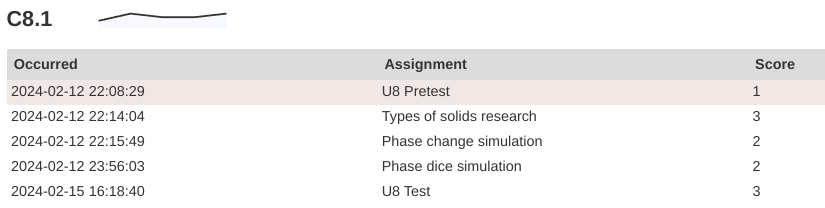 A sample from a student report showing growth on a skill over time. This is my view, students see the skill and the calculated score. This student has a 3/3.
Anticipated Changes
In the short term, I'm going to start delaying specific grades or standard marks and really focus on feedback - getting students to solicit feedback from others, give their own feedback, and reflect on my feedback toward their growth.
In the long term, I'm going to finish this year with my four-point scale. At this point in the year, it's too late to change something this significant. With the feedback shift, I'm going to move toward using single-point rubrics on assignments to deliver feedback and push growth while still keeping private notes on their performance on assignments.
I'm also going to slowly phase out the "Exceeds expectations" tier. If a student can do the thing, they should always receive the highest mark noting that they're capable of the thing. Gusky notes that adding "Distinguised" or "Exemplary" as some kind of indicator does a better job of communicating the intent, so maybe I'll grab a pack of stickers and start adding those to papers...some kind of small recognition for exceptional work as a morale boost mroe than anything else.
If you're still here, thanks for sticking with me. This is definitely a niche topic, but if you have experience with standards based grading (teachers, students, and parents are all welcome) and want to leave a comment, you can do that in the form below.
I attended the Michigan Science Teachers Association Conference on March 1st. It was the first all-science teaching conference I'd attended, which is very different than the kind of conference I generally go to.
Some of my big takeaways are:
- Lots of new resources on where to find relevant and rich data. My Environmental Science course uses a ton of data because we're constantly circling that question of how humans are interacting with and impacting the environment. I like to have my students analyze and make sense of data. One site in particular that stands out is Our World in Data, a free, searchable site of data on just about anything you could possibly want. We will be using it this week.
- At some point, the fun got taken out of science. Maybe it was the testing changes in the early-mid 2000's or it was me just deciding that I was going to be "rigorous" and "serious about learning." I'm not really sure. Either way, there is a ton of fun to be had in school and it is okay to do the fun stuff. I got a couple new, goofy songs to help students remember the intermolecular force properties of water (to the tune of the Mickey Mouse Club) that we will use in our next chapter on solutions.
- I'm a chump when it comes to labs. So many teachers have such better labs than I've been doing. We're going to turn pennies to gold next week for St. Patrick's Day (see #2).
What good science teachers do
The session that made me think the most was a research report out of Michigan State University which looked at classroom practices which led to higher student retention and application of science skills and content. Teachers and students from across the country participated (125,000 students over four years) so this is, like, a legit thing.
The most effective science teachers took time to help students go through a divergent/convergent thinking protocol over the course of an investigation. Students are guided through forming ideas, comparing, coming to consensus, investigating a phenomena, and then using evidence to draw conclusions. The best teachers get students to diverge in their thinking by calling up background knowldge to engage with the scientific thinking process and then working as a community (like real scientists) to develop plans to test their thinking.
That's all well and good but the real payoff comes in the convergence that happens later. Because students are engaged in the process, all of their work is consequential, meaning it can be used to draw conclusions (whether or not it is graded - that doesn't actually matter). The research found that when students are encouraged to use what they've done, they converge on ideas which descibe the phenomena. They learn what to look for as they are learning what it represents in parallel.
I would really like to think that this is what I do in my classroom, but in all honesty, I think four days out of five I tend to focus on process and getting from Point A to Point B. We do a lot of consequential writing in our notebooks and students are able to use those materials on assessments, but it isn't around longer-running, wholistic units.
This is not to say that every unit must follow that process. It's more a point of reference for me moving foward - am I allowing time and space for divergent thinking to become convergent? What methods and tools do I use to help students find that consensus on phenomena? In what ways can I support students through that process? It's a very different way of thinking about science as a discipline in high school but it seems to do a better job of helping students build dual understandings (plural - that's important) of content as well as practice.
I'm re-working my next unit a little bit in respose. We're staring solution chemistry this week and I'm going to try to do some pre-thinking activities to tease out what they know (or think they know) about solutions before we go through our investigations later this month.
This is a scheduled post!
One thing I miss from a CMS blog is the ability to schedule posts for publication. It turns out a lot of other people running Pelican (my blog engine of choice) have also faced this problem and shared their solutions:
- Scheduling Posts with Pelican written by Tiffany B. Brown of Webinsta mentions a bash script to look for "scheduled" posts in the frontmatter and then a second cron job to build the site.
- Timed Posts with Pelican written by mcman_s which includes a link to a bash script which will publish shared posts from a cron job.
- Scheduled Posts with Pelican by Benjamin Gordon. The oldest of the promising results I came across and the simplest implementation.
It would be great to be able to use the WITH_FUTURE_DATES setting in Pelican, but since this is built from a bare git repo, I don't actually have the entire content directory on my server anywhere. My build step creates it when a push is received, so method #3 won't work easily without a change to my workflow.
I decied to modify the script shared by mcman_s (and I'm assuming it's similar to what Tiffany Brown wrote about). Each day, a cron job will create a clone of the repo to get the most up to date source files. Then, it loops over the content directory and looks for posts which need to be published based on the date. When it finds one, the file is edited and then committed and pushed back to the repo to be built.
So, this post was automatically published from a cron job. Now, when the mood hits me to fire out a couple of posts, I can do that and just set the publish date as some time in the future.
I read less in February, but the books were a little longer than January. We also didn't have a week-long break as part of my reading schedule.
The Boys in the Boat: Nine Americans and Their Epic Quest for Gold at the 1936 Berlin Olympics - Daniel James Brown
This is a biography/sports history book about the Washington rowing team which, according to all sources, was the best the world had ever seen. Brown takes an intimate look of the team members and coaches pulling from stories from the rowers themselves and family who have records and journals from their time together. Some people compare this to Unbroken by Laura Hillenbrand, I felt it was more like Seabiscuit (also by Laura Hillenbrand). It is definitely worth reading. I hear the movie is also very good.
Tomorrow, and Tomorrow, and Tomorrow - Gabrielle Zevin
This is one of those books that I heard about from several different outlets, so I decided to give it a try. My copy took several weeks of waiting on hold to actually come, but then I read it pretty quickly. This book has several ups and downs. Each character is tragic, losing something dear and having an unclear resolution of anything gained in the loss. Sam and Sadie are complex in faults and their differences led to a satisfying ending.
Update November 2024
The post below details how to build Helix from source. This doesn't really provide much of a benefit other than being able to install from a specific branch of the project or a specific build from an open PR.
I've updated the bottom of the post with how to install Helix from the pre-built binaries. This takes much less disk space because you don't have to install the entire Rust toolchain to build the editor. The binary runs at about 13MB, so is much friendlier for the humble Chromebook.
I'm setting up another Chromebook and I realized I never documented the entire process of building Helix for a Chromebook. There are a couple extra steps needed to get everything wired up correctly.
The ChromeOS Linux container is Debian, but Helix doesn't have an apt package for an easy install, so the best options are to either download and install the binaries or build from source. The GitHub repo has compiled source binaries for many systems. aarch64 builds should run on an ARM Chromebook, but I haven't tried it myself. This will walk through building from source.
Install from source
Chromebooks don't come with a C compiler toolchain, so you need to install the gcc package:
text
sudo apt install build-essential
Now, you can install Rust:
text
curl --proto '=https' --tlsv1.2 -sSf https://sh.rustup.rs | sh
Once the tooling is in place, make sure the /usr/src directory is writable. It's owned by root initially, so either reset the ownership or adjust the group who can write. This is where you can download the Helix git repository source files.
Clone the Helix repo into your directory of choice:
text
git clone https://github.com/helix-editor/helix
cd helix
Once you have the source downloaded, you can use cargo to build Helix. Make sure you're in the helix directory you just downloaded:
text
cargo install --path helix-term --locked
This will take a while, so grab a book. All of the dependencies are downloaded and then the compiler will build the Helix tooling and command line utilities. When you're finished, you'll have the hx command available in your terminal to launch the editor.
The last thing to do is set up a symlink to the runtime directory:
text
ln -Ts $PWD/runtime ~/.config/helix/runtime
From there, you can set up your config.toml and languages.toml files in the config directory. If you're on a Chromebook, you'll need to override the truecolor check to use themes.
Install from pre-built binary
The Helix team releases pre-built binaries for each release. You can get those from the releases page on the repo. You'll need to make sure you download the binary for the correct architecture. Most likely you'll need the *-x86_64_linux.tar.gz file.
Once it's downloaded, you'll need to move it to your Linux container. If you're running the Linux development container, you'll need to make sure your Downloads folder is shared. You can also use the ChromeOS file manager to move the folder around.
Unzip the file and move the hx file into your Linux system somewhere. Mine lives at ~/.cargo/bin/hx, but it can just as easily be under /usr/bin or /usr/local/bin. It just needs to be accessible on your PATH variable. Once you've got your file stored somewhere, you'll need to make it executable with chmod +x hx.
Finally, you'll need to move the runtime/ directory. Copy it into a config directory. The installation documents suggest ~/.config/helix/runtime which is what I do. I also keep my languages.toml and config.toml files here.
Last month, I gave myself a diagnosis of tinnitus. My ears have a strong persistent ring that has started to work its way into my day to day experience. I think it's been there for a long time, but for some reason, it has intensified this year.
I've been reading and listening to a lot of materials to try and understand more. First, I've learned it is a symptom, not a disease. It's a non-existent sound produced by my brain for some reason. I think mine is related to persistent loud noise in my younger years, which is very common. This week, I experienced my first "spike" - a sudden increase because of some external factor - and that led to feeling horrible overall. A headache set in and I just ended up going to bed. It was my first true experience of the tiny screaming fairy.
There is no one cause or one fix for any of these symptoms. My body is sensitive to some things and I need to pay close attention to causes and effects. I'm paying attention to my diet, my moods, my sleep...pretty much anything I do day to day which can affect my perception of the ringing. And that's the difficult part - it's all perception. I'm fighting against the feeling that I should just be able to deal with it because it's all in my head and the reality that this is affecting me in new ways.
Success! I've been using Helix on my Chromebook for almost a year and I was finally able to get editor themes working correctly. Helix has a great selection of themes but I was never able to get them working on this little machine. I had to install from source, which was a little dicey given how small the hard drive is and how low-power mid-range Chromebooks are in general. The development container works well but the terminal emulator on Chrome isn't well documented and I kept running into an error any time I tried to set the theme:
text
Unsupported theme: theme requires true color support.
Long story short, Helix does some kind of internal check for color support in the terminal and, for some reason, it would throw a false negative. I finally found a discussion thread in the repo from 2023 showing that you can set the editor section of the config file to override the auto check:
toml
[editor]
true-color = true
Funnily enough, another ChromeOS user posted in the repo's discussions about ChromeOS specificallywith the same answer being given. I wish it hadn't taken me this long to figure out, but here we are.
It's still not my favorite for programming, but this little Chromebook can do a lot more than it seems on the surface. This is one more box checked off on my list and a mystery finally solved.
I've learned to focus on slowing this down rather than fighting to accelerate all the time. It comes from living away from places. It comes from taking my work as it comes rather than tracking productivity like I used to. I'm appreciating the time it takes so do things instead of constantly tweaking my rhythms to squeeze as much "value" out of every minute. Sometimes the value is in the time between starting and finishing a project.
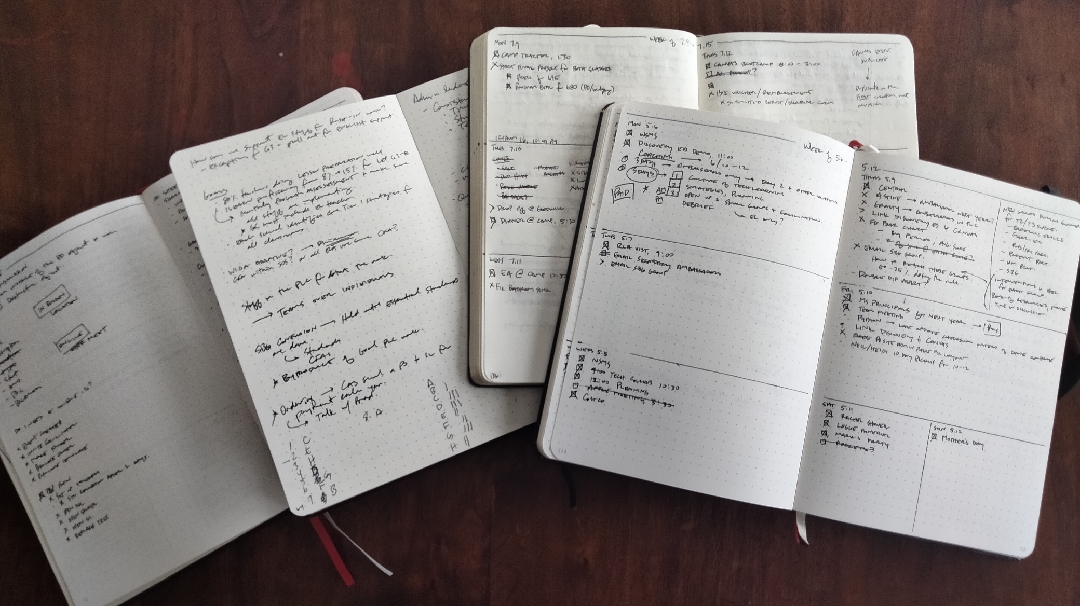
When I was doing technical and organizational work, I fell into the productivity black hole. I was constantly trying to find systems that would make me just a little more productive - a few more tasks tracked and a few more jobs done. I did good work but I felt a compulsion to show just how much I got done. I logged and planned and at the end, filled pages of books with stuff I don't care about.
I don't have these notebooks anymore.
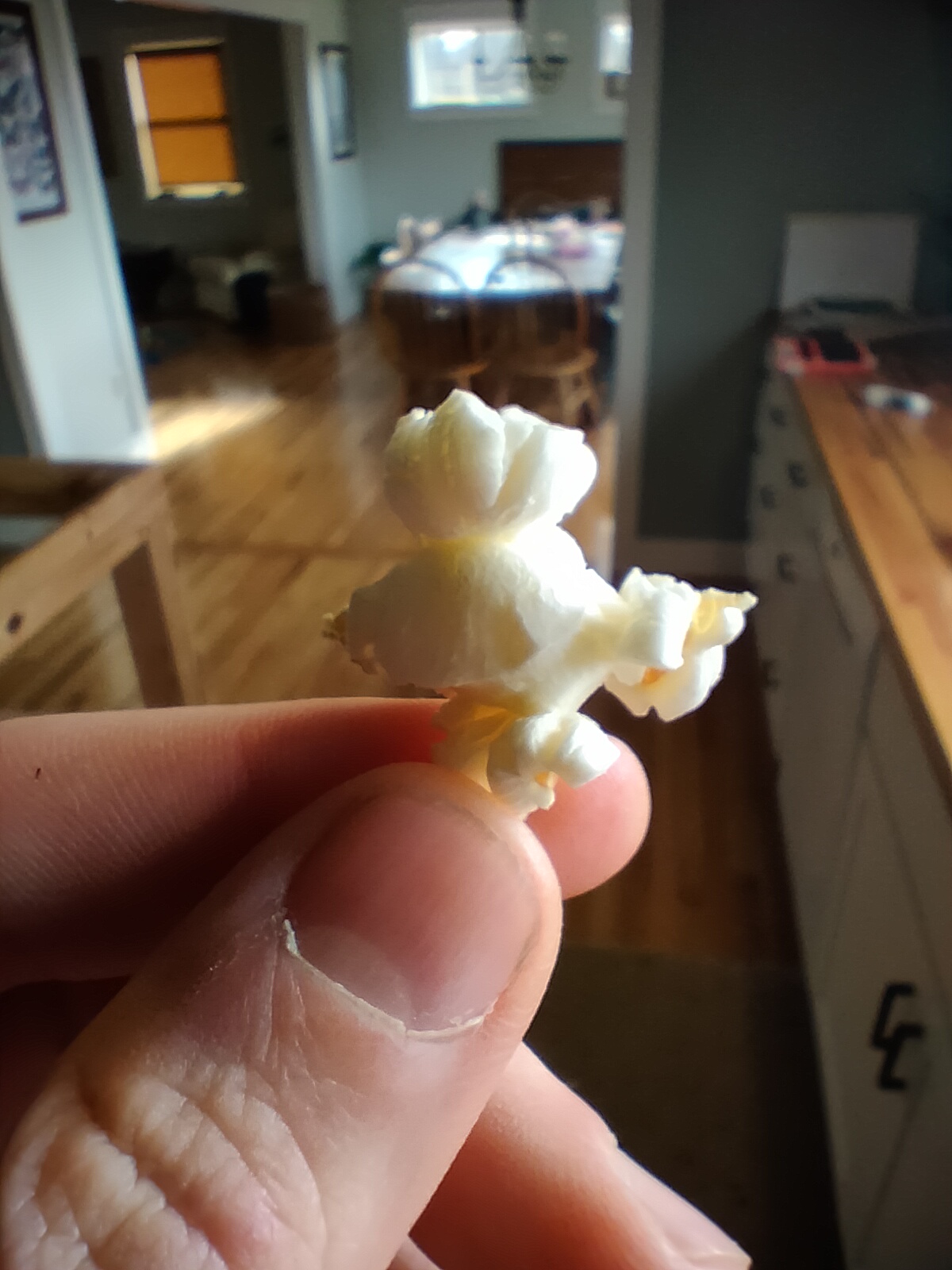
This kernel of popcorn took nine months to eat. It has the story of our family choosing to plant something new. The dirt of the garden under our nails when we planted the seeds. Water on our skin from setting up the sprinkler. Husks in our hands. The smell in the air.
All of that takes time. I have this written down in my new notebook.
I just finished watching the final series of The Expanse on Amazon Prime last night and I'm really hoping they continue the story. If you're not familiar with the series, it is a TV adaptation of a series of novels of the same name written by James S. A. Corey (Daniel Abram and Ty Frank). It's set a couple hundred years into the future and centers on the tensions between the people of Earth, Mars, and essentially an underclass living in the asteroid belt and outer planets who rely on the inner planets to survive. I've read and listened to the books a number of times because they're just that good as a return-to book when I need something familiar.
The TV series started on Syfy and was then dropped after three seasons. Amazon Prime picked it up and ran three more seasons before ending at the end of book 6, Babylon's Ashes. The TV series departs from the books in several areas, but more out of necessity than creative choices. For instance, the novels are very realistic in how how big space is, so there are several parts of books where the crew is in transit for months. You can't do that on TV. There are some changes in characters and their roles, but that's more because the books feature dozens of people. Each book in the novel series introduces secondary characters that go along with the main crew. You can't keep introducing new faces in a TV series.
That said, the TV series does a great job of adapting the huge universe created by the books. Without giving much away, there is a large gap of time between books six and seven in the novels that would make an adaptation difficult - Screnrant has a good breakdown of some of the challenges. The frustrating part is that season six left of with just enough hanging fruit that it could be started up again if the conditions were right.
If you've not seen the show, I would recommend reading the books first. I'm not a "the book is always better" kind of person but the depth of story in the books helps you appreciate how the show was made. The showrunners did a good job of telling a coherent, captivating, and human story in a very large, very complicated universe.
I took some time this morning to go through ooh.directory and add some personal blogs to my feed reader. Nothing in particular, just things that were updated in the last month and caught my attention while I combed through the lists page by page. There are two that have stood out immediately looking through the backlog:
- A Man and His Hoe. An anonymous man writing from Washington state about chickens and the weather. It's great to read someone who has similar perspectives and just to get day to day updates.
- My Granddad is Keeping Busy. Another daily site where Anne posts her grandfather's journal entries from 50 years ago. There are 40 (!) pages of posts so far. The first post was published in January 2023 so it appears this one will be around for a while.
For a long time, I'd only subscribed to blogs where people hadd A Message and I'm looking forward to meandering again.
In my elective class (environmental science), I've moved toward using "concept checks" at the end of each unit in favor of a traditional test. I have a Google Doc template with several prompts (usually 6-8) related to the concepts we've been working on in class. At the bottom of the test, students reflect on the learnin objectives set at the start of the unit and then grade their own understanding.
I like this method because it asks students to verbalize what they know and apply concepts in more detail than we normally do in class. As I read, I leave comments in the doc, prompting with followup questions or asking them to provide more detail on claims they make in writing. After the feedback stage, I send it back and students are able to make revisions.
While it has worked well, I don't think I'm doing a good job of preparing students for the depth of response I would like to see. They're able to use their notes and resources to form their responses, but many times, it turns into a definition word salad and I don't see application or justification of ideas. My feedback step pushes them to justify more, but I would love to see that happen on the first attempt.
Ideally, I would be able to give a single grade at the end of the semester representing their growth as science consumers and communicators. I'm not 100% sure how to do that along with tracking progress across individual units of study. I don't know if that's important or if it is my own perception of what should be shown in the gradebook. I just know that grades are something that trouble me and I'm trying to find a way to play both sides of the line.
A goal this year is to read more books. I finished four books this month:
Pastoral Song: An Inheritance - James Rebanks
Rebanks is a regenerative farmer in England and this book is about his care for the fell farms in northern England. He writes like James Herriot in this memoir, lamenting the "advances" of modern farming as he works to keep hold of his family's traditional approaches.
Under Alien Skies: A Signseer's Guide to the Universe - Phil Plait
Phil is an astronomer and writer of the Bad Astronomy newsletter/social media accounts. He explores various areas in our galaxy and explains how you would actually perceive some of these places if we could go there. The book is full of vivid imagery built from what we understand via observations mixed with some scientific fiction narrative worked in.
Leave the World Behind - Rumaan Alam
This is a new suspense/disaster novel that I picked up because I watched the Netflix trailer. It's a slow-build suspense novel that has a ton of weird stuff happen to two unfortunate families stuck together. The premise was interesting but the characters felt a little flat to me.
The Sheperd's Life: Modern Dispatches from an Ancient Landscape - James Rebanks
This is more of a memoir than Pastoral Song was as Rebanks works his way through a growing season as a shepherd. This is filled with lessons from his grandfather and father as he wrestles what it means to be his own farmer making decisions as a traditional farmer in a modern landscape. It also reads very much like James Herriott.
I'll keep posting here but I'm also keeping track on LibraryThing if you're there and would like to connect.
January is at an end and I'm longing for more sunlight. The days are definitely longer, but they're still too short to really have appreciable time after school to be outside and decompress.
We tapped maple trees yesterday on the farm. Our two families were working together in the woods to take advantage of a coming warm streak. The sap will run this week with temperatures forecast in the 40's, but still cold at night. It's not as early as last year which is good, but it's still probably earlier than it should be overall. Climate change is pushing our seasons earlier which means we need to be ready to grow sooner. My body is happy to have some warmer weather but my mind knows that it comes at a cost. Maybe not one we can pay.
My bees are still alive. I took a moment this week to put my ear against the hive. I could hear their hum through the wood - no stethescope needed. They know how to take care of themselves...I just try to give them a place they want to occupy.
There is still a lot of winter yet left. But one can hope.
We're wrapping up a case study on the Ogallala Aquifer this week and I'm happy with the kind of exploration students have been able to do. Original credit for the base materials go to my sister-in-law who graciously shared all of her environmental science materials with me once I found out I would be teaching it for the first time this year.
The Prelude
Students took some time to define the difference between groundwater and surface water. We did a large watershed mapping exercise (that will probably be another blog post) showing how water moves across different regions of the world downhill toward oceans. Then, we took some time to talk about freshwater uses before moving into discussing how areas without major rivers get freshwater resources.
The Aquifer
The Ogallala Aquifer is the largest freshwater deposit in the United States (175,000 sqaure miles in eight states). Starting in the mid 1900's, plains states farmers began pumping water from the aquifer as an irrigation source. I showed this short documentary as a discussion starter for the main portion of the exploration.
Expand and Explore
Following the video, I gave students a Google Doc template with expansion and exploration questions. Because environmental science overlaps science with human experience, these explorations look at the science behind what is happening as well as social, economic, and political implications. Students need to build their own understanding through research as they work to apply ideas and concepts to the scientific base.
This is also a great time to introduce data manipulation skills. The US Geological Survey publishes open-access data sources on all kinds of projects, one of which is the High Plains Water-Level Monitoring Study. This is field data for well depths which tap into the Ogallala Aquifer across all eight states. I grabbed the full TSV for 2013 from the published data page and then worked with students to create a scatter plot showing average well depth for each state that year. They then worked on some data analysis using their graphs.
The document linked below has two graphs already created, one showing the average depth to the water surface for each state as well as one showing the average water depth as well as the average well depth. I asked students to predict which state was most at risk of losing water first based on the water surface depth alone and, after some discussion, they realized that the aquifer might not be uniform depth. They also discussed topography differences which would make the water surface further into the crust. We then generated the second graph to show the average volume of water in each state which led to more thorough analysis.
Bigger Perspective
Data on charts is good for interpretation skills but I wanted them to be able to conceptualize each row on that sheet as an actual place with an actual well. Using the same USGS data, I threw together a custom Google Map and colored each marker in a range according to the depth of water below the surface of the ground (deeper wells are red).

The Endgame
We happen to live in an area rife with water thanks to the Great Lakes so we don't really think about water as a scarce commodity. We're finishing the unit with pollution and its effect on the Great Lakes' (sidebar: The Death and Life of the Great Lakes by Dan Eagen is wonderful and will probably appear in this unit soon) ecology and economy along with a reflection on their own personal water use habits. Some of my students come from farms with radial irrigation equipment, so I'm curious to see what connections come from this study.
Links
If you'd like copies of anything, you can get them here:
A new semester means a fresh gradebook and more time to think about how I'm actually giving feedback and reporting progress. I've been a user of the four-point rubric for a long time and, of course, I'm rethinking that entire approach. There are some benefits to the four point scale which are outlined particularly well by Robert Talbert's post on point everything toward feedback (my emphasis):
The biggest and most central problem is that marks are often used as an implicit form of feedback. But as feedback, number- or letter-based marks are not helpful. As I wrote in my previous post, the primary purpose of feedback is iteration. In order to be helpful, feedback should convey information back to the learner about their work that will be useful in crafting a next iteration of that work.
My standards rubric is essentially the EMRF model Robert discusses, but I've started wrestling with how to use a single point rubric as a method of driving students forwawrd. Single point rubrics remove the "score" component and would allow me to indiciate what a student needs to improve (they have not met the standard) as well as what they can do to expand (go beyond basic implementation or demonstration) their understanding.
The four-point rubric gives me some leeway in how to calculate that score because each item is entered numerically into the gradebook. At the end of each unit, I calculate a score out of four as the most recent mark + the highest mark divided by two. I like this because recent effort counts and students always benefit from their best performance, as opposed to a traditional average where they're always penalized for their worst performance.
I struggle with calculations because the last performance should be the most indiciative of skill development, but with so many conflicting factors involved in assessment, looking at growth over time is important to me. A single point rubric would make the grading faster and more specific to the student but would make my collection and analysis of progress more difficult. Alas.
I do have a site where students can track their progress over time and look at accumulated feedback. The idea is that they are checking that (for their digital assignments at least) to make sure they're making progress. On my end, I generate a simple sparkline to show trends. That isn't shown to students, though. Perhaps adding that small indicator would help me help them reflect on their own growth. Removing the point values entirely would allow them to focus on making their line move up rather than adding scores.